5 min read
Petra Pažanin
TL;DR: shadcn's Switch works well out of the box, but ByteChef needed brand colors, three visual variants, label-click support, and precise thumb styling that shadcn's defaults couldn't provide. This post covers how the custom wrapper was built, why arbitrary Tailwind variants were the right tool for the job, and why a component isn't truly finished until the tests and Storybook stories are in place.
UI component libraries give you a foundation, but they don't give you a finished product, at least not a personalized one. At ByteChef, the goal was a Switch that didn't just toggle state: it communicated brand, supported multiple layout contexts, and gave users a clear, readable toggle they could trust at a glance.
shadcn's Switch component handles the hard parts: accessible ARIA roles, keyboard navigation, and Radix UI primitives underneath. What it doesn't handle is product-specific visual language. The default thumb shadow is shadow-lg: a heavy box shadow that doesn't match ByteChef's design tokens. The track color uses generic Tailwind grays. There's no concept of variants, no label integration, and clicking the label text does nothing.
The decision was to wrap, not replace: keep the accessible Radix foundation and build a controlled surface on top of it. It's the same approach we took with our custom shadcn badge component.
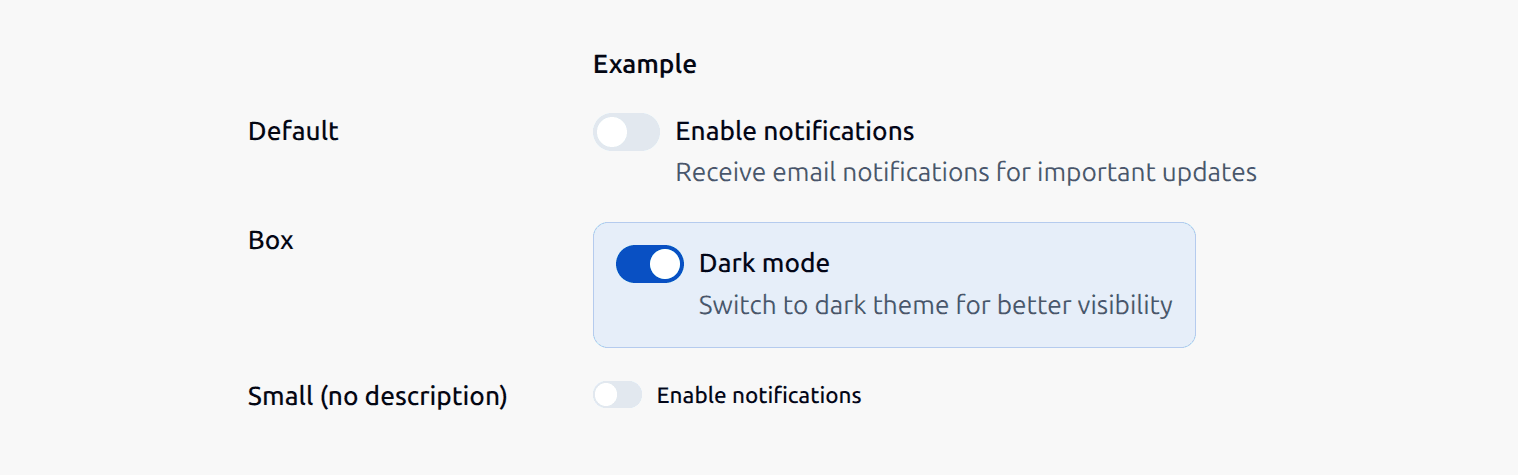
Three visual variants cover the full range of contexts in ByteChef's UI:
default: standard labeled switch for settings panels and formsbox: bordered container variant for feature toggles; background shifts to brand color when checkedsmall: compact variant for dense layouts like the workflow editor toolbar
Each variant has its own track dimensions, thumb translation, and border radius:
const variantConfig: Record<
    VariantType,
    {track: string; thumbOverrides: string}
> = {
    default: {
        thumbOverrides:
            '[&>span]:size-4 [&>span]:data-[state=checked]:translate-x-4',
        track: 'h-5 w-9 px-0.5 rounded-full border-0',
    },
    box: {
        thumbOverrides:
            '[&>span]:size-4 [&>span]:data-[state=checked]:translate-x-4',
        track: 'h-5 w-9 px-0.5 rounded-full border-0',
    },
    small: {
        thumbOverrides:
            '[&>span]:size-3 [&>span]:data-[state=checked]:translate-x-3',
        track: 'h-[14px] w-[26px] px-[1px] rounded-[7px] border-0',
    },
};
The box variant adds a checked-state background at the wrapper level, not just the track level, because the color change needs to fill the entire bordered container, not just the toggle itself:
const wrapperClasses = twMerge(
    wrapperStyles[variant],
    isBoxVariant && checked
        ? 'bg-surface-brand-secondary border-stroke-brand-secondary'
        : ''
);shadcn components render internal DOM elements that aren't directly accessible through standard Tailwind classes. The thumb (the circular knob that slides) is a <span> rendered inside the Radix primitive. Styling it requires Tailwind's arbitrary variant syntax:
const switchClasses = twMerge(
    config.track,
    config.thumbOverrides,
    'shadow-none [&_.shadow-lg]:shadow-none',
    'data-[state=checked]:bg-surface-brand-primary data-[state=unchecked]:bg-surface-neutral-tertiary',
    'focus-visible:ring-2 focus-visible:ring-stroke-brand-focus focus-visible:ring-offset-0',
    '[&>span]:bg-surface-neutral-primary',
    className
);
A few things worth noting here:
[&>span]:bg-surface-neutral-primary sets the thumb to ByteChef's neutral surface token instead of whiteshadow-none [&_.shadow-lg]:shadow-none explicitly overrides shadcn's default shadow-lg on the thumb, which clashed with the custom shadowfocus-visible:ring-stroke-brand-focus uses a newly added design token stroke-brand-focus for keyboard focus rings, keeping focus styles consistent with the rest of the productdiv → labelAfter the initial implementation shipped, a usability gap surfaced: clicking the label text next to the switch did nothing. The wrapper was a <div>, which has no semantic relationship to the input inside it.
The fix was a one-element change: replacing <div> with <label>:
// Before
<div className={wrapperClasses} data-testid="switch-wrapper">

// After
<label className={wrapperClasses} data-testid="switch-wrapper">
A <label> wrapping a form control makes the entire label area a click target for that control. No htmlFor, no id wiring needed, the implicit association handles it. This change also improved screen reader announcements, since the label text is now semantically associated with the switch's ARIA role.
A custom component wrapper isn't finished when it renders correctly. It's finished when:
For this Switch, that meant tests for every variant and disabled state, explicit assertions on the arbitrary Tailwind classes that aren't self-documenting, and a dedicated test for label clickability - the exact behavior that regressed once before:
it('should toggle switch when label text is clicked', () => {
    const handleChange = vi.fn();
    render(<Switch checked={false} label="Enable notifications" onCheckedChange={handleChange} />);
    screen.getByText('Enable notifications').click();
    expect(handleChange).toHaveBeenCalledWith(true);
});
Storybook handles the visual and interactive side: every variant, alignment, checked/unchecked state, and disabled combination has its own story. Where unit tests guard correctness, Storybook makes the component's full visual range explorable and reviewable without spinning up the full application.
This combination (a typed API with a discriminated union, a clear variant system, unit tests for behavior, and Storybook for visual coverage) is what makes a custom shadcn wrapper a genuinely reusable design system component rather than a one-off fix. Anyone on the team can open it, understand it in a few minutes, and extend it with confidence.
The custom Switch ships with three variants, two alignment options, optional descriptions, full keyboard accessibility, and a test suite that covers every combination. The component is now used across settings panels, deployment dialogs, workflow test configuration, and the workflow editor itself.
The wrapper pattern, keeping the accessible Radix foundation while building a controlled visual surface on top, turned out to be exactly the right approach. Behavior is inherited, but appearance is owned.
See it in ByteChef - every toggle in the product runs on this component.
Get the latest guides on complex automation, AI agents, and visual workflow best practices delivered to your inbox.