Building Subflow Navigation
On this page
TL;DR: What started as a task for adding an Edit button to open a subflow, evolved into solving URL-based navigation stacks, Zustand execution snapshots, execution panel restore and a context-aware banner - all without a single backend change.
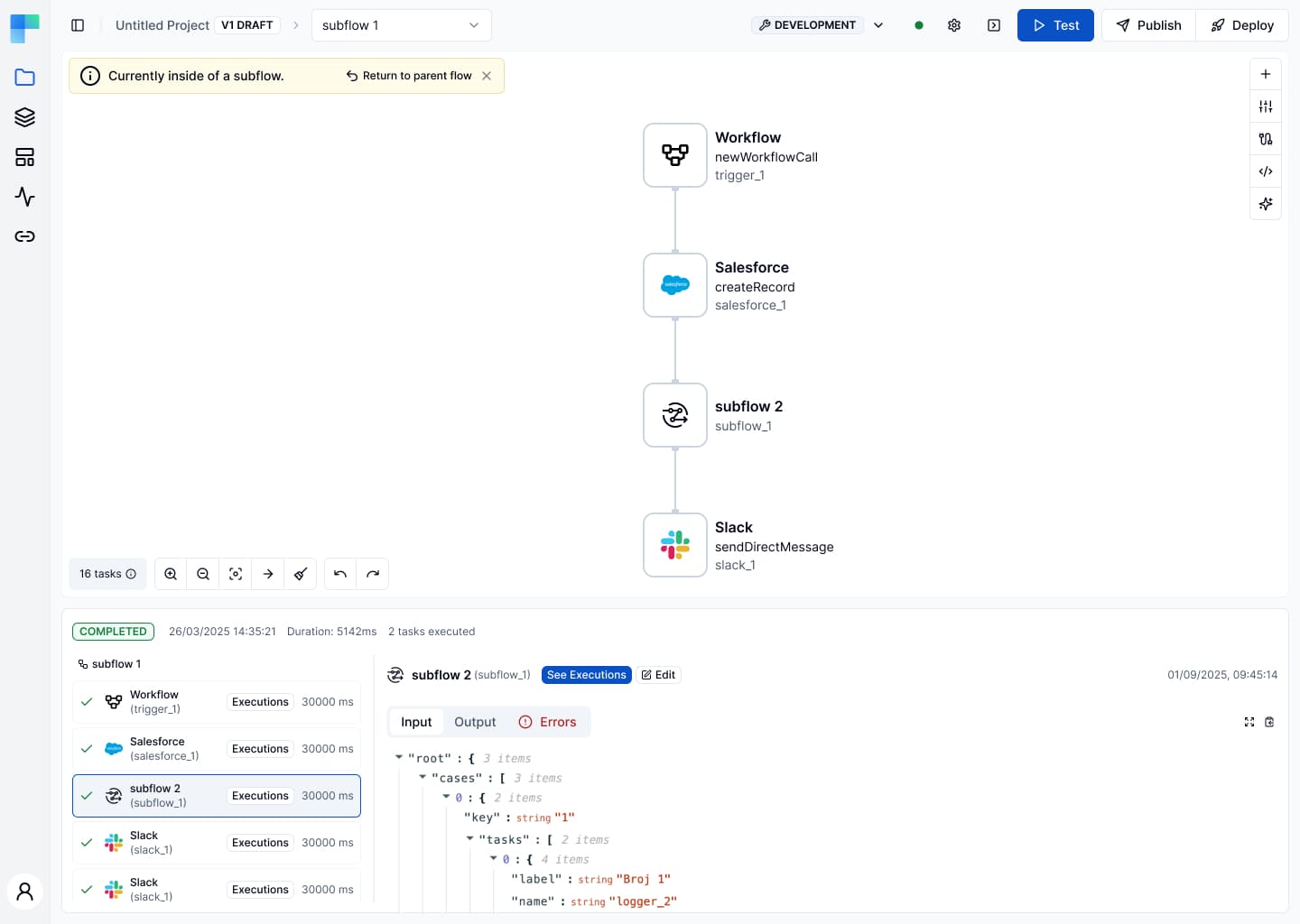
At ByteChef, workflows can contain subflows - reusable child workflows embedded as nodes inside a parent. When you run a workflow and inspect its execution, you can see each subflow task's input, output, and logs. The missing piece: a way to jump directly into the subflow's canvas to edit it.
The ticket read: Add a button to open Subflow from Execution Island. Simple enough, but what followed wasn’t as trivial.
The Edit Button
The first step was adding an Edit button to the subflow task detail panel (the panel that appears on the right when you click a subflow node in the Execution Island).
The button needed to appear only when the selected task was a subflow, identified by the presence of workflowTask.parameters.workflowUuid. To keep it isolated, we added an onEditSubflowClick prop to the shared WorkflowExecutionsTabsPanel component and only passed it in the workflow editor context - not in execution history sheets.
{
    subflowWorkflowUuid && onEditSubflowClick && (
        <Button
            icon={<SquarePenIcon />}
            label="Edit"
            onClick={() => onEditSubflowClick(subflowWorkflowUuid)}
            size="xxs"
            variant="outline"
        />
    );
}
The URL Problem
Clicking Edit navigates to a different workflow. But navigating away means losing context - which workflow did we come from? Should the execution panel re-open when we return?
The instinct might be to reach for a store. Create a Zustand slice, write the parent workflow ID into it before navigating, read it back on return. It works until the user refreshes the page, opens the subflow in a new tab, or shares the URL with a colleague. The store and context are gone. The URL doesn't have that problem. Since ByteChef is a React Router SPA, the URL is the only piece of state that:
- survives a page refresh
- is available to every component without prop drilling
- can be bookmarked, shared, or deep-linked
- is readable synchronously on mount, before any effect fires
So instead of a store, we appended three params when navigating to a subflow:
newSearchParams.set('fromSubflow', 'true');
newSearchParams.set('parentProjectWorkflowId', projectWorkflowId);
newSearchParams.set('restoreExecutionPanel', 'true'); // only if panel was open
fromSubflow tells every component downstream that we're inside a subflow - the banner reads it, the mount effect reads it, the restore logic reads it.
parentProjectWorkflowId is the return address - where "Return to parent flow" should navigate.
restoreExecutionPanel is a flag that says: the user had the execution panel open before they left, so reopen it when they come back.
No component needed to know about any other component, there was no prop drilling or shared mutable state. The URL held the entire navigation context, and every component that needed it - just called useSearchParams().
The Banner
Once inside the subflow, the user needs to know where they are and how to get back. We built SubflowBanner - a yellow info bar that reads the URL params on every render and shows itself when fromSubflow=true.
const fromSubflowParam = searchParams.get('fromSubflow');
const parentProjectWorkflowIdParam = searchParams.get(
    'parentProjectWorkflowId'
);

if (fromSubflowParam !== 'true' || dismissed) {
    return null;
}
Two actions: Return to parent flow navigates back using parentProjectWorkflowId, and × dismisses the banner locally for the current visit - resetting on the next subflow entry via a useEffect tied to projectWorkflowId.

No global state and no store. Just the URL and a single useState.
Nested Subflows: The URL as a Stack
What about subflows inside subflows (nested subflows)? Entering subflow 2 from subflow 1 would overwrite parentProjectWorkflowId with subflow 1's ID - losing the link back to the main flow.
The solution was a parentChain param - a comma separated stack of ancestor workflow IDs:
main → subflow1: fromSubflow=true&parentProjectWorkflowId=200
subflow1 → subflow2: fromSubflow=true&parentProjectWorkflowId=300&parentChain=100,200
On "Return to parent flow", the banner pops the last entry from parentChain and uses it as the new parentProjectWorkflowId. If the chain is empty, it removes fromSubflow entirely - returning to the top-level parent.
const chainItems = parentChain.split(',');
const grandparentId = chainItems.pop() ?? '';

if (chainItems.length > 0) {
    newSearchParams.set('parentChain', chainItems.join(','));
} else {
    newSearchParams.delete('parentChain');
}

newSearchParams.set('parentProjectWorkflowId', grandparentId);
The URL became a navigation stack with no additional state required.
Execution Panel Restore
When you click Edit, the execution panel at the bottom closes. When you return to the parent, it should reopen - but only if it was open before.
The challenge: Project is a SPA route component. React Router reuses the same instance when only projectWorkflowId changes, so a []-dep mount effect only fires once. We moved the restore logic into the existing projectWorkflowId watcher:
useEffect(() => {
    const restorePanelParam = searchParams.get('restoreExecutionPanel');
    const fromSubflowParam = searchParams.get('fromSubflow');

    const isReturningFromSubflow =
        restorePanelParam === 'true' && fromSubflowParam !== 'true';

    if (isReturningFromSubflow) {
        // restore execution data and re-open panel
    } else {
        // hide panel as usual
    }
}, [projectWorkflowId]);
The fromSubflow !== 'true' guard was critical - entering a subflow also carries restoreExecutionPanel=true, so without the guard the panel would reopen on the way in as well.
The Zustand Snapshot
One more problem: running a test inside the subflow overwrites the global workflowTestExecution slot in the Zustand store. On return, the panel would reopen but it would show the subflow's execution data, not the parent's.
The fix was a snapshot. When entering a subflow, we save the parent's execution into a separate parentWorkflowTestExecution slot - but only if it's empty, to avoid overwriting the original snapshot when entering deeper subflows:
const {
    parentWorkflowTestExecution,
    setParentWorkflowTestExecution,
    workflowTestExecution,
} = useWorkflowEditorStore.getState();

if (!parentWorkflowTestExecution) {
    setParentWorkflowTestExecution(workflowTestExecution);
}
On return, we restore it:
setWorkflowTestExecution(parentWorkflowTestExecution);
setParentWorkflowTestExecution(undefined);
One snapshot slot covers the most common case - one level of subflow nesting. For deeper nesting, a map keyed by projectWorkflowId would be the next step.
Using Internal Component Library
Throughout the implementation, we leaned on ByteChef's internal Button component instead of raw <button> elements. The component supports icon, label, size, and variant props that map directly to the design system tokens:
// Edit button in Execution Island
<Button icon={<SquarePenIcon />} label="Edit" size="xxs" variant="outline" />

// Dismiss button in SubflowBanner
<Button
    icon={<XIcon />}
    onClick={() => setDismissed(true)}
    size="iconXs"
    variant="ghost"
/>
Using the component library kept the UI consistent and reduced the number of custom Tailwind classes needed.
Result
What looked like a single button ended up touching navigation, state management, execution restore, and component design - all without a backend change. The URL did most of the heavy lifting.
Try it yourself in ByteChef or book a demo to see the full workflow editor in action.
Subscribe to the ByteChef Newsletter
Get the latest guides on complex automation, AI agents, and visual workflow best practices delivered to your inbox.