Pick the Exact Array Item: Selectable Data Pill Index
On this page
TL;DR: When a data pill points inside an array, the
[0]index in it is now a clickable control. Click it and pick the item you want from a list of the real sample values, instead of editing the raw reference and counting positions yourself. No sample data? A number field lets you type the index. Pills also work at any index now, not just0, and every index in a reference resolves when you insert the pill.
Data pills are how you pass data between tasks in a ByteChef workflow. You drop a pill into a field, and at runtime it pulls in the output of an earlier task, like an email address or an order total.
But a lot of real data isn't a single value. It's a list. An API returns an array of orders, a trigger hands you a batch of rows, a search comes back with several matches. And the moment a data pill points inside an array, you run into a question the pill couldn't really answer before: which item?
That's what this update fixes.
The Problem with [index]
When a data pill referenced something inside an array, it showed up with an index placeholder, a [0] sitting in the middle of the reference. In practice you were stuck with the first item unless you dropped out of the pill UI, edited the raw reference by hand, and counted array positions yourself.
It got worse if you set an index other than 0: the pill often rendered as unavailable, greyed out as if the reference were broken, even though it was fine. So the safe move was to use item zero and hope it was the one you wanted.
Arrays are everywhere in automation, and guessing at positions shouldn't be part of the work.
What's New
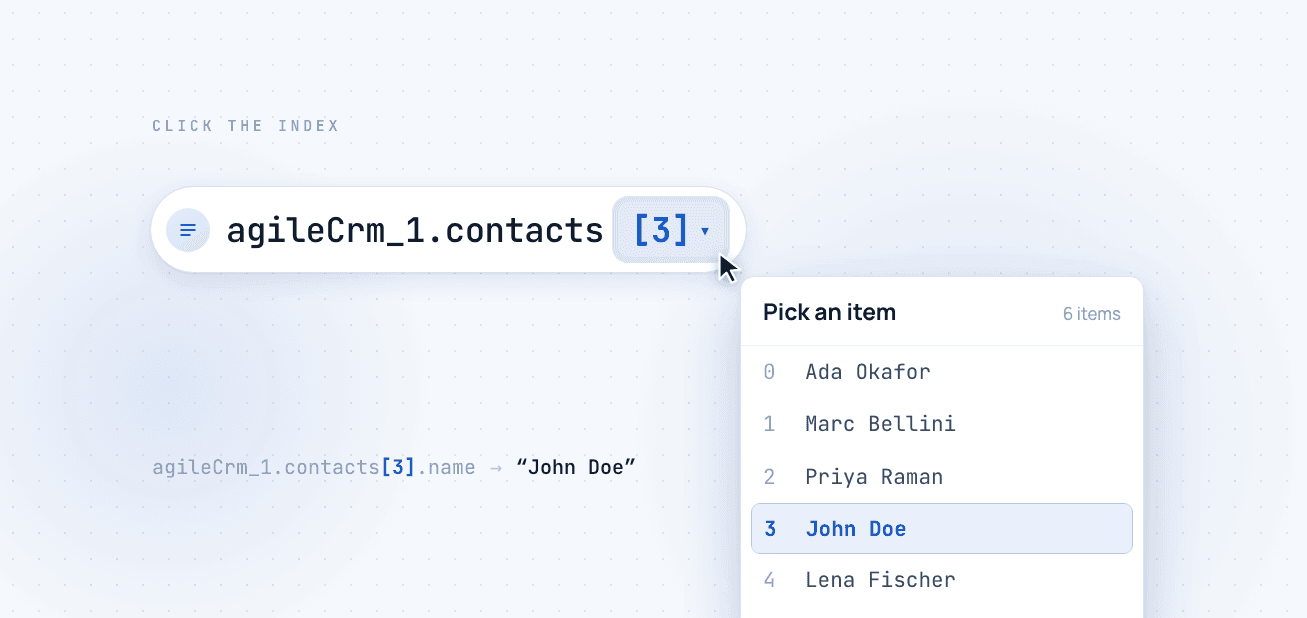
The index inside a data pill is now a clickable control. Click it, and instead of typing a number into raw text, you pick the item you want from a list of the real values in your workflow.
How to Use It
1. Drop In a Data Pill That Points at an Array
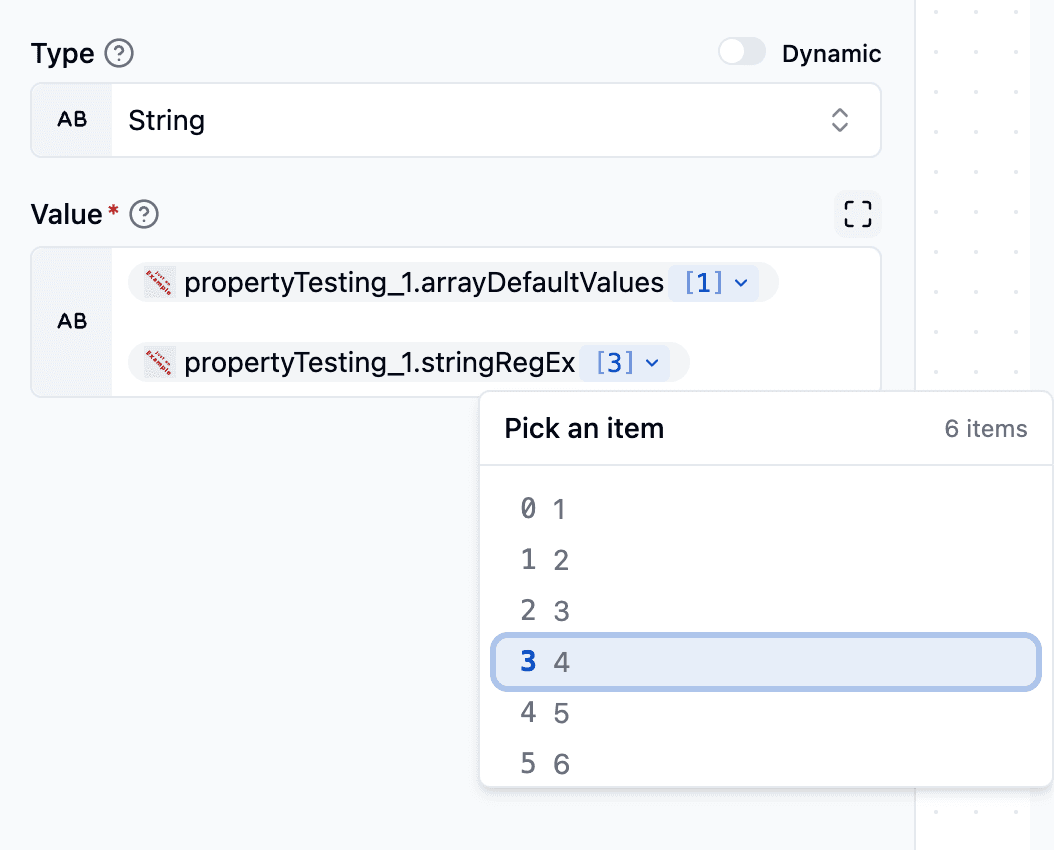
Insert a data pill the way you always have. If it references a value inside an array, you'll now see the index rendered as a small, highlighted control: [0] with a dropdown chevron, right inside the pill. That control is the whole feature, and everything else happens when you click it.
2. Click the Index and Pick an Item
Click the index and a picker opens. If ByteChef has a sample output for the task you're referencing, and it usually does, since that's the same sample data behind the data pill list, the picker shows the actual items in that array. Each row is numbered by its position and previews the real value there, so you can recognize the one you want.
Click a row and the pill updates to that index. You're choosing "the one that says John Doe" instead of "position 3, I think." The picker also tells you how many items are in the array and highlights the one you have selected.
3. No Sample Data? Type the Index
Sometimes there's no sample output to preview, maybe because the upstream task hasn't run yet. Then the picker falls back to a simple number field: enter the zero-based position you want and hit Apply. You can always set an index by hand, you just don't need to when real data is there.
4. Long Arrays Are Handled
If an array is large, the picker shows the first 50 items so it stays fast and readable, and notes that there are more. To reach something further down, use the number field to jump straight to any index.
5. Nested Arrays Work Too
A single reference can dip into more than one array, an array inside an array. Each index in the pill is its own control, so you can set the outer position and the inner position separately, right where each one appears.
The Quality-of-Life Fixes That Came With It
Two smaller things got fixed along the way.
The first: pills now work at any index, not just 0. Validation used to recognize only index 0, so a pill pointing at any other position could show up as unavailable even when it was fine. A pill now looks and behaves the same whether you pick item 0 or item 12.
The second: every index resolves when you insert the pill. If a reference had more than one index, only the first placeholder used to be filled in, and the leftover placeholders made the server reject the expression. Now the whole reference resolves on insert, so what you build in the editor is what runs.
Why It's Built This Way
The picker doesn't add a round-trip or ask you to configure anything. It reads the same sample outputs ByteChef already fetches to build your data pill list, so the real values are there the moment you click. No extra setup, and no extra request.
Conclusion
Picking an item out of a list is one of the most common things you do when building an automation, and until now it was one of the fiddliest. A clickable index turns "position 3, I think" into "the one that says John Doe," and the fixes around it mean a pill behaves the same at any position in the array.
Next time you build a workflow around a list, whether it's orders, rows, or search results, drop in a data pill, click the index, and pick the exact item you mean. It's available in the ByteChef workflow editor now.
Subscribe to the ByteChef Newsletter
Get the latest guides on complex automation, AI agents, and visual workflow best practices delivered to your inbox.