Smart Return & Refund Workflow
On this page
TL;DR: Automate return approvals, refund processing, and customer notifications with a Smart Return & Refund Workflow in ByteChef.
Bottom line: Faster refunds, less manual work, and a better customer experience.
Why Automate Returns and Refunds?
Returns are an unavoidable part of ecommerce, but handling them manually can be time-consuming and error-prone.
Support teams often need to:
- Verify order details
- Check return eligibility
- Validate returned items
- Calculate refund amounts
- Communicate decisions to customers
As order volume grows, these repetitive tasks consume valuable time and slow down customer service.
With automation, you can:
- Instantly validate return requests
- Enforce return policies consistently
- Process refunds faster
- Reduce support workload
- Keep customers informed automatically
This tutorial shows how to build a production-ready return and refund automation workflow in ByteChef.
Workflow Overview
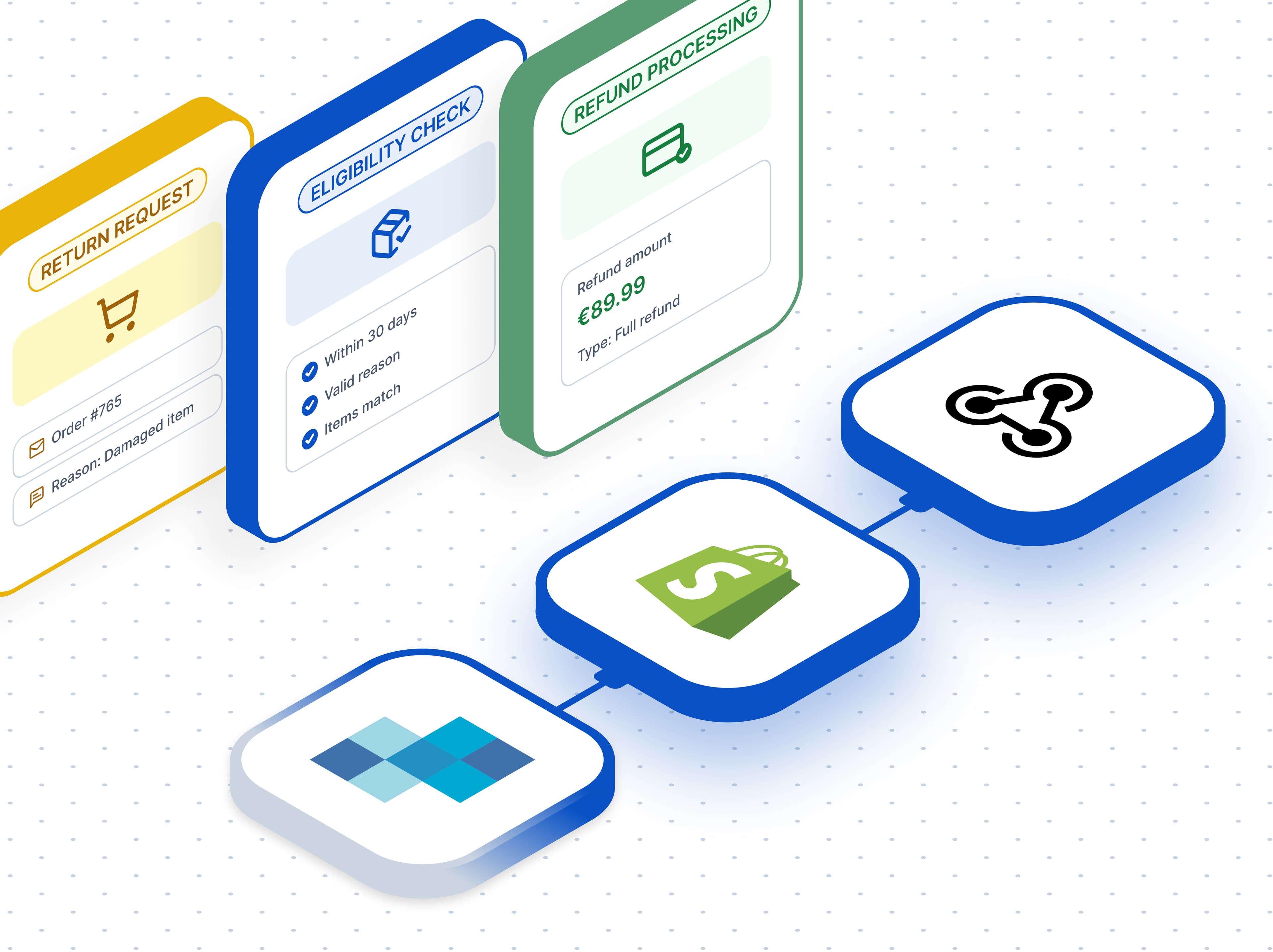
The workflow consists of four key components:
- Receive Return Request
- Validate Eligibility and Calculate Refund
- Process Full or Partial Refunds
- Notify Customers Automatically
1. Receive Return Request
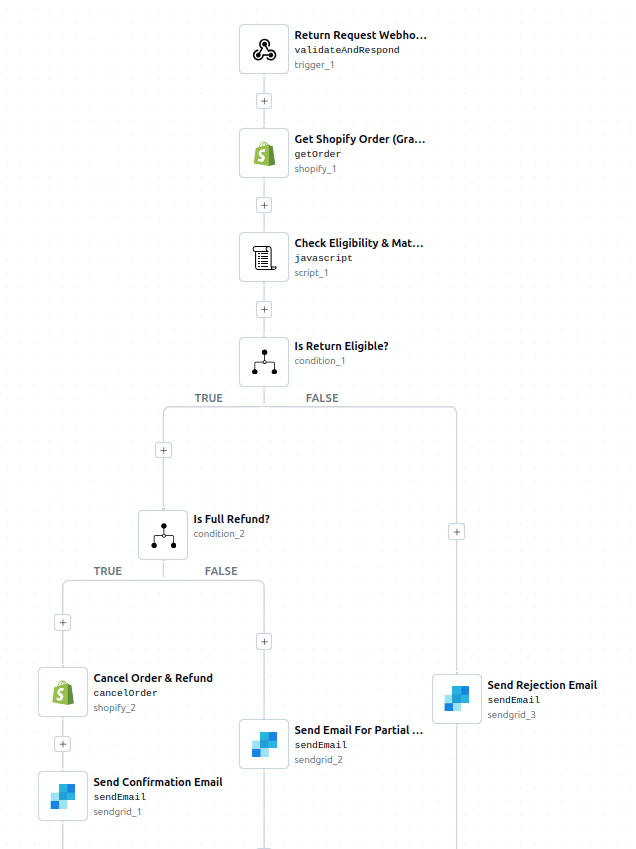
The workflow begins with a webhook trigger that receives return requests directly from your storefront, customer portal, or support form.
The request typically includes:
- Order ID
- Customer email
- Return reason
- Items being returned
- Requested quantities
Once the request arrives, the workflow retrieves the corresponding order information from Shopify using the Shopify Get Order action.
This gives the workflow access to critical information such as:
- Order creation date
- Cancellation status
- Order status
- Purchased items
- Quantities
- Pricing information
2. Validate Eligibility and Calculate Refund
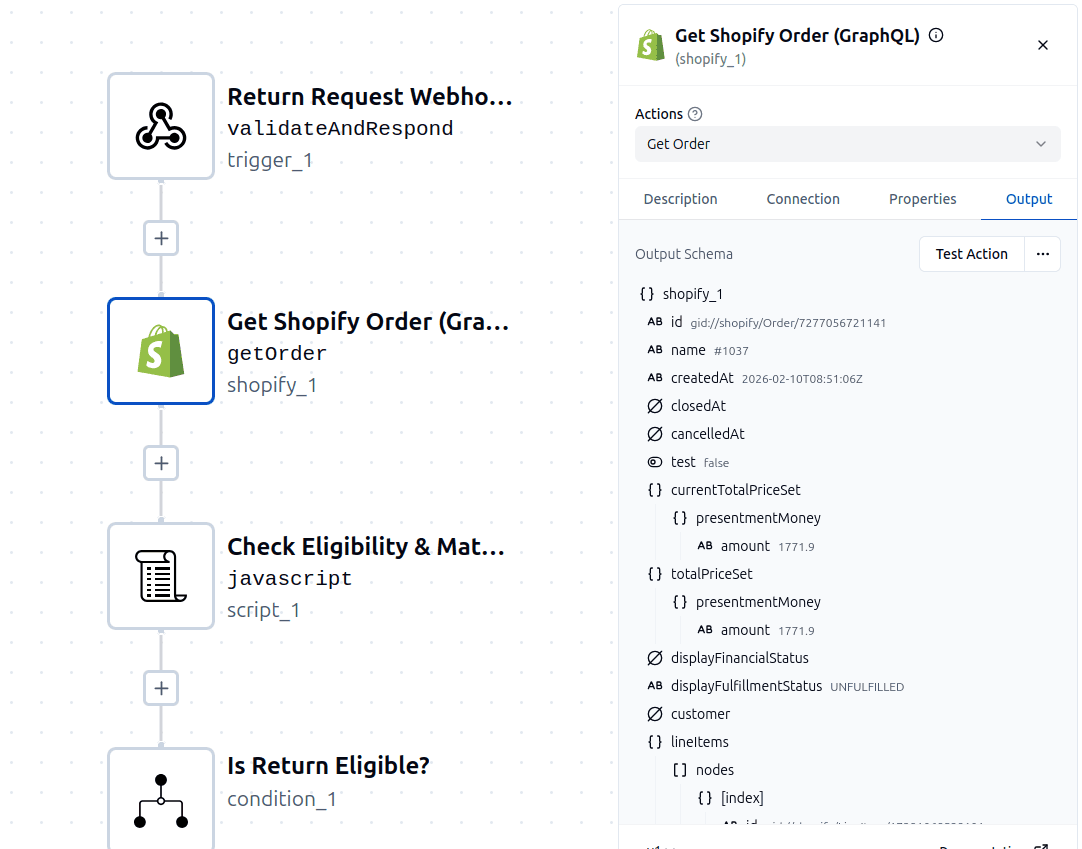
After retrieving the order, the workflow executes a JavaScript validation step that applies the store's return policy automatically.
This step performs several important checks:
Order Status Validation
The workflow immediately rejects requests for:
- Closed orders
- Cancelled orders
- Test orders
This prevents invalid refund requests from moving further through the process.
Return Window Validation
The workflow verifies that the order was placed within the allowed return period.
In this example, customers must submit return requests within 30 days of purchase.
If the order falls outside the return window, the request is automatically rejected with a clear explanation.
Return Reason Validation
The workflow only accepts approved return reasons, such as:
- Damaged item
- Defective item
- Wrong item
- Missing parts
- Not as described
- Arrived late
- Changed mind
This ensures that all return requests follow company policy and use standardized categories.
Item Matching
The workflow validates that:
- The requested items actually exist in the order
- Requested quantities do not exceed purchased quantities
Any mismatch immediately results in a rejection, preventing fraudulent or accidental refund requests.
Refund Calculation
Once validation succeeds, the workflow calculates:
- Eligible refund amount
- Total order value
- Days since purchase
- Whether the request qualifies for a full refund or partial refund
The result is returned as structured data that drives the rest of the workflow.
3. Process Full or Partial Refunds
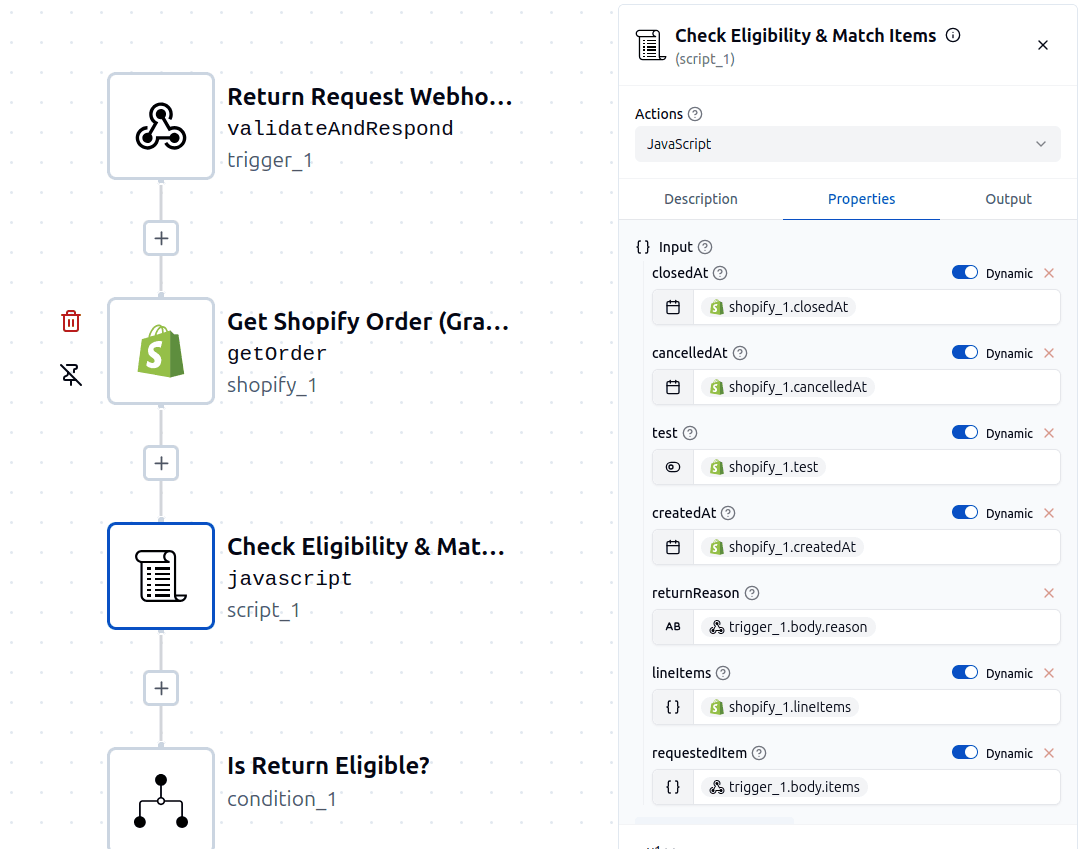
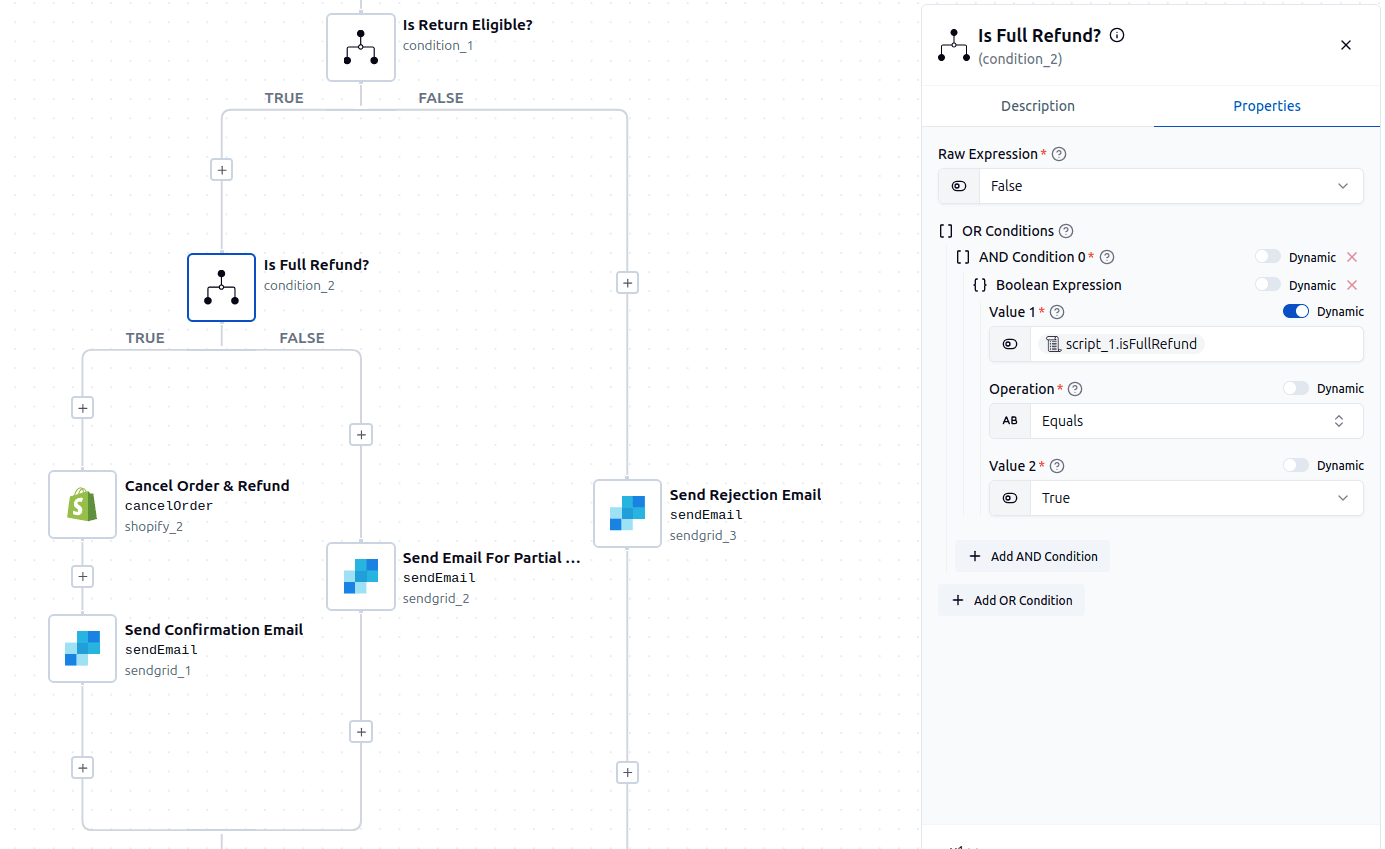
After validation, the workflow uses branching logic to determine the appropriate action.
Is the Return Eligible?
The first decision checks whether the return request passed all validation rules.
If the request is not eligible:
- The workflow immediately sends a rejection email
- The customer receives an explanation
- No refund action is taken
If the request is eligible, the workflow continues to the next decision.
Is It a Full Refund?
The workflow then determines whether all purchased items are being returned.
Full Refund Path
If every item from the order is being returned:
- Shopify automatically cancels the order
- Inventory is restocked
- The refund is issued to the original payment method
- The customer is notified
This creates a completely hands-off refund process.
Partial Refund Path
If only some items are being returned:
- The workflow calculates the approved refund amount
- A partial refund notification is generated
- The customer receives details about the returned items and refund value
This allows partial returns to be handled just as efficiently as full returns.
4. Notify Customers Automatically
Communication is one of the most important parts of the return experience.
The workflow automatically sends personalized emails based on the outcome of the request.
Full Refund Confirmation
Customers receive confirmation that:
- Their return request was approved
- The refund has been processed
- Funds will be returned to the original payment method
Return Rejection Notification
If a request is rejected, customers receive an email explaining why the request could not be processed.
This ensures customers are never left wondering about the status of their return.
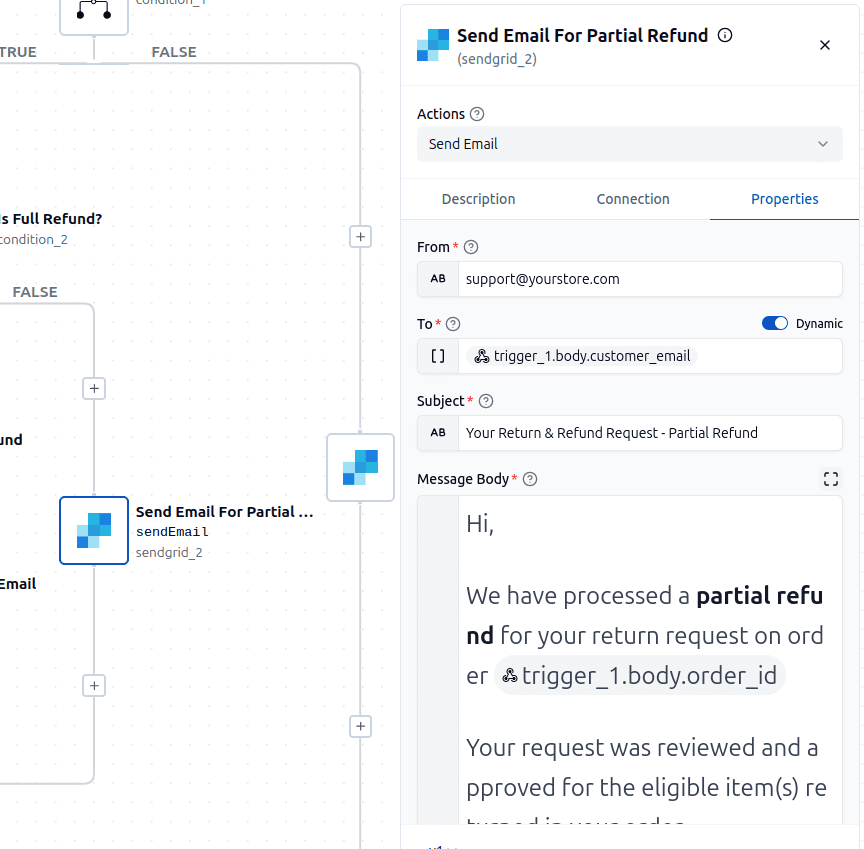
Partial Refund Confirmation
Customers receive:
- Approved refund amount
- Returned item details
- Information about refund processing timelines
Possible Enhancements
This workflow can easily be expanded to support more advanced return operations.
For example, before approving a refund, you could automatically create a return merchandise authorization (RMA) and generate a shipping label for the customer.
Other possible enhancements include:
- Generating prepaid return shipping labels
- Creating tickets in customer support platforms
- Detecting high-risk or fraudulent return patterns
- Uploading return evidence and photos for review
- Notifying warehouse teams about incoming returns
- Creating refund approval workflows for high-value orders
- Sending Slack notifications to support agents
- Tracking return metrics and analytics in a data warehouse
- Integrating with ERP or inventory management systems
By combining validation logic, refund automation, and customer communications, you can build a complete post-purchase experience that scales with your business.
In Conclusion
By combining Shopify, automated validation, branching logic, and customer notifications, you can eliminate most of the manual work involved in processing returns and refunds.
This ByteChef workflow is:
- Reliable (enforces return policies consistently)
- Accurate (validates orders, quantities, and refund amounts)
- Scalable (handles increasing return volume automatically)
- Customer-Friendly (provides immediate updates and transparency)
Most importantly, it transforms returns from a manual support task into a streamlined automated process. Instead of spending time reviewing every request individually, your team can focus on exceptions while automation handles the routine work.
Subscribe to the ByteChef Newsletter
Get the latest guides on complex automation, AI agents, and visual workflow best practices delivered to your inbox.