14 min read
Marko Krišković
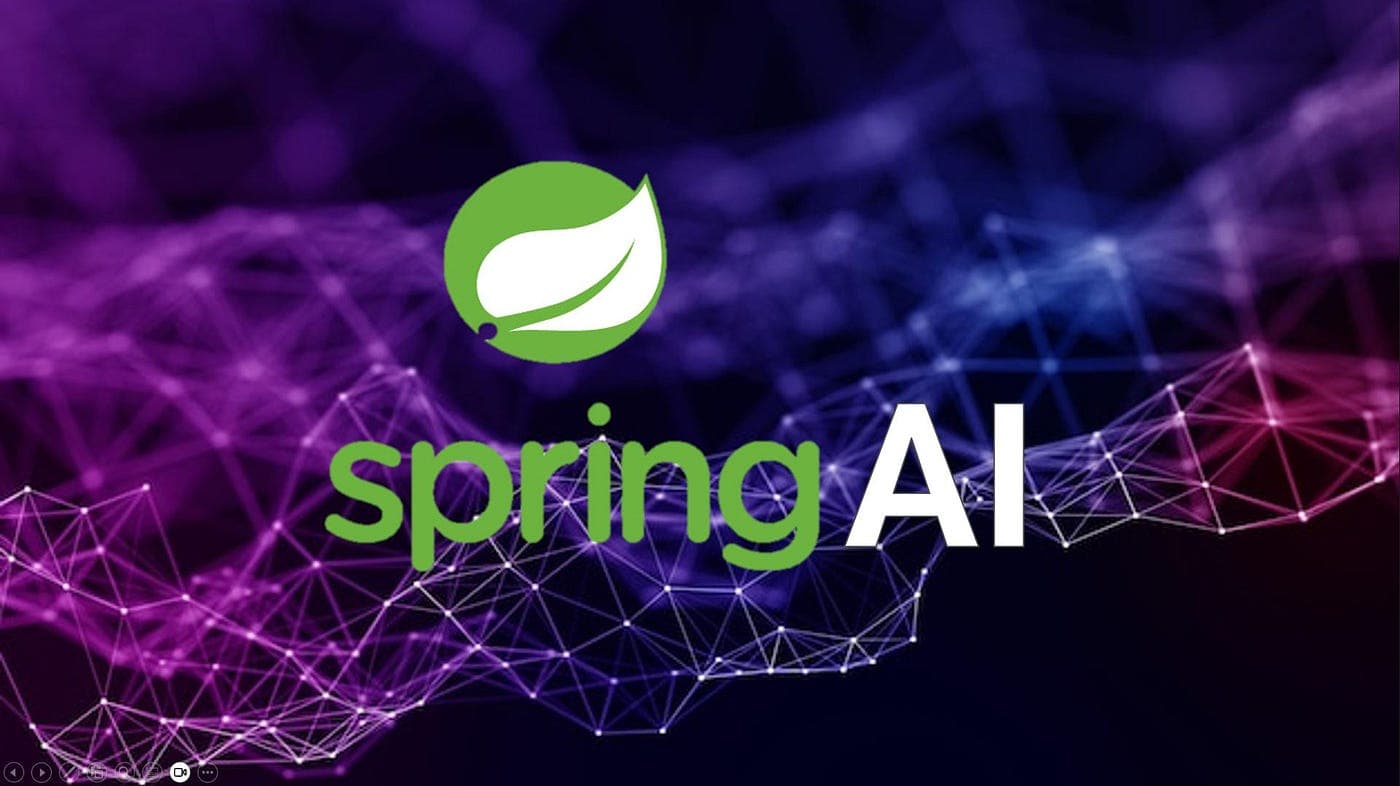
TL;DR: ByteChef's AI Agent is a visual, no-code building block for agentic workflows, powered by Spring AI under the hood. It's composed of five cluster elements: a Model, RAG, Memory, Tools, and Guardrails. And you don't build blind - the editor's Agent Playbook lets you test the agent live as you configure it. Together, they give you everything needed to build production-grade AI agents without writing your own AI infrastructure.
Artificial intelligence is supported for every programming language nowadays. With the right tools, every developer can embed intelligent behavior directly into their workflows and automations. ByteChef's AI Agent component makes this possible by integrating deeply with Spring AI, the leading Java framework for building AI-powered applications. Exposing it through a visual, no-code/low-code interface.
In this post, we'll walk through how ByteChef's AI Agent is structured, what each of its cluster elements does, and how Spring AI powers it all under the hood.
The AI Agent is ByteChef's core building block for agentic workflows. Rather than making a single call to a language model, an AI Agent can: reason, retrieve context, remember past interactions, call external tools, and even delegate to other agents. It is capable of handling complex, multi-step tasks.
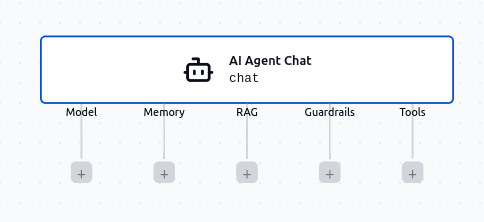
The AI Agent is composed of a set of cluster elements: configurable sub-components that each handle a specific aspect of agentic behavior. These are:
Let's explore each one.
The model is the brain of the AI Agent. It defines which LLM receives prompts, thinks and generates responses. Spring AI provides a unified ChatModel abstraction that normalizes communication across many different LLM providers, so ByteChef can support a wide range of models without changing the underlying agent logic.
ByteChef currently supports the following models, all integrated through Spring AI:
In addition to these Spring AI-backed providers, ByteChef also supports OpenRouter, a gateway that aggregates hundreds of models from dozens of providers under a single API. This means that even if your preferred model isn't in the list above, there's a very good chance you can still connect to it through OpenRouter. This makes ByteChef's AI Agent one of the most model-versatile automation platforms available.
Language models are powerful, but they only know what they were trained on. If you want your agent to answer questions about your internal documents, product catalog, support tickets, or any proprietary data, you need Retrieval-Augmented Generation (RAG).
RAG works by searching a knowledge source for documents relevant to the user's query, then injecting that context into the prompt before the model generates a response. Spring AI provides a rich, modular RAG architecture that ByteChef exposes directly in the AI Agent.
To perform semantic search, documents are embedded into high-dimensional vectors and stored in a vector database. ByteChef supports the following vector stores:
Don't want to set up your own vector database? ByteChef also offers a built-in Knowledge Base - an internal, managed knowledge store where you can upload documents (PDFs, text files, and more) directly. ByteChef handles the chunking, embedding, and storage automatically, so you can start building RAG-powered agents without configuring any external infrastructure.
Spring AI supports two RAG approaches:
QuestionAnswerAdvisor is Spring AI's out-of-the-box RAG implementation. When a query comes in, it performs a similarity search against the vector store, retrieves the most relevant documents, and appends them to the prompt as context before the model responds. It supports configurable similarity thresholds, top-K result limits, and dynamic filter expressions so you can scope searches to specific subsets of your data.
Modular RAG is based on Spring AI's RetrievalAugmentationAdvisor and inspired by the research paper "Modular RAG: Transforming RAG Systems into LEGO-like Reconfigurable Frameworks." Instead of a fixed pipeline, it lets you assemble a RAG flow from individual building blocks, each responsible for one well-defined step. ByteChef exposes the following modules:
A single question-and-answer interaction is useful, but many real-world use cases require the agent to maintain context across a conversation. Remembering what was said earlier, tracking user preferences, or picking up where a previous session left off are what Memory provides.
Spring AI's ChatMemory abstraction handles storing and retrieving conversation history. ByteChef exposes multiple memory backend options:
External memory providers - for durable, production-grade memory that persists across sessions and scales with your application:
Additionally, all vector stores supported for RAG (Couchbase, MariaDB, Milvus, Neo4j, Oracle, PostgreSQL, Pinecone) can also serve as memory backends, enabling semantic retrieval of past conversation turns rather than just chronological lookups.
InMemory Chat Memory is a lightweight option that stores conversation history in a simple HashMap in application memory. It requires no external setup and works great for development, testing, or short-lived sessions - but the history is wiped when the chat session ends.
Chat Memory (ByteChef's internal store) is the managed alternative to external providers. Like the Knowledge Base for RAG, it lets you persist conversation history without configuring a separate database. ByteChef handles the storage backend for you.
One of the defining features of an AI agent is its ability to act. Tools let the AI Agent go beyond generating text and actually interact with external systems: querying databases, sending emails, creating records, calling APIs, and more.
ByteChef's tool support is one of its most powerful differentiators, and it comes in several forms:
Component Actions - ByteChef integrates with over 200 applications and services through its component library (think Slack, GitHub, Salesforce, Google Sheets, HubSpot, and many more). Any action within any component can be exposed to the AI Agent as a tool. When configuring a tool, you choose which properties the AI should determine dynamically based on context, and which ones are fixed constants - so you stay in full control of what the agent can and cannot change.
MCP Tool - ByteChef supports the Model Context Protocol (MCP), an emerging open standard for exposing tools to AI models. The MCP Tool cluster element lets the agent connect to any compatible MCP server and use its tools, opening up the ecosystem beyond ByteChef's built-in integrations.
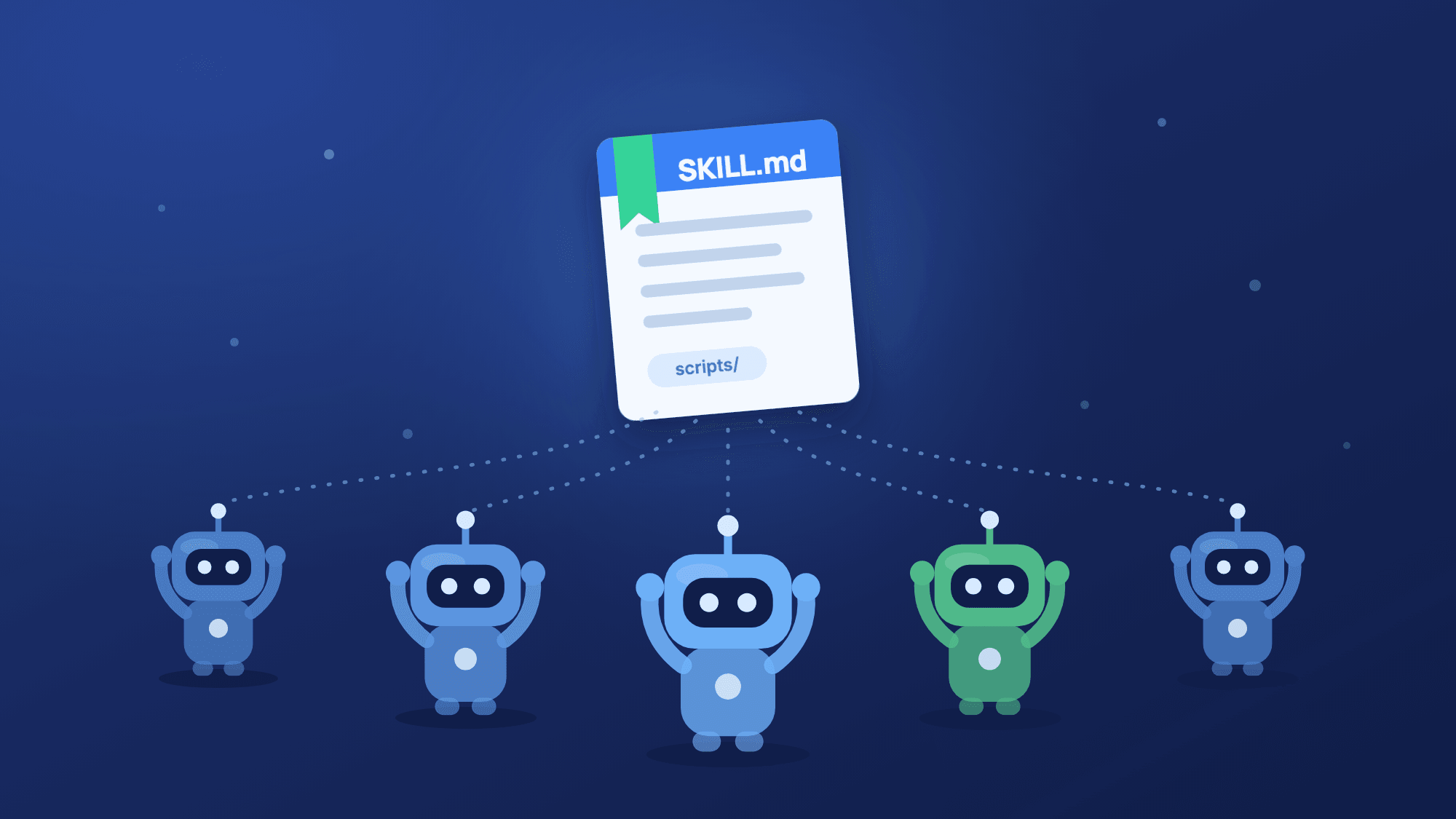
Skills Tool - ByteChef supports the concept of Skills: reusable, self-contained packages of instructions and files that you build once and reuse across agents. The Skills Tool cluster element lets the agent invoke any Skill available in your ByteChef workspace. (More on creating and managing Skills later in this post.)
AI Agent as a Tool - the most powerful option of all: an AI Agent can use another AI Agent as a tool. It's important enough that it gets its own section below.
Guardrails are ByteChef's own layer of control on top of the Spring AI-powered capabilities. While the other cluster elements are about making the agent smarter and more capable, Guardrails are about keeping it appropriate and safe.
Guardrails can be configured to inspect both incoming requests and outgoing responses. Common use cases include:
Unlike the other cluster elements, Guardrails are a ByteChef-native feature, not part of Spring AI. They sit as a wrapper around the agent interaction, giving you a transparent enforcement layer regardless of which model, RAG strategy, or memory backend you've chosen.
The Tools section introduced the Skills Tool, which lets an agent call a Skill. But where do Skills come from? ByteChef includes a dedicated Skills area for building and maintaining them, so a capability you define once becomes available to every agent in your workspace.
A Skill is a self-contained, reusable package of instructions and supporting files - essentially a .skill archive built around a primary SKILL.md (the instructions, with optional frontmatter metadata) plus any extra files it needs. Each Skill has a name and a description, and once it lives in your workspace, any number of agents can invoke it through the Skills Tool. Build the capability once; reuse it everywhere.
There are three ways to create one:
.skill file - drag in a pre-built Skill archive, handy for moving a Skill between workspaces or sharing it with teammates.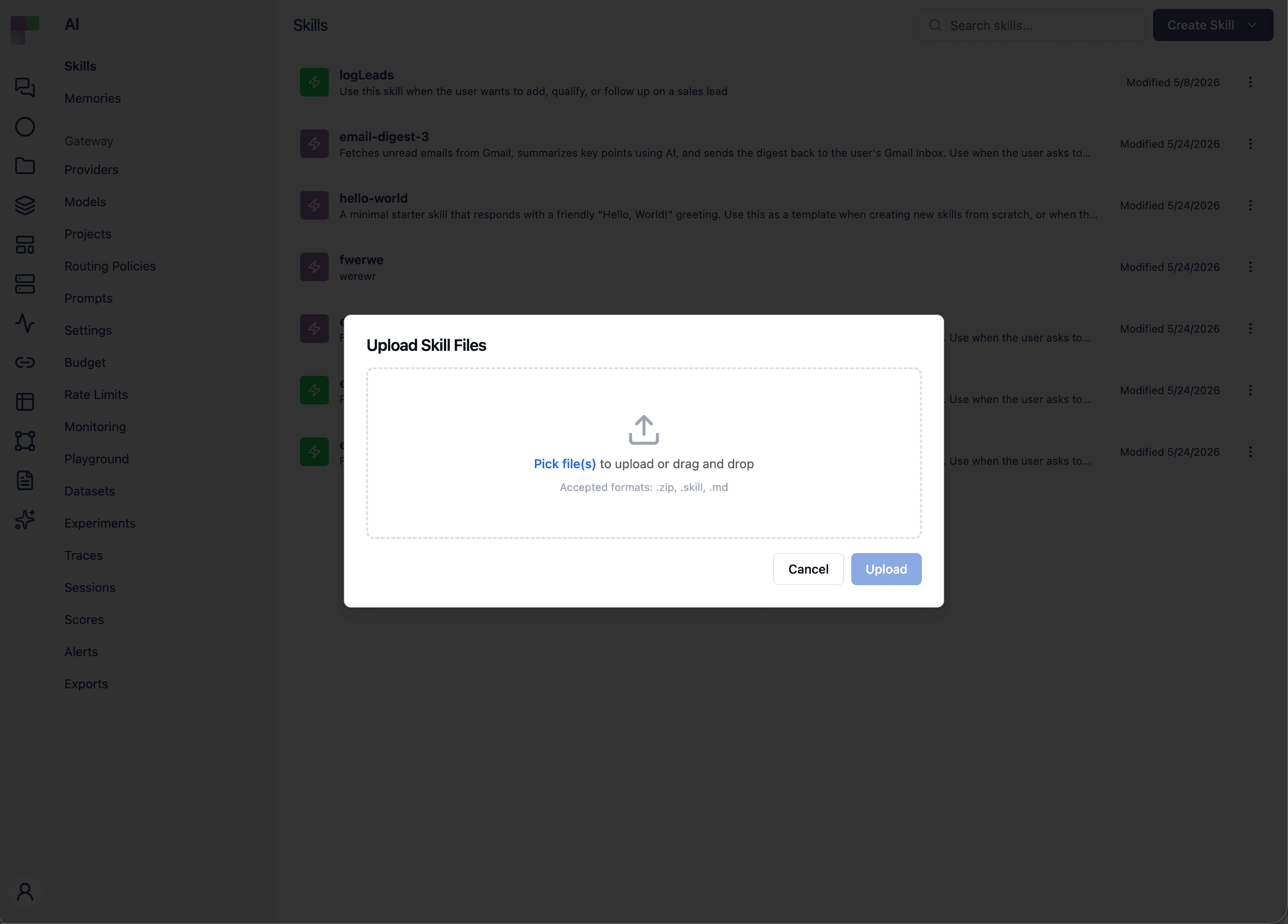
Once created, a Skill opens in a built-in editor: a file tree on the left, and a dual-mode view that toggles between a source editor (Monaco, with syntax highlighting for Markdown, Python, JavaScript, YAML, JSON, and more) and a Markdown preview for .md files. You can edit any file in the Skill, save your changes, download the Skill as a .skill archive to share, or delete it.
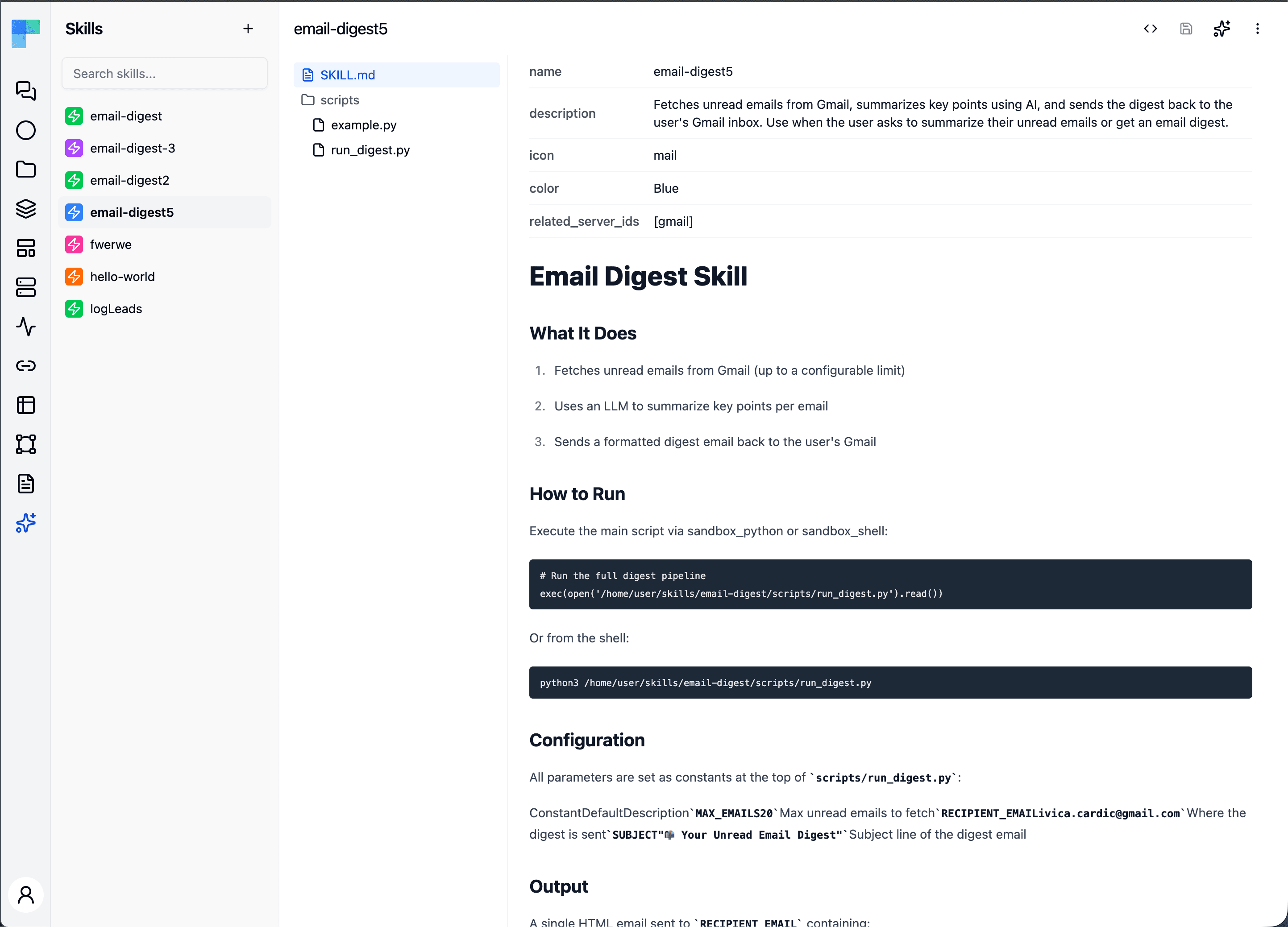
Because Skills are decoupled from any single agent, they become a shared library of capabilities for your whole workspace: capture a procedure or a piece of know-how once, then wire it into as many agents as you like through the Skills Tool.
Perhaps the most powerful tool an AI Agent can use is another AI Agent. Because the AI Agent is itself a cluster-element building block, you can configure a second agent - complete with its own model, RAG, memory, tools, and guardrails - as a tool for the current agent to call.
This is the foundation for building agentic patterns such as orchestrator/subagent hierarchies, where a supervisor agent breaks a complex request into parts and delegates each one to a specialized sub-agent - a research agent, a drafting agent, a data-lookup agent - each tuned for its own job. The supervisor decides which sub-agent to call and when, then combines their results into a final answer.
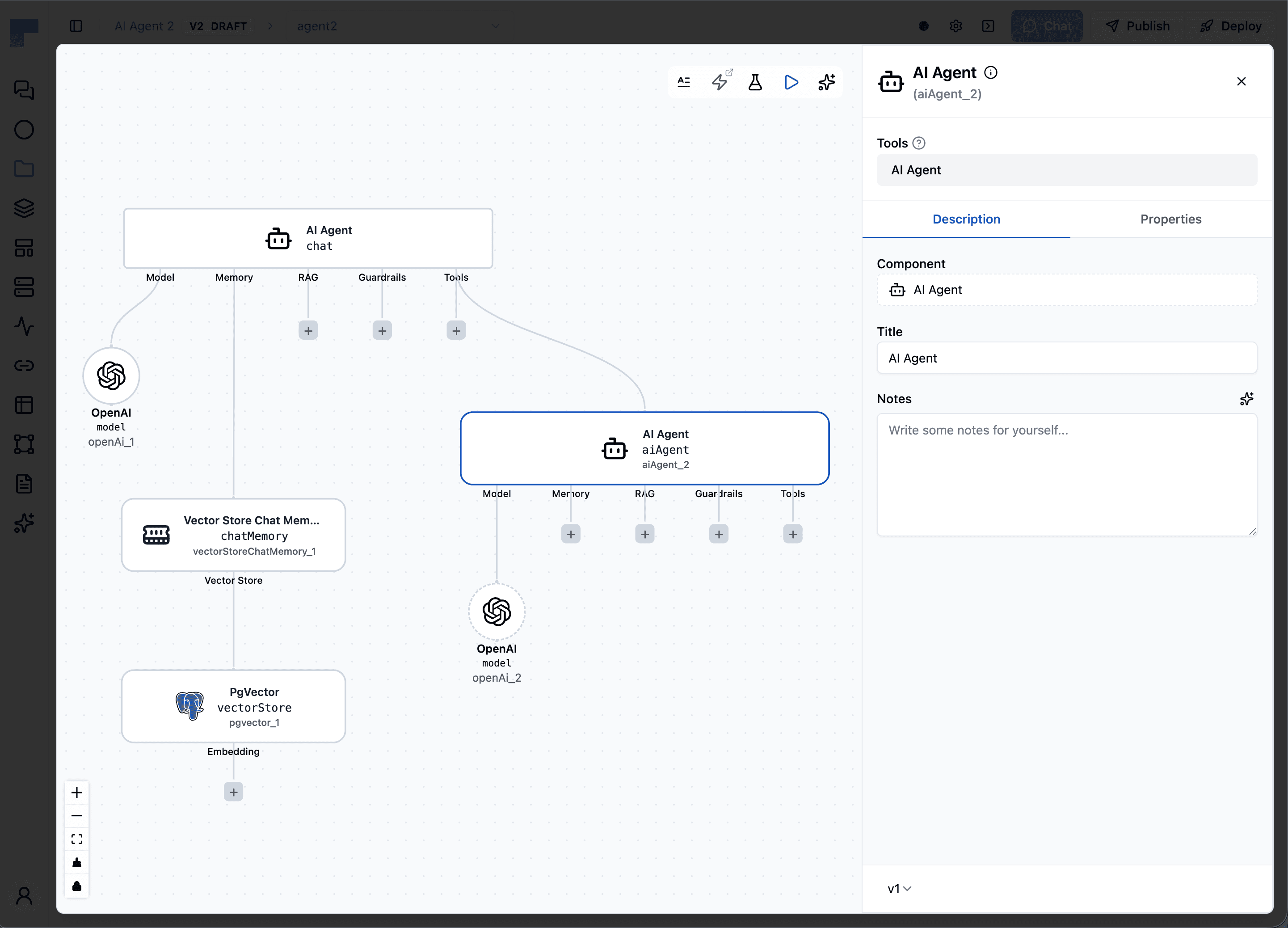
Because the composition is recursive - agents calling agents, which can in turn call their own sub-agents - there's no artificial ceiling on how sophisticated the system can get. That recursive composability is what makes ByteChef's AI Agent a genuine platform for multi-agent systems, not just a runtime for a single agent.
The power of ByteChef's AI Agent comes from how these cluster elements combine. A production-grade agent might use:
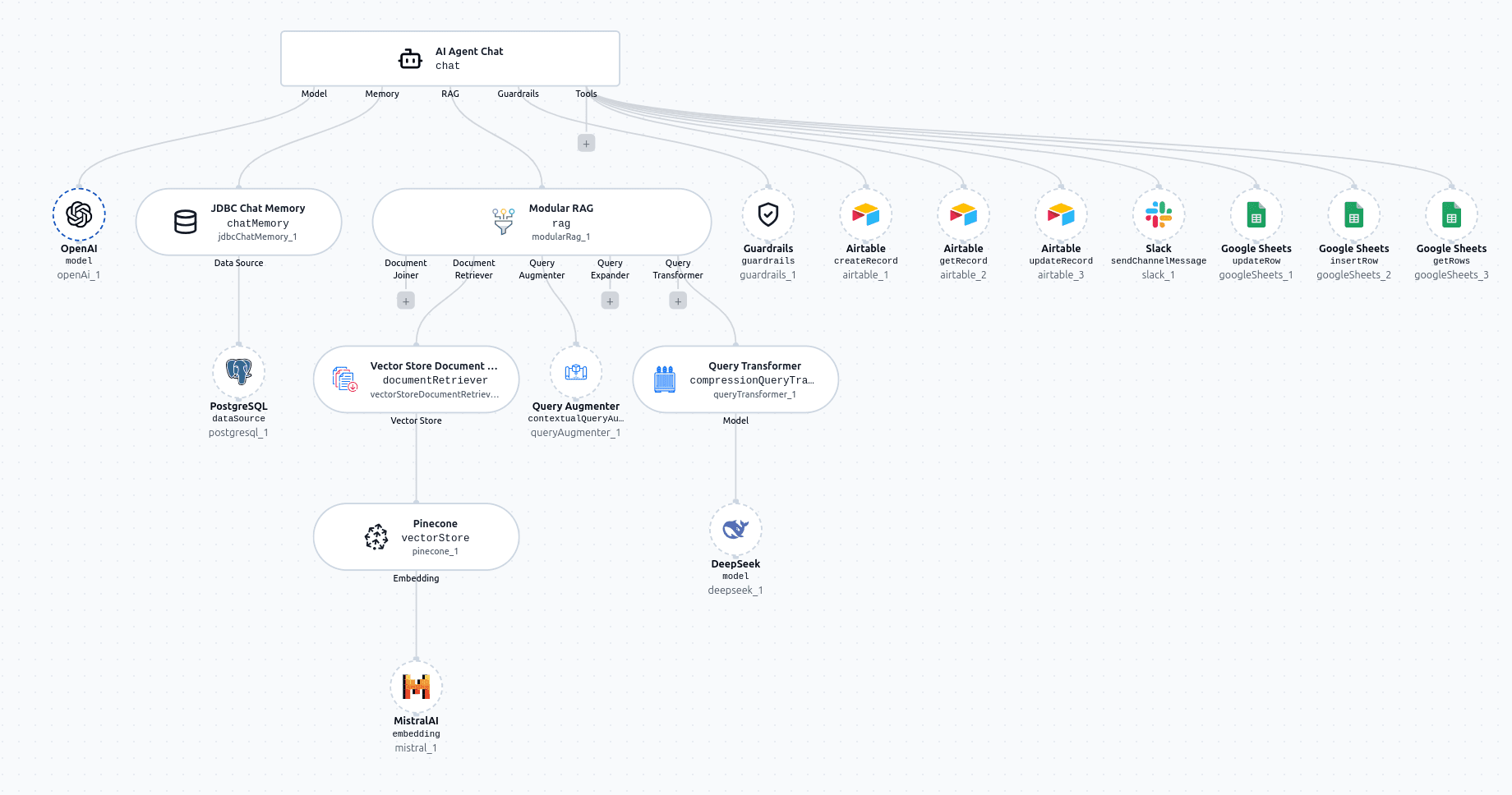
And because ByteChef is built on Spring AI, you benefit from a well-maintained, actively developed foundation that keeps pace with the rapidly evolving AI ecosystem, new models, new vector stores, and new capabilities get integrated continuously.
Whether you're building a customer support agent, an internal knowledge assistant, a data processing pipeline, or a complex multi-agent system, ByteChef's AI Agent gives you the building blocks to do it without needing to write your own AI infrastructure from scratch.
Assembling an agent is only half the job - you also need to know it behaves the way you expect before it ever touches a real workflow. ByteChef bakes this in. The AI Agent editor is a split view: your configuration sits on the left, and an interactive testing panel - the Agent Playbook - sits on the right. You build and test side by side, without ever switching screens.
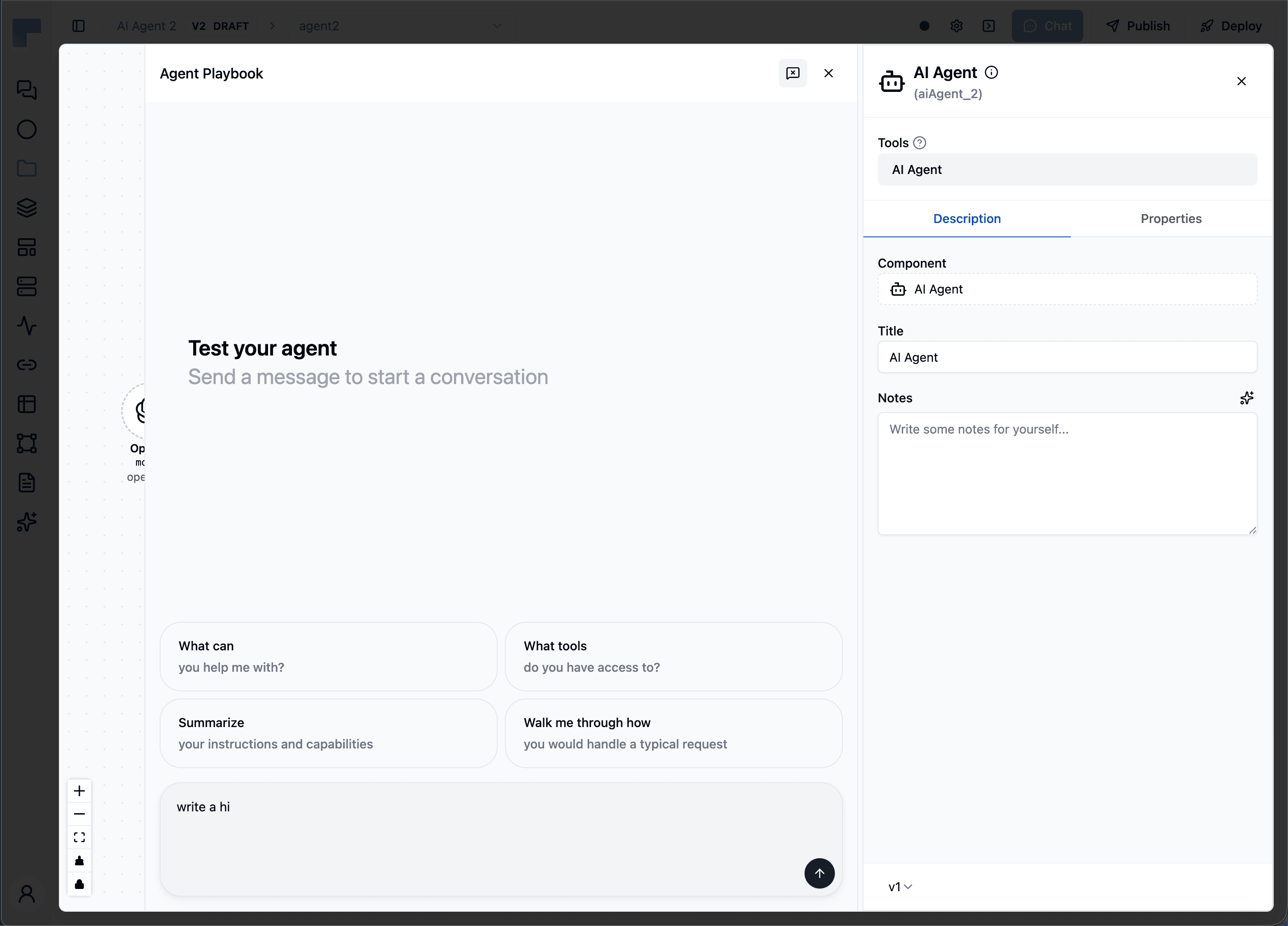
Click Test Agent and the panel turns into a live chat. Send sample messages that imitate the kind of input real users will send, and watch the agent respond in real time - responses stream in token by token, exactly as they will in production. A couple of suggested prompts, like "What can you help me with?" and "What tools do you have access to?", give you a quick way to get started.
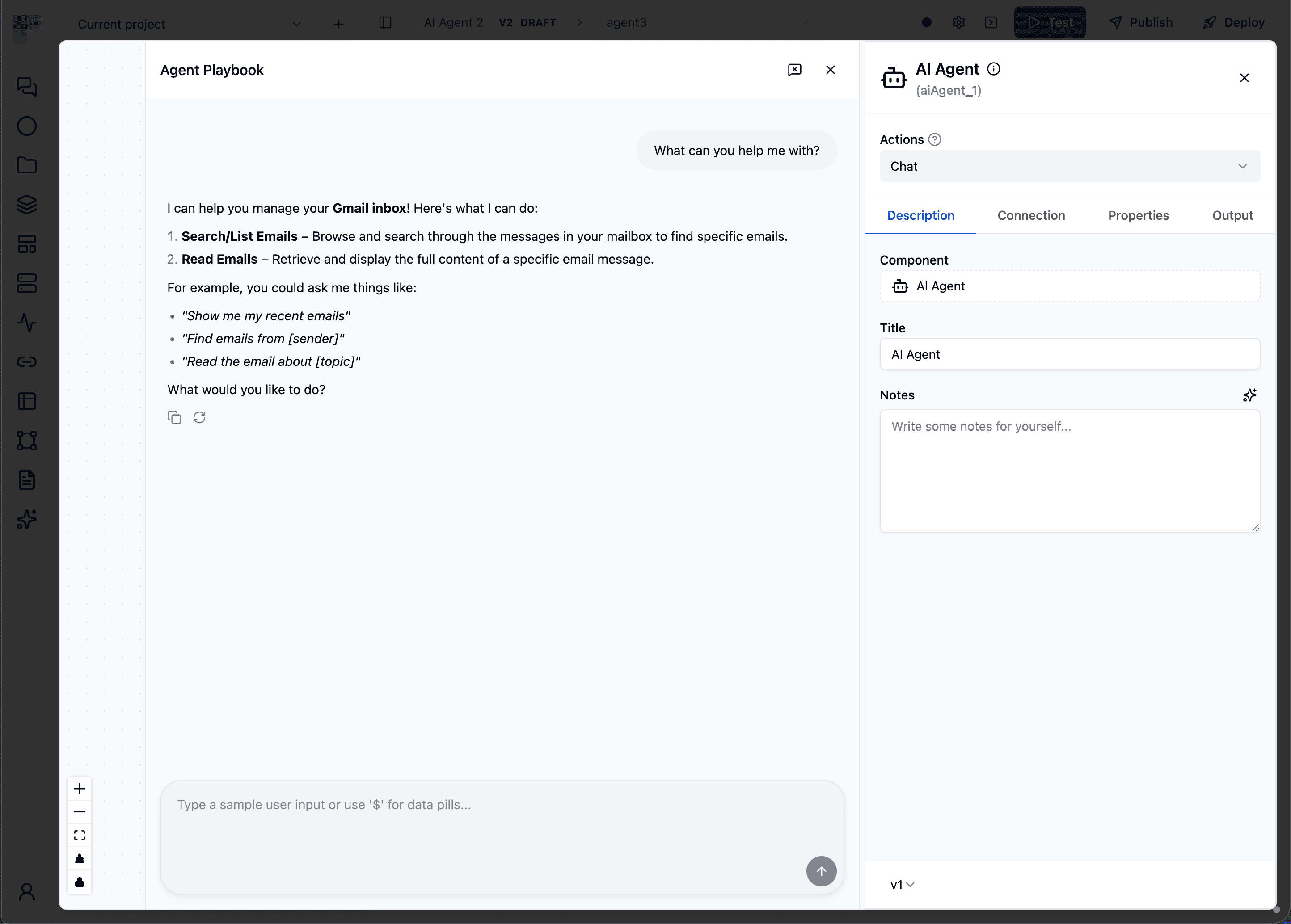
What makes the Agent Playbook more than a chat box is its transparency into the agent's reasoning. Whenever the agent decides to call a tool, an expandable card appears inline in the conversation, showing:
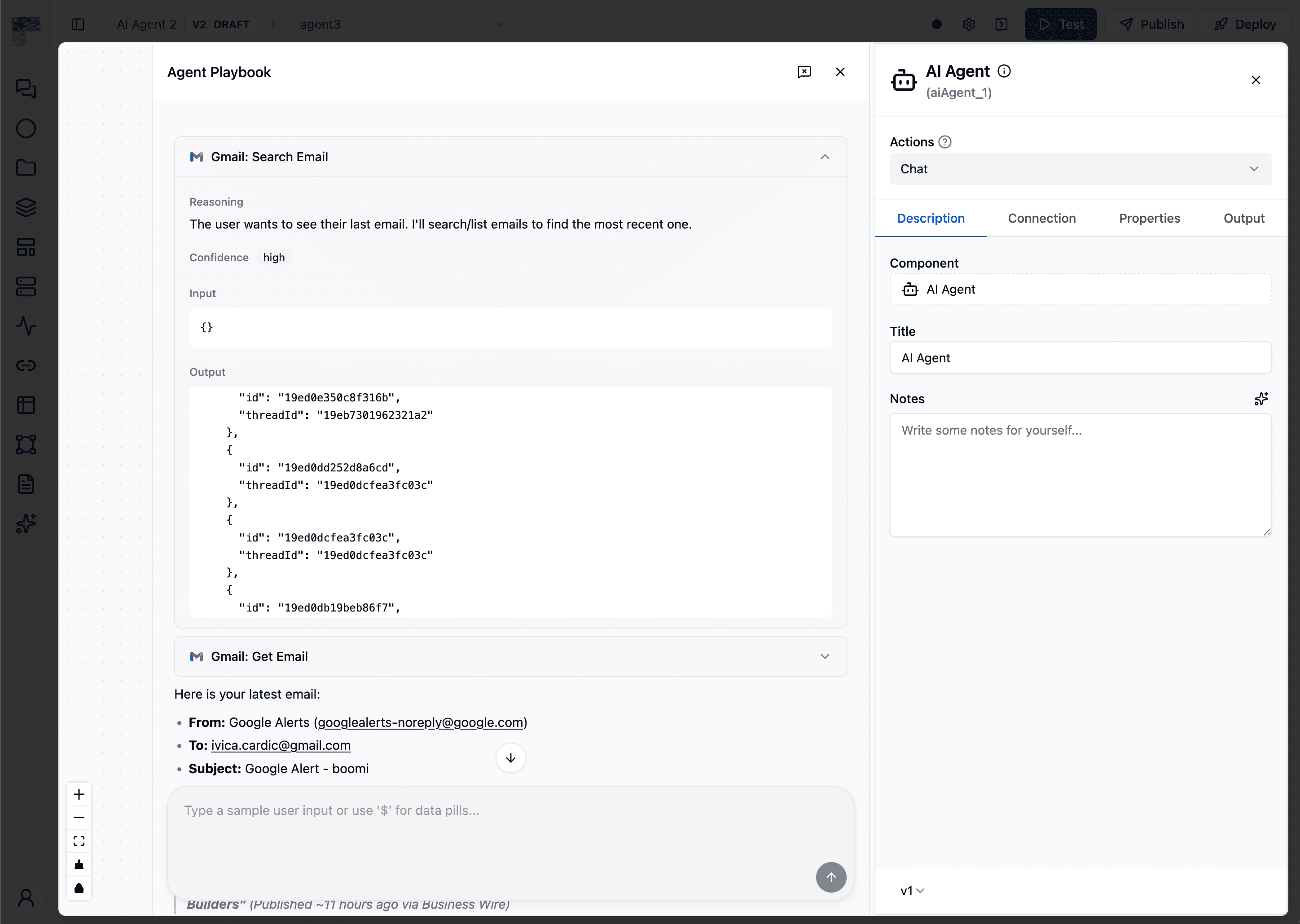
This means you're not just seeing the final answer - you're seeing how the agent got there. If it picks the wrong tool, invents an argument, or skips a step, you'll catch it right away instead of discovering it in production.
Crucially, testing runs against your in-progress configuration. There's no save-and-deploy cycle: tweak the system prompt, swap the model, add or remove a tool or a guardrail, then hit Reset conversation and try again. The loop between changing the agent and seeing the effect is measured in seconds. And because the panel lives inside the workflow context, you can feed it workflow variables (data pills, via $) to mirror the data the agent will actually receive at runtime.
Ready to try building with the AI Agent in ByteChef for yourself?
Get the latest guides on complex automation, AI agents, and visual workflow best practices delivered to your inbox.