14 min read
Ivica Čardić
TL;DR: Agent Skills are folders of instructions and scripts, built around a
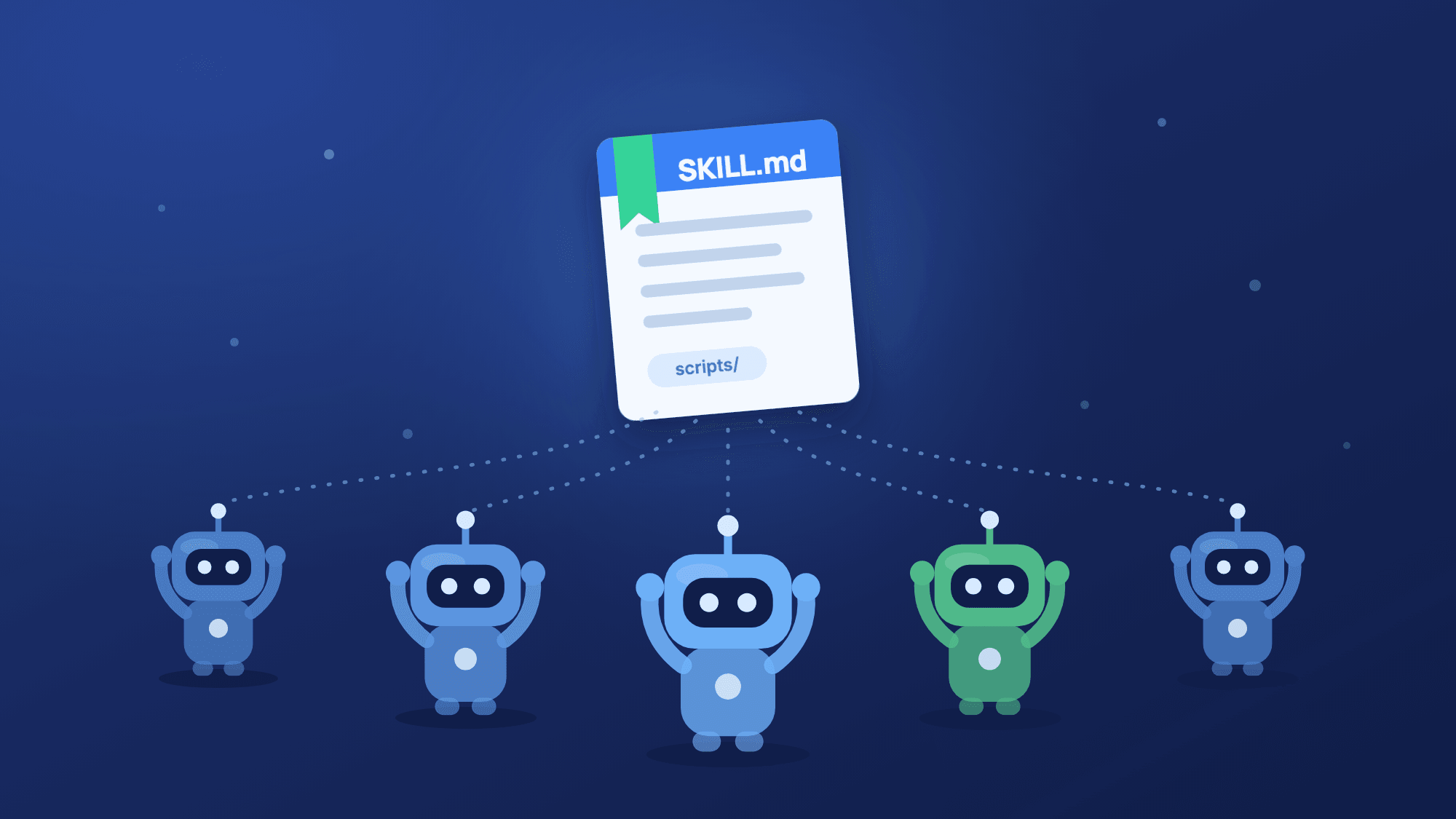
SKILL.mdfile, that an agent loads only when a request needs them. ByteChef runs on Spring AI, which added Agent Skills to Java, and ships them as a product feature: a Skills area to manage them, sandboxed script execution, and a Skills Tool for any AI Agent. To see it working, import the Release notes agent with a skill template: paste your commits, get release notes.
There's a moment every agent builder hits: your AI Agent works, but making it good at your job means feeding it more and more instructions. The release notes format. The refund policy. The naming conventions. Everything lands in the system prompt, which grows into a wall of text that every request pays for in tokens, whether it's relevant or not.
Agent Skills fix that. Anthropic introduced the pattern and its SKILL.md convention, and it spread fast. In January, the Spring AI team published Agent Skills in Spring AI, showing how to wire skills into a Java application with SkillsTool, file-system tools and shell tools.
ByteChef is built on top of Spring AI (see our posts on the AI Agent component and agentic workflow patterns). Where Spring AI gives Java developers the building blocks, ByteChef ships skills as a managed feature you attach to an agent in the editor.
This post explains the pattern with one concrete skill, release-notes, and the template that uses it. By the end you'll have an agent that turns a pasted git log into user-facing release notes.
The Release notes agent with a skill template is three steps:
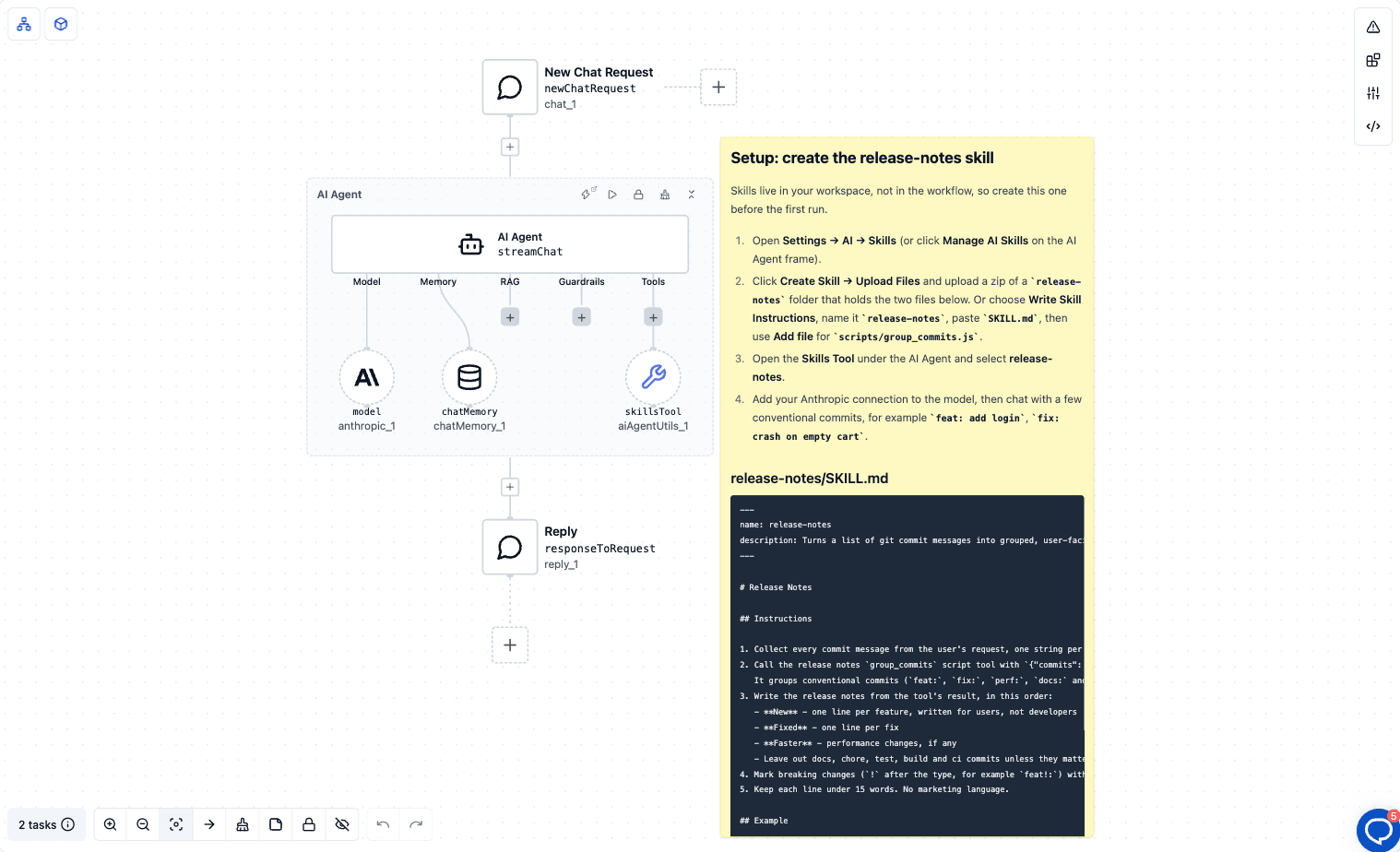
The system prompt is one sentence: "You are a release manager assistant for a Java team. Use your skills whenever a request matches one of them, and follow the skill's instructions exactly." Nothing about commit formats, section order or tone. All of that lives in the skill.
Skills belong to your workspace, not to a workflow, so the template can't create one for you. Instead, the yellow note on the canvas holds the full skill, its SKILL.md and its script, with setup steps. That's the next section.
A skill is a folder. That's the whole format, and it's why the pattern spreads so easily.
At the root sits a SKILL.md file: YAML frontmatter with metadata on top, Markdown instructions below. Around it, optional supporting files. The release-notes skill has one script:
release-notes/
├── SKILL.md                  ← metadata + instructions (required)
└── scripts/
    └── group_commits.js      ← becomes a tool the agent can call
Larger skills add a references/ folder for documentation the agent reads only when needed, and an assets/ folder for templates.
Here's the SKILL.md from the template:
---
name: release-notes
description: Turns a list of git commit messages into grouped, user-facing release notes. Use when the user pastes commits, a changelog or a git log and asks for release notes, a changelog entry or a "what's new" summary.
---

# Release Notes

## Instructions

1. Collect every commit message from the user's request, one string per commit.
2. Call the release notes `group_commits` script tool with `{"commits": [ ...the commit strings... ]}`.
   It groups conventional commits (`feat:`, `fix:`, `perf:`, `docs:` and so on) for you.
3. Write the release notes from the tool's result, in this order:
   - **New** - one line per feature, written for users, not developers
   - **Fixed** - one line per fix
   - **Faster** - performance changes, if any
   - Leave out docs, chore, test, build and ci commits unless they matter to users.
4. Mark breaking changes (`!` after the type, for example `feat!:`) with **Breaking:** at the start of the line.
5. Keep each line under 15 words. No marketing language.
The file continues with an input/output example, which you'll find in the template's note.
Two things to notice. First, the description does two jobs: it tells people what the skill is for, and it tells the agent when to use it. The second sentence ("Use when the user pastes commits…") is discovery guidance, not filler. Second, the instructions are written for the agent, as short numbered steps. A skill is an onboarding document for a very fast, very literal new hire.
Because the format is plain Markdown in a folder, skills are portable. Claude Code, Spring AI and ByteChef all use the same convention, so a skill you write in one place works in the others.
The clever part of skills isn't the file format. It's when the content loads. Skills use progressive disclosure, in three phases:
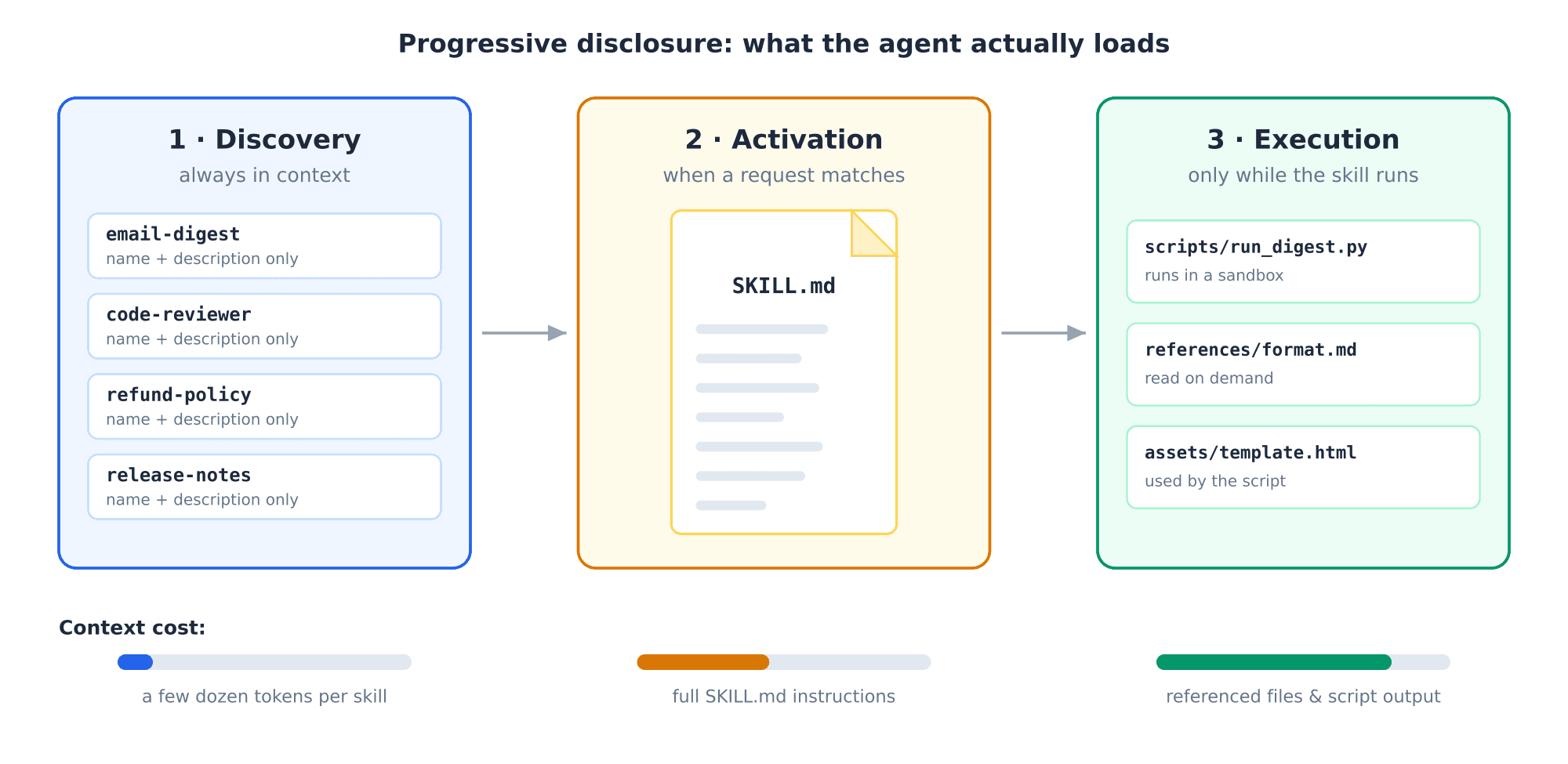
SKILL.md loads into context. Paste a git log, and release-notes activates. Ask about the weather, and it stays a single line.Compare that with putting everything in the system prompt, where your release notes format is in context for every request. With progressive disclosure you pay for know-how only when it's used, which is what makes a library of specialized skills affordable.
An agent gets skills through the Skills Tool, one of the options in the AI Agent's Tools slot, next to component actions, MCP tools and sub-agents. You choose which workspace skills it offers; the template's Skills Tool offers release-notes.
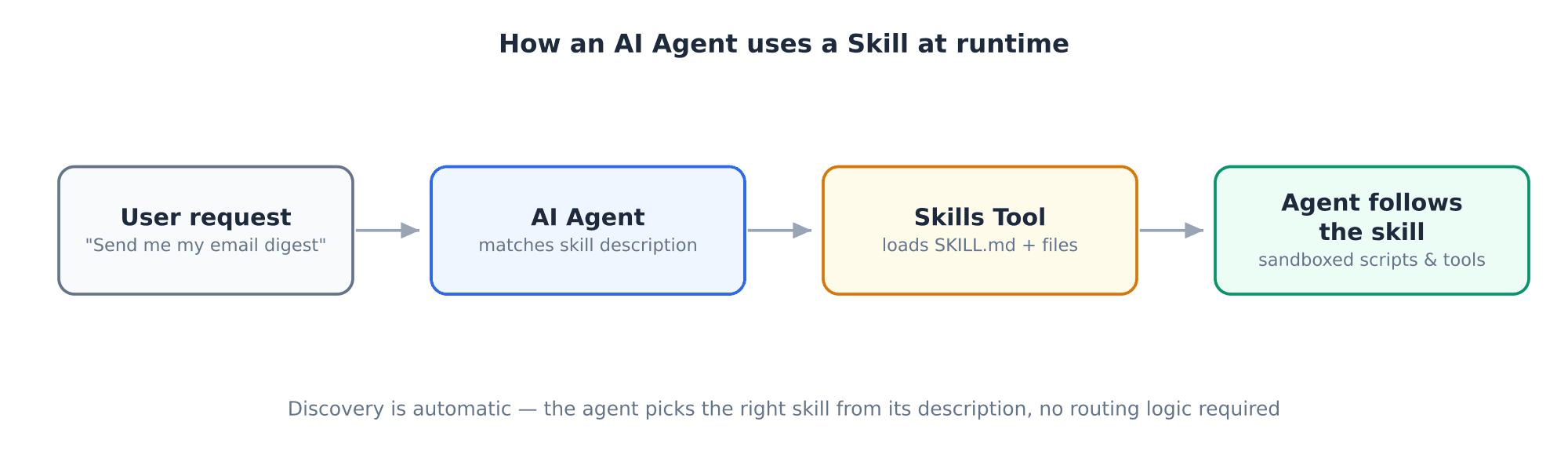
Notice what's missing: routing logic. You don't configure which requests trigger which skill. The agent matches the user's request against skill descriptions on its own.
When a skill bundles scripts, ByteChef doesn't give the agent a shell. It reads the skill's scripts/ folder and turns every script that defines a perform function into a tool of its own, named after the skill and the file. In the template, scripts/group_commits.js becomes a tool called release_notes_group_commits:
function perform(input, context) {
    const commits = (input && input.commits) ? Array.from(input.commits) : [];
    const groups = {feat: [], fix: [], perf: [], other: [], breaking: []};
    const pattern = /^(\w+)(\([^)]*\))?(!)?:\s*(.+)$/;

    for (const commit of commits) {
        const message = String(commit).trim();
        const match = message.match(pattern);

        if (!match) {
            groups.other.push(message);

            continue;
        }

        const type = match[1].toLowerCase();
        const summary = match[4];

        if (match[3] === '!') {
            groups.breaking.push(summary);
        }

        if (type === 'feat' || type === 'fix' || type === 'perf') {
            groups[type].push(summary);
        } else {
            groups.other.push(type + ': ' + summary);
        }
    }

    return groups;
}
This is the split that makes skills reliable. Parsing feat(agent)!: … is exact work, so a script does it. Writing a friendly one-line summary is judgment, so the model does it. The model decides when to call the script; the script guarantees how commits are grouped.
Scripts can be JavaScript, Python, Ruby, R or Java. A file without a perform function is not exposed as a tool.
The Spring AI post is honest about its own trade-off: in the do-it-yourself setup, "scripts execute directly on your local machine without sandboxing," and the advice is to containerize your whole application.
In ByteChef, a skill script runs in a GraalVM polyglot context with no host filesystem, no network sockets and no native access. It reaches the outside world only through context.component, the same action layer the rest of the platform uses. That isn't a resource sandbox: there are no CPU or memory limits on guest code, so read a skill's scripts before you attach it. But the access a loose python3 process would have simply isn't there.
There's a useful side effect. Because scripts are plain files, ByteChef reads them before the workflow runs and looks for context.component.<name>.<action>(…) calls. For every component it finds, the Skills Tool asks for a connection. A script that calls context.component.gmail.* makes the Skills Tool ask for a Gmail connection. group_commits.js calls no components, so the template needs only an Anthropic connection.
And because model access goes through Spring AI's provider abstraction, skills are model-portable: the template uses Claude, but the same skill works on OpenAI, Gemini or a local Ollama model.
Here's the whole setup, as the canvas note describes it:
release-notes folder that holds SKILL.md and scripts/group_commits.js (both are in the note), and upload it; orrelease-notes, paste SKILL.md, then use Add file for scripts/group_commits.js.Here's the example from the skill. Input:
feat(agent): add skills tool
fix: retry on 429 from the model API
perf!: stream tool results instead of buffering
docs: update README
The agent loads release-notes and calls release_notes_group_commits. The skill's own example shows the answer it is asked to write:
**New**
- Agents can load skills on demand.

**Fixed**
- Requests retry when the model API is rate limited.

**Faster**
- **Breaking:** tool results now stream instead of buffering.
The docs: commit is left out, as the skill says. Thanks to Chat Memory, you can follow up with "make the Fixed section friendlier" without pasting the commits again.
To watch the skill work, use the Agent Playbook in the editor. Its tool-call cards show the skill loading and the script tool running, with its input and output. If the agent never loads the skill, the description is usually too vague, so edit it and try again.
In Spring AI, skills live in folders next to your application code. ByteChef gives them a home in the product: the Skills area under Settings → AI.
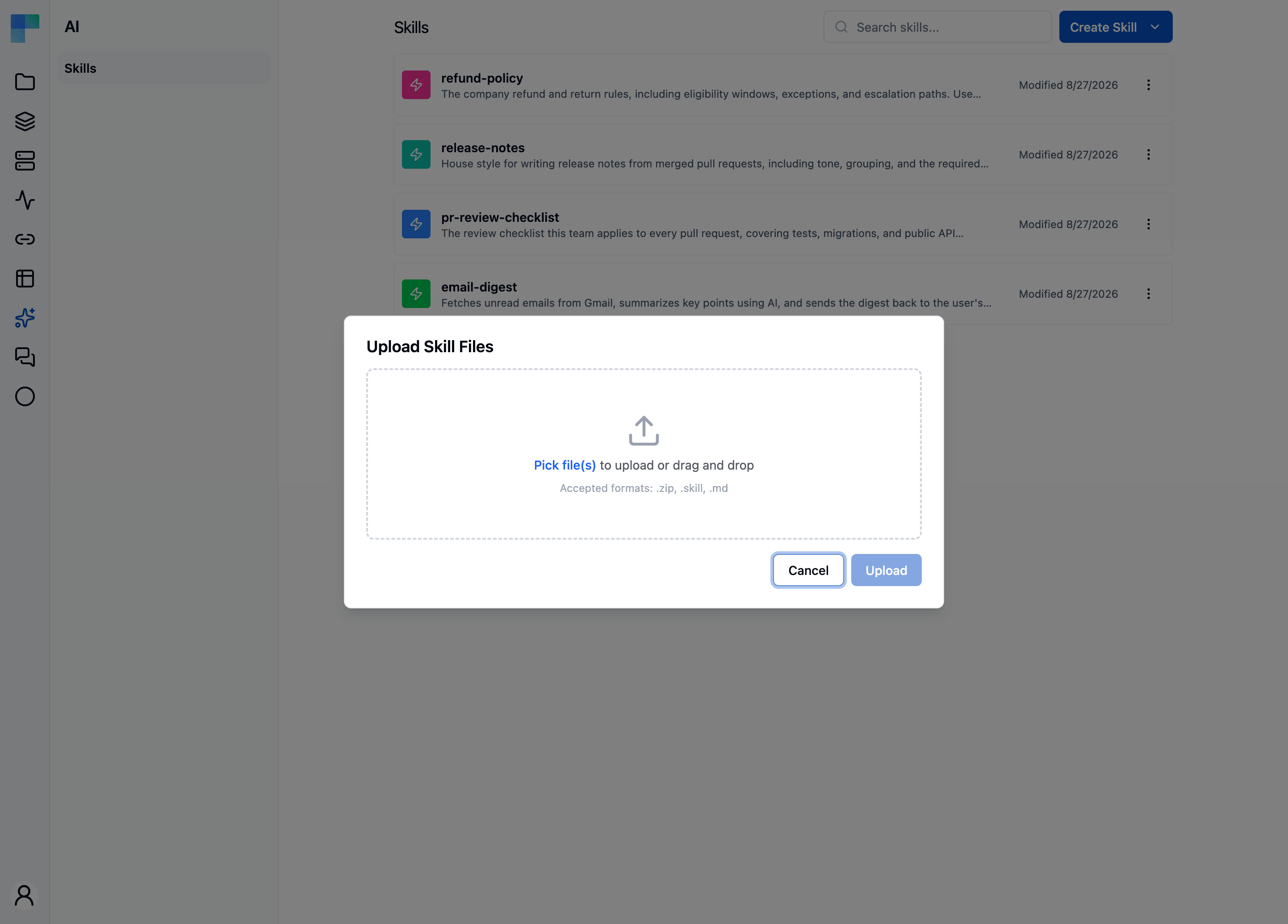
Each skill shows its name, its description (the same one agents use for discovery) and when it last changed. You can create a skill two ways today:
SKILL.md for you. Add more files, such as scripts, from the editor..skill archive, a .zip or a single .md file. This is how you import skills built elsewhere, including skills from the wider SKILL.md ecosystem.A third way, Create with AI, is coming: describe the capability and ByteChef's Copilot drafts the skill.
Every skill opens in a built-in editor. Here's the release-notes skill from the template:
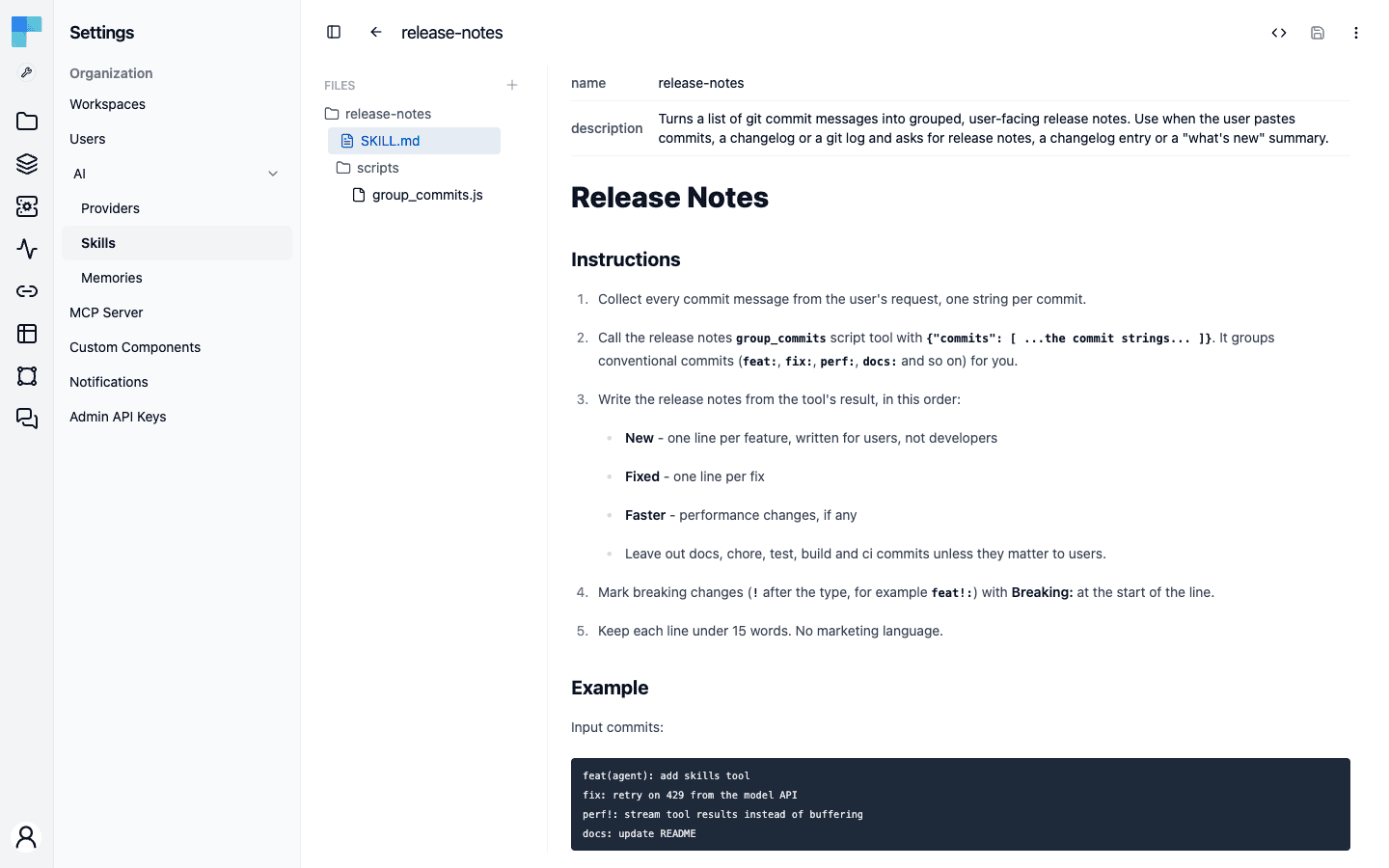
The file tree is on the left, with SKILL.md and scripts/group_commits.js. The main pane shows the frontmatter as a table above the formatted instructions. ByteChef validates name and description and keeps any other keys as they are, so a skill imported from another tool keeps its metadata. A toggle switches to a source editor with syntax highlighting for Markdown, Python, JavaScript, TypeScript, Java, JSON, YAML, HTML, CSS and SQL. Save, and every agent using the skill picks up the change on its next run, with no rebuild and no redeploy.
To move a skill to another workspace or keep a snapshot, Download it as a .skill archive. It's a file you can version, review and upload again anywhere.
Because skills aren't tied to one agent, they form a shared library for your workspace:
release-notes skill can serve the engineering agent that drafts notes from merged PRs and the marketing agent that turns them into announcements. Change the format once, and both follow it.refund-policy skill can serve the support, sales and helpdesk agents. Update the policy once, and all three follow the new rules in their next conversation.The Spring AI post makes the same "build once, reuse everywhere" point. The difference is that in ByteChef the unit of reuse isn't a folder you copy between codebases; it's a managed object every agent in the workspace can use.
Skills are one of three ways to shape what an agent does. Each kind of knowledge has its place:
| Mechanism | What it's for | Loaded |
|---|---|---|
| System prompt | Identity and ground rules: who the agent is, tone, hard limits | Always |
| RAG | Facts: your documents, tickets, product data; what is true | Per query, by similarity |
| Skills | Procedures: how to do a task, step by step; how it's done | On demand, by intent |
The template follows this split. The system prompt says who the agent is ("a release manager assistant"). The skill says how to write release notes. If you wanted the notes to mention your product's real feature names, that would be RAG or the Knowledge Base.
A rule of thumb: if you're writing "always" or "never," it's system prompt. If you're writing "our Q3 pricing is…," it's a document for RAG. If you're writing "first do this, then that, format the result like so," it's a skill.
Because it's built on Spring AI, ByteChef inherits the pattern's strengths: LLM portability, reusable and composable skills, and no vendor lock-in, since SKILL.md is a shared convention.
The Spring AI post lists four limitations. ByteChef's managed layer closes two of them:
group_commits.js runs with nothing to install.The other two remain open in both. There's no built-in human approval before a skill's script runs, and skill versioning is up to you: download the .skill archive and commit it alongside your code.
Two more differences are product concerns rather than framework ones: skills live in a managed workspace with search and an editor instead of on the filesystem, and wiring them up is one Skills Tool on an agent instead of dependencies and configuration code.
The release-notes skill follows five habits worth copying:
SKILL.md short. It loads in full on activation, so it should hold the steps. Move long reference material into references/ files the agent reads only when needed.perform function, like group_commits.js. Leave the judgment to the model.Agent Skills answer a simple question: where should an agent's know-how live? Not in a bloated system prompt, and not copied between agents, but in small, portable packages that load when needed.
Spring AI brought that pattern to Java as a library. ByteChef, built on Spring AI, turns it into something you don't have to build: managed storage, an editor, sandboxed scripts and one Skills Tool for any agent.
The fastest way to see it is to run it. Import the Release notes agent with a skill template, create the skill from the note on the canvas, and paste your last week of commits.
Get the latest guides on complex automation, AI agents, and visual workflow best practices delivered to your inbox.