20 min read
Ivica Čardić
TL;DR: The Runtime Job app (
runtime-job-app, Enterprise Edition) is a single-shot ByteChef binary. You give it a workflow name, its inputs as JSON, and its credentials as JSON. It boots the full Atlas engine in one process, runs that one workflow to completion, and exits0if the job completed or1if it failed, was stopped, or ran past--timeout. Execution state, the message broker and connections all live in memory and disappear on exit, so there is nothing to provision and nothing to clean up. It fits wherever the schedule already lives somewhere else: a KubernetesCronJob, Airflow, a CI pipeline, or your own product's job runner.
Most of ByteChef is built to stay up. The server holds your projects, runs triggers on a schedule, listens for webhooks, and keeps a history of every execution in PostgreSQL. That's the right shape for an automation platform.
It's the wrong shape for a surprising number of jobs:
CronJob, next to twenty other batch jobs, with alerting wired to failed pods.In all of these, a standing server, its database and its broker are pure overhead. You only need the engine, for the length of one run. That's what the Runtime Job app is.
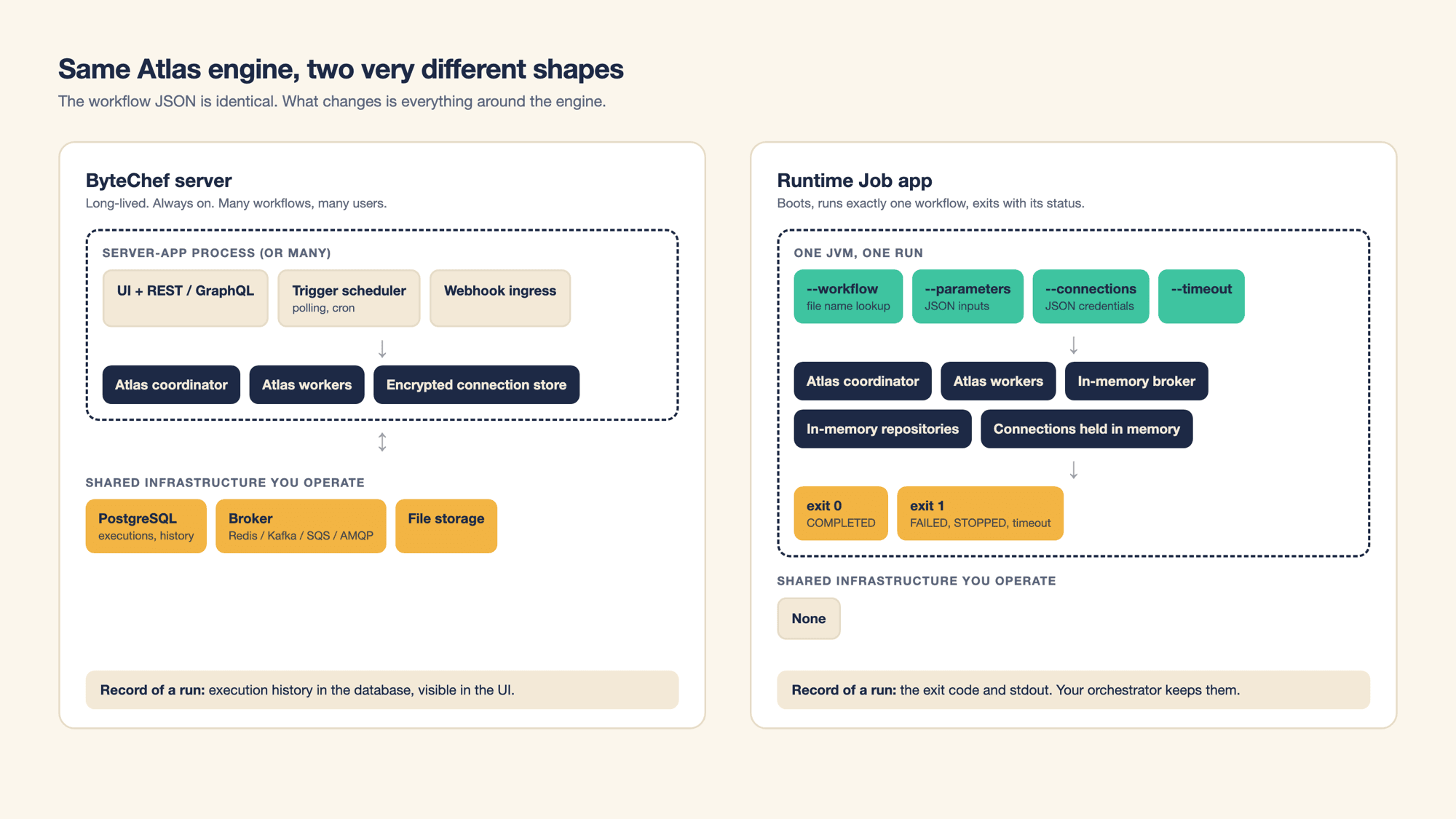
The Runtime Job app isn't a stripped-down interpreter. It carries the full Atlas engine, with the coordinator, the workers and the task dispatchers, inside one JVM. What it replaces is everything around the engine:
| Concern | ByteChef server | Runtime Job app |
|---|---|---|
| Execution state | PostgreSQL | In-memory repositories, gone on exit |
| Message broker | Redis, Kafka, SQS, RabbitMQ, JMS or in-memory | In-process memory broker |
| Connections | Encrypted credential store in the database | Passed as JSON at launch, held in memory |
| Triggers | Scheduler, polling, webhook ingress | None. The workflow starts when the process starts |
| UI and API | Yes | No |
| Record of a run | Execution history in the UI | The exit code and the log |
Because the workflow definition is the same JSON either way, the usual loop is: build and test on a ByteChef instance, export the workflow, hand the file to the Runtime Job app.
Let's make it concrete. Everything in this section was run against a freshly built JAR and a throwaway PostgreSQL container, and the output in the screenshots is the real output (with the Spring Boot banner trimmed).
A small daily sales report: take a date as input, total the paid orders for that day from PostgreSQL, log a one-line summary.
{
  "label": "Daily Sales Report",
  "description": "Total the paid orders for one day and log a summary",
  "inputs": [ {
    "name": "reportDate",
    "label": "Report date",
    "type": "string",
    "required": true
  } ],
  "triggers": [ {
    "label": "Manual",
    "name": "trigger_1",
    "type": "manual/v1/manual"
  } ],
  "tasks": [ {
    "label": "Sum paid orders",
    "name": "postgresql_1",
    "type": "postgresql/v1/query",
    "parameters": {
      "query": "SELECT count(*) AS orders, coalesce(sum(total), 0) AS revenue FROM orders WHERE status = 'PAID' AND created_at = CAST(:reportDate AS date)",
      "parameters": {
        "reportDate": "${reportDate}"
      }
    }
  }, {
    "label": "Log summary",
    "name": "logger_1",
    "type": "logger/v1/info",
    "parameters": {
      "text": "Sales for ${reportDate}: ${postgresql_1[0].orders} paid orders, revenue ${postgresql_1[0].revenue}"
    }
  } ]
}
Three things worth noticing, because they matter later:
reportDate, and tasks reference it as ${reportDate}.postgresql_1 and is an instance of the component postgresql. Connections can bind to either name.manual. The Runtime Job app has no trigger scheduler; whatever trigger the workflow declares, the run starts when the process starts.Save it as daily-sales.json in ~/bytechef/data/workflows/, which is the default place the app looks.
./gradlew :server:ee:apps:runtime-job-app:bootJarThe result is a single self-contained executable at server/ee/apps/runtime-job-app/build/libs/runtime-job-app.jar. It's a big one, around 770 MB, because it bundles the engine, the polyglot runtime for script tasks, and about a hundred components.
CONNECTIONS='{"postgresql": {"host": "localhost", "port": 5432, "database": "shop", "username": "etl", "password": "..."}}'

java -jar runtime-job-app.jar \
    --workflow=daily-sales.json \
    --parameters='{"reportDate": "2026-10-14"}' \
    --connections="$CONNECTIONS"

echo $?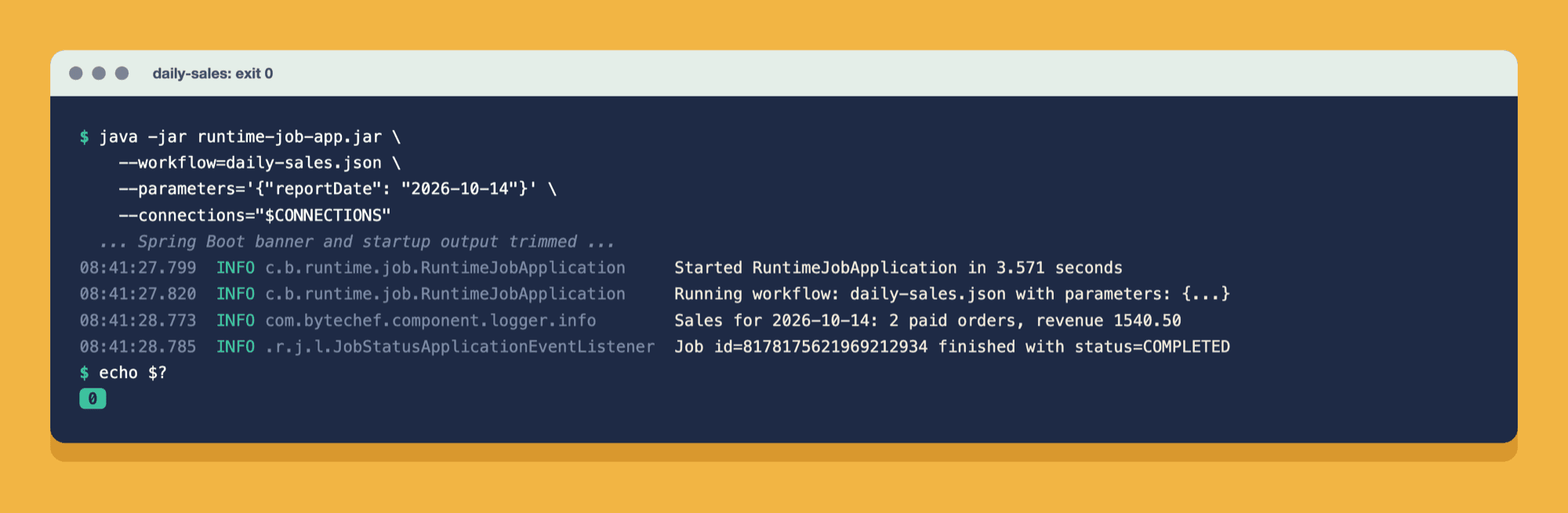
On a laptop the whole thing (JVM start, Spring context, the run itself, shutdown) took about 10 seconds of wall-clock time, of which the workflow was roughly one. That's the trade you're making: a few seconds of boot for zero standing infrastructure. For a nightly batch it's irrelevant. For something you'd call a thousand times a minute, use the server.
The app does very little on its own, and that's the point:
--workflow is required; the app refuses to start without it. --parameters is parsed as a JSON object. --timeout, if present, is parsed as a duration.daily-sales becomes ZGFpbHktc2FsZXM=. More on why that matters below.JobFacade.createJob the server uses. From here on, it's ordinary Atlas: the coordinator turns the job into task executions and puts them on the in-memory broker, and the workers pick them up.--connections JSON and attaches them.COMPLETED, FAILED or STOPPED, or until --timeout runs out.outputs are logged and, with --outputs-file, written to a file.| Argument | Required | What it does |
|---|---|---|
--workflow=<file> | Yes | The workflow to run, as a file name with its extension, e.g. daily-sales.json. A lookup key, not a path. |
--parameters=<json> | No | A JSON object of the workflow's inputs, e.g. '{"reportDate": "2026-10-14"}'. Values keep their JSON types. |
--connections=<json> | No | A JSON object mapping connection names to connection parameters. May be passed more than once. |
--timeout=<duration> | No | Give up and exit 1 if the job hasn't finished in time: 30s, 15m, 1h. Without it, the app waits indefinitely. |
--outputs-file=<path> | No | Write the workflow's outputs to this file as a JSON object once the job completes. |
Because this is a standard Spring Boot application, any Spring or ByteChef property can also be passed on the command line, e.g. --logging.level.com.bytechef=DEBUG, or set as an environment variable.
This is the part that trips people up, so it's worth being precise.
--workflow is not a path to a file. The app throws the directory part away, strips the extension, and Base64-encodes what's left. At startup, it has already scanned every enabled workflow repository and indexed each file it found under the same kind of id. The run looks the id up in that index.
So these two are exactly equivalent:
java -jar runtime-job-app.jar --workflow=daily-sales.json
java -jar runtime-job-app.jar --workflow=/anything/at/all/daily-sales.json
And passing a path to a file that lives outside the repositories does not make it reachable. If nothing was indexed under the id, the run fails at startup:
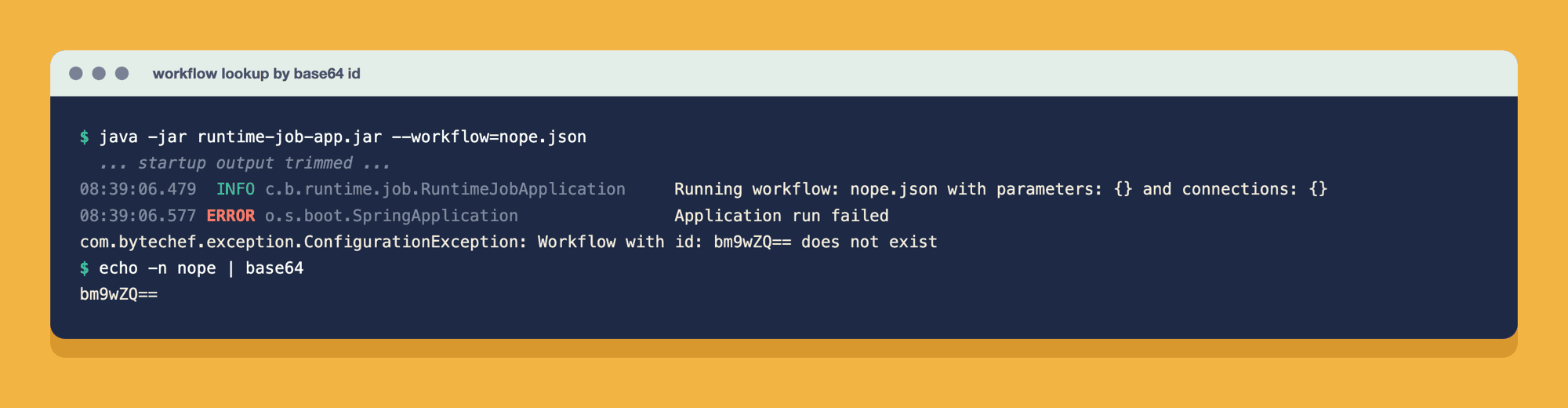
The cryptic id in the error is just the Base64 of the file name, which makes it easy to check what the app was actually looking for.
Three repositories are available:
| Repository | Enabled by default | Reads |
|---|---|---|
| Filesystem | Yes | ${user.home}/bytechef/data/workflows/*.{json|yml|yaml} |
| Classpath | Yes | workflows/*.{json|yml|yaml} inside the JAR |
| Git | No | A Git repository cloned at startup |
To read workflows from somewhere else on disk, override the filesystem pattern:
BYTECHEF_WORKFLOW_REPOSITORY_FILESYSTEM_LOCATION_PATTERN='/opt/workflows/*.json' \
  java -jar runtime-job-app.jar --workflow=daily-sales.json
To pull workflows straight from Git, so that a merge to main is a deploy, enable the Git repository:
BYTECHEF_WORKFLOW_REPOSITORY_GIT_ENABLED=true
BYTECHEF_WORKFLOW_REPOSITORY_GIT_URL=https://github.com/acme/workflows.git
BYTECHEF_WORKFLOW_REPOSITORY_GIT_BRANCH=main
BYTECHEF_WORKFLOW_REPOSITORY_GIT_SEARCH_PATHS=batch
BYTECHEF_WORKFLOW_REPOSITORY_GIT_USERNAME=...
BYTECHEF_WORKFLOW_REPOSITORY_GIT_PASSWORD=...
Subworkflows called through the subflow dispatcher are resolved through the same repositories as the main workflow, so keep them next to it.
There's no credential store, so connections arrive as JSON on the command line. Each key is a connection name, and each value is that connection's parameters, using the same property names the component's connection form shows in the UI.
For PostgreSQL (and MySQL), that's host, port, database, username and password:
{
  "postgresql": {
    "host": "db.internal",
    "port": 5432,
    "database": "shop",
    "username": "etl",
    "password": "..."
  }
}
For the LLM providers, it's the API token:
{
  "openAi": { "token": "sk-..." }
}Before each task is dispatched, the app resolves its connection in this order:
name (e.g. postgresql_1) binds to that task only.postgresql) is shared by every task of that component.logger or httpClient against a public API. A component that needs credentials will fail the task, and with it the job.Task-name keys are how you give two tasks of the same component different credentials, like reading from a replica and writing to the primary:
{
  "postgresql_read":  { "host": "replica.internal", "port": 5432, "database": "shop", "username": "reader", "password": "..." },
  "postgresql_write": { "host": "primary.internal", "port": 5432, "database": "shop", "username": "writer", "password": "..." }
}--connections can be repeated, and the objects are merged. That's handy when each credential lives in its own secret:
java -jar runtime-job-app.jar \
    --workflow=daily-sales.json \
    --connections="$OPENAI_CONNECTION" \
--connections="$POSTGRES_CONNECTION"The exit code is the whole interface between the Runtime Job app and whatever launched it:
| Exit code | Meaning |
|---|---|
0 | The job reached COMPLETED. |
1 | The job reached FAILED or STOPPED, or --timeout ran out first. |
| non-zero | The app couldn't start the run: missing --workflow, invalid --parameters or --connections JSON, or a workflow no repository has. |
143 | The process was killed with SIGTERM (128 + 15) before the job finished: docker stop, a pod eviction, a node drain, activeDeadlineSeconds. |
Here's the same workflow with a wrong database password. The task fails, Atlas marks the job FAILED, and the process exits 1:
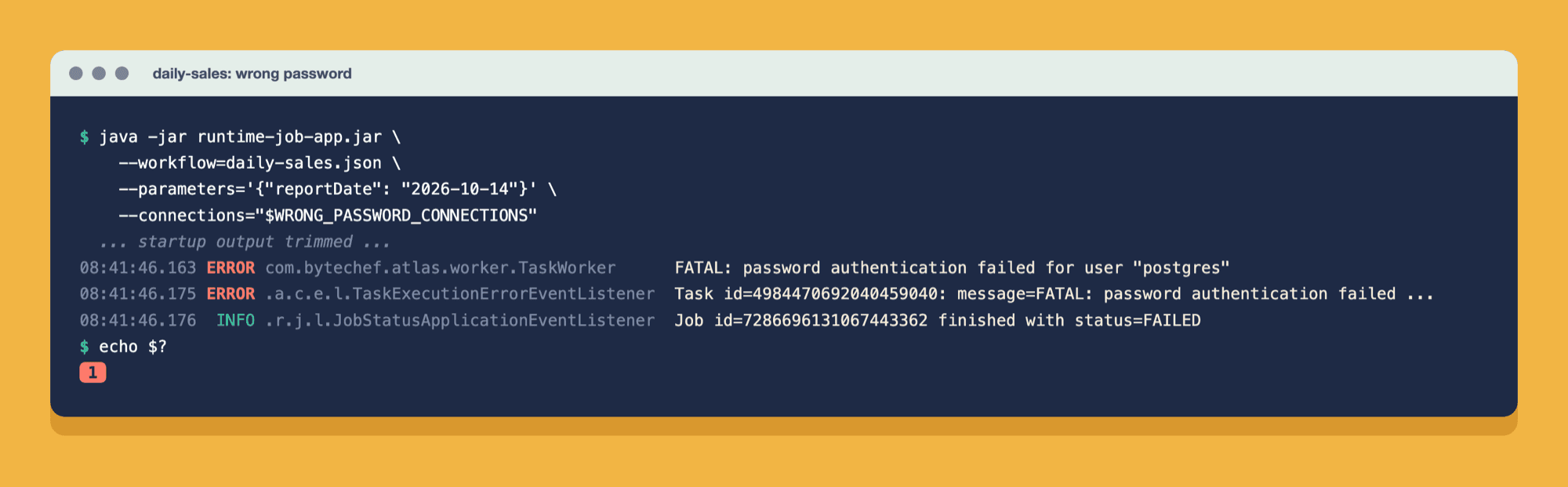
That's all a scheduler needs. A Kubernetes Job retries per its backoffLimit. Airflow marks the task failed. A CI step goes red. Nobody has to parse a log.
Without --timeout, the app waits for a terminal status forever. A workflow stuck on an unresponsive API means a process (or a pod) that never ends, and nothing retries a process that's merely stuck. With --timeout the app gives up, logs it, and exits 1:
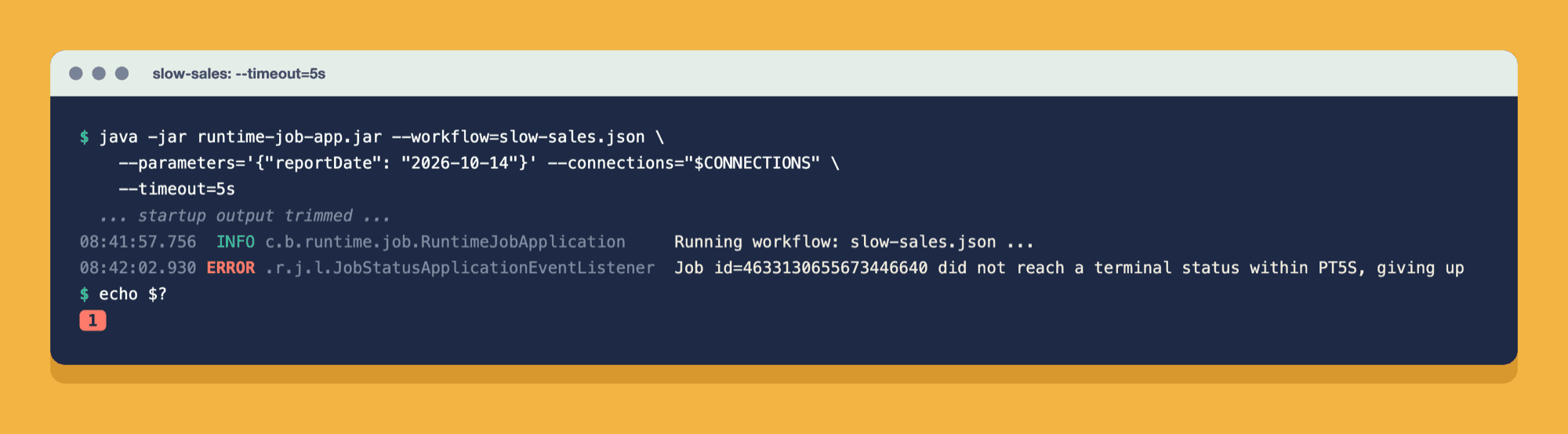
The timeout starts when the job is created, not when the JVM starts, so it measures the run itself. Expect shutdown to take a few extra seconds after the timeout, while the in-flight task is interrupted.
If something outside the app stops it mid-run, the JVM shuts down on SIGTERM and the process exits 143. Stopping a container running a two-minute task took about 5 seconds. Nothing in the log says the job was interrupted, so the exit code is the only signal. Every scheduler treats 143 as a failure, which is the behavior you want: a pod evicted during a node drain fails, and a Job retries it under backoffLimit like any other failure. Because a retry starts from scratch, workflows that write somewhere should be safe to run twice (upserts rather than inserts, or a check for an existing result).
The exit code says whether the workflow succeeded. The workflow's outputs say what it produced. Declare them in the workflow JSON, as on a ByteChef server:
"outputs": [ {
  "name": "orders",
  "value": "${postgresql_1[0].orders}"
}, {
  "name": "revenue",
  "value": "${postgresql_1[0].revenue}"
} ]
When the job completes, the app logs them as one JSON line:
... c.b.runtime.job.RuntimeJobApplication : Job id=7929758770519705850 outputs: {"revenue":1540.50,"orders":2}That's enough for a person reading the log. For a program, pass --outputs-file and read the file instead of parsing log lines:
java -jar runtime-job-app.jar \
    --workflow=daily-sales.json \
    --parameters='{"reportDate": "2026-10-14"}' \
    --connections="$CONNECTIONS" \
    --outputs-file=/tmp/daily-sales.json

jq .revenue /tmp/daily-sales.json   # 1540.50
The file holds only the outputs, as a JSON object (keys in no guaranteed order), so a CI step can read a value with jq and a wrapper can load it directly. Outputs exist only for a completed job. On a failure, a stop or a timeout nothing is evaluated and the file isn't written, so check the exit code before you read it.
Outputs are for small results: counts, ids, a status, a short summary. For anything large, or anything another system has to keep, have the workflow write it where it's used (a table, a bucket, a sheet) or send it (Slack, email, an HTTP call to your API), and return only a pointer to it as an output.
The app ships with a Dockerfile whose entrypoint forwards every argument to the application. Build the JAR, then the image, and push it to your registry:
./gradlew :server:ee:apps:runtime-job-app:bootJar
docker build -t registry.example.com/bytechef-runtime-job:2026-10-16 server/ee/apps/runtime-job-app/
docker push registry.example.com/bytechef-runtime-job:2026-10-16
The repository's release script does the same thing with ./docker-build.sh --runtime-job <tag>.
Then mount your workflows and point the filesystem repository at the mount:
docker run --rm \
  -v "$(pwd)/workflows:/workflows" \
  -e SPRING_PROFILES_ACTIVE=prod \
  -e BYTECHEF_WORKFLOW_REPOSITORY_FILESYSTEM_LOCATION_PATTERN='/workflows/*.json' \
  registry.example.com/bytechef-runtime-job:2026-10-16 \
  --workflow=daily-sales.json \
  --parameters='{"reportDate": "2026-10-14"}' \
  --connections="$CONNECTIONS"

echo $?   # 0
Expect the image to be about 2 GB: roughly 1.2 GB of GraalVM base image plus the 770 MB JAR. That matters most on Kubernetes, where every pod scheduled on a node that hasn't pulled the image yet pays for the download before the run starts. Keep imagePullPolicy: IfNotPresent with an immutable tag (as in the manifest below), or pre-pull the image onto batch nodes, so the pull happens once per node rather than once per run.
The container runs as root, so the default filesystem location inside it is /root/bytechef/data/workflows. Mounting there instead works just as well and needs no environment variable. For JVM options, set JAVA_TOOL_OPTIONS, e.g. -e JAVA_TOOL_OPTIONS=-Xmx2g.
Use the prod profile in containers. A locally built JAR starts with the dev profile active, which logs com.bytechef at DEBUG.
This is where the Runtime Job app fits most naturally: a pod is created, runs one workflow, terminates, and its exit code decides whether Kubernetes retries.
apiVersion: batch/v1
kind: CronJob
metadata:
  name: daily-sales
spec:
  schedule: "15 6 * * *"
  concurrencyPolicy: Forbid
  jobTemplate:
    spec:
      backoffLimit: 2
      template:
        spec:
          restartPolicy: Never
          containers:
            - name: runtime-job
              image: registry.example.com/bytechef-runtime-job:2026-10-16
              imagePullPolicy: IfNotPresent
              command: ["/bin/sh", "-c"]
              args:
                - >-
                  exec java -jar /opt/bytechef/runtime-job/runtime-job-app.jar
                  --workflow=daily-sales.json
                  --parameters="{\"reportDate\": \"$(date -d yesterday +%F)\"}"
                  --connections="$POSTGRES_CONNECTION"
                  --timeout=20m
              env:
                - name: SPRING_PROFILES_ACTIVE
                  value: prod
                - name: BYTECHEF_WORKFLOW_REPOSITORY_FILESYSTEM_LOCATION_PATTERN
                  value: /workflows/*.json
                - name: POSTGRES_CONNECTION
                  valueFrom:
                    secretKeyRef:
                      name: daily-sales-connections
                      key: postgresql.json
              resources:
                requests:
                  cpu: 500m
                  memory: 768Mi
                limits:
                  memory: 1Gi
              volumeMounts:
                - name: workflows
                  mountPath: /workflows
          volumes:
            - name: workflows
              configMap:
                name: daily-sales-workflow
A few deliberate choices in that manifest:
restartPolicy: Never plus backoffLimit. Exit 1 fails the pod and Kubernetes creates a new one, up to the limit. Each attempt is a clean process with no leftover state, which is exactly what you want from a retry.--timeout. backoffLimit only retries pods that fail. A stuck pod isn't failed, so without a timeout it holds the slot forever. (activeDeadlineSeconds is the Kubernetes-side alternative, but it kills the pod, which exits 143 with nothing in the log, instead of letting the app log the timeout and exit 1.)768Mi requested with a 1Gi limit is a reasonable starting point. Workflows that hold large payloads in memory, or run script tasks (which have no heap cap of their own), need more. Measure one real run (kubectl top pod, or docker stats locally) and size from that. A pod over its limit is OOMKilled and exits 137, which a Job retries like any other failure, but always with the same result.imagePullPolicy: IfNotPresent. With an immutable tag, each node downloads the 2 GB image once instead of on every run.reportDate, which YAML can't compute, so the container runs the same java -jar command as the image's entrypoint through sh -c. exec hands the shell's process over to the JVM, so the pod's exit code is still the workflow's. If your workflow takes no dynamic inputs, drop command and pass the flags straight in args.POSTGRES_CONNECTION is read from a Secret into the environment and expanded at run time.kubectl apply, not an image rebuild. For a fixed workflow you can bake it into the image's classpath instead; for many workflows, use the Git repository.The schedule lives in the CronJob; the execution lives in ByteChef. Neither needs to know much about the other.
Because success and failure are just exit codes, a ByteChef workflow drops into CI like any other command. A GitHub Actions example that runs a release-notes workflow on every tag:
name: Release notes
on:
  push:
    tags: ['v*']

jobs:
  notes:
    runs-on: ubuntu-latest
    container:
      image: registry.example.com/bytechef-runtime-job:2026-10-16
    steps:
      - uses: actions/checkout@v4
      - name: Generate and publish release notes
        env:
          SPRING_PROFILES_ACTIVE: prod
          BYTECHEF_WORKFLOW_REPOSITORY_FILESYSTEM_LOCATION_PATTERN: ${{ github.workspace }}/.bytechef/*.json
          OPENAI_CONNECTION: ${{ secrets.BYTECHEF_OPENAI_CONNECTION }}
        run: |
          java -jar /opt/bytechef/runtime-job/runtime-job-app.jar \
            --workflow=release-notes.json \
            --parameters="{\"tag\": \"${GITHUB_REF_NAME}\"}" \
            --connections="$OPENAI_CONNECTION" \
            --timeout=10m
The workflow file lives in the repository it automates, under .bytechef/, and goes through code review like everything else. The same pattern works in GitLab CI, Jenkins, or an Airflow KubernetesPodOperator. Anything that can run a container and read an exit code can run a ByteChef workflow.
The app is a standard Spring Boot binary, so every property binds from an environment variable. The ones that matter for one-shot runs:
| Environment variable | Default | Purpose |
|---|---|---|
SPRING_PROFILES_ACTIVE | dev in development builds | Use prod for INFO logging. |
BYTECHEF_WORKFLOW_REPOSITORY_FILESYSTEM_LOCATION_PATTERN | ${user.home}/bytechef/data/workflows/*.{json|yml|yaml} | Where to find workflow files. |
BYTECHEF_WORKFLOW_REPOSITORY_GIT_ENABLED (and _URL, _BRANCH, _SEARCH_PATHS, _USERNAME, _PASSWORD) | false | Load workflows from Git. |
BYTECHEF_FILE_STORAGE_PROVIDER | filesystem | Where file entries (large outputs, file properties) live during the run. |
BYTECHEF_FILE_STORAGE_FILESYSTEM_BASEDIR | ${user.home}/bytechef/data/file-storage | Base directory for the filesystem provider. |
BYTECHEF_ENCRYPTION_PROVIDER | filesystem | Set to property with BYTECHEF_ENCRYPTION_PROPERTY_KEY so no generated key is written to an ephemeral disk. |
BYTECHEF_WORKER_TASK_SUBSCRIPTIONS_DEFAULT | 10 | Concurrent task executions within the run. |
JAVA_TOOL_OPTIONS | (none) | JVM flags, e.g. -Xmx2g. |
OTLP export of metrics, traces and logs ships with the app but is off by default. Turn each one on with BYTECHEF_OBSERVABILITY_METRICS_ENABLED, BYTECHEF_OBSERVABILITY_TRACING_ENABLED and BYTECHEF_OBSERVABILITY_LOGGING_ENABLED, and point the matching ..._ENDPOINT at your collector. In practice a run is often over before a scrape interval elapses, so traces are the most useful of the three.
The app compiles in a curated set of about a hundred components: the HTTP client, script and Bash, the helpers (text, date, math, object, XML, random), file formats (CSV, JSON, XML, XLSX, ODS), PostgreSQL and MySQL, the major LLM providers (OpenAI, Anthropic, Gemini, Mistral, Azure OpenAI, Amazon Bedrock, Groq, DeepSeek, Ollama and more), Claude Code, the core Google Workspace and Microsoft 365 components (Sheets, Drive, Gmail, Calendar, Excel, Outlook, Teams, SharePoint, OneDrive), and widely used SaaS connectors such as Slack, GitHub, Jira, HubSpot and Shopify. It also includes the control-flow dispatchers branch, condition, each, loop, map, parallel, fork-join, subflow and approval. It's a subset of the full catalog, so check the app's build.gradle.kts before you depend on a specific component.
Deliberately left out, because a one-shot process has no use for them:
| Symptom | Cause and fix |
|---|---|
Workflow name is required | --workflow is missing. |
Workflow with id: <base64> does not exist | No repository indexed a file with that name. Check the file is really in the configured location (in a container: that the volume is mounted), that its extension matches the pattern, and remember the directory part of --workflow is ignored. |
Unknown value for : <property> | The workflow JSON is missing a property the action requires. Re-export it from the editor. |
| A task fails with an authentication error | The connection key doesn't match the task or component name, or its property names don't match the component's connection form. Also check the "Which connections work today" note above. |
| The process never exits | The job never reached a terminal status. Add --timeout. |
Exit 143 with no error in the log | The process was sent SIGTERM: an eviction, a drain, activeDeadlineSeconds or a manual stop. Check the pod's events. |
Exit 137, pod status OOMKilled | The memory limit is too low for this workflow. Raise it, and -Xmx with it if you set one. |
--outputs-file was not written | The job didn't complete: outputs exist only for COMPLETED. Check the exit code and the log for the failure. |
| Too much log output | You're on the dev profile. Set SPRING_PROFILES_ACTIVE=prod. |
For one noisy run, raise the log level without touching the image: --logging.level.com.bytechef=DEBUG.
| You need | Use |
|---|---|
| Triggers, webhooks, polling, a UI, run history | The ByteChef server |
| Always-on or high-frequency processing | The ByteChef server |
| RBAC, governance, a central credential store | The ByteChef server |
| A nightly batch, a CI step, an externally scheduled run | The Runtime Job app |
| A run that leaves no infrastructure behind | The Runtime Job app |
| The schedule already lives in Kubernetes, Airflow or GitHub Actions | The Runtime Job app |
They aren't competitors. A common setup is a ByteChef server where people build and test workflows, plus a set of CronJobs that run the exported, reviewed versions of the batch ones in production. The same JSON runs unchanged in both.
The Runtime Job app takes the part of ByteChef that does the work, the Atlas engine and its components, and lets you run it like any other command-line tool: inputs in, side effects out, exit code at the end. No database to migrate, no broker to keep alive, no server to patch. If your organization already has a place where scheduled work lives, this is how ByteChef workflows can live there too.
The Runtime Job Runner documentation has the full reference. To see how it fits with the other deployment options, read the self-hosted architecture overview.