7 min read
Ivica Čardić

TL;DR: The Ask User Question Tool lets a ByteChef AI Agent stop and ask the user one to four multiple-choice questions before it acts. In a deployed chat, the workflow pauses for up to 30 days and continues when the answers arrive. It's built on the
AskUserQuestionToolfrom Spring AI's agent utils toolkit. To try it, import the Plan a team offsite with an agent that asks before it plans template.
There's a failure mode every agent builder knows. You give the agent a task, "plan our team offsite", and it runs. It picks a city. It picks a budget. It picks a week half the team is on holiday. Now you're not reviewing a plan. You're undoing one.
The Spring AI team described this well in their AskUserQuestionTool post: "you provide a prompt, the AI makes assumptions, and produces a response… Each assumption creates rework." Their fix is a tool that changes the default. The agent asks first, and acts only once it has real answers.
ByteChef is built on Spring AI, so it runs the same tool. In Part 1 we gave agents know-how with skills. In this part we teach them to ask.
The Plan a team offsite with an agent that asks before it plans template has three steps:
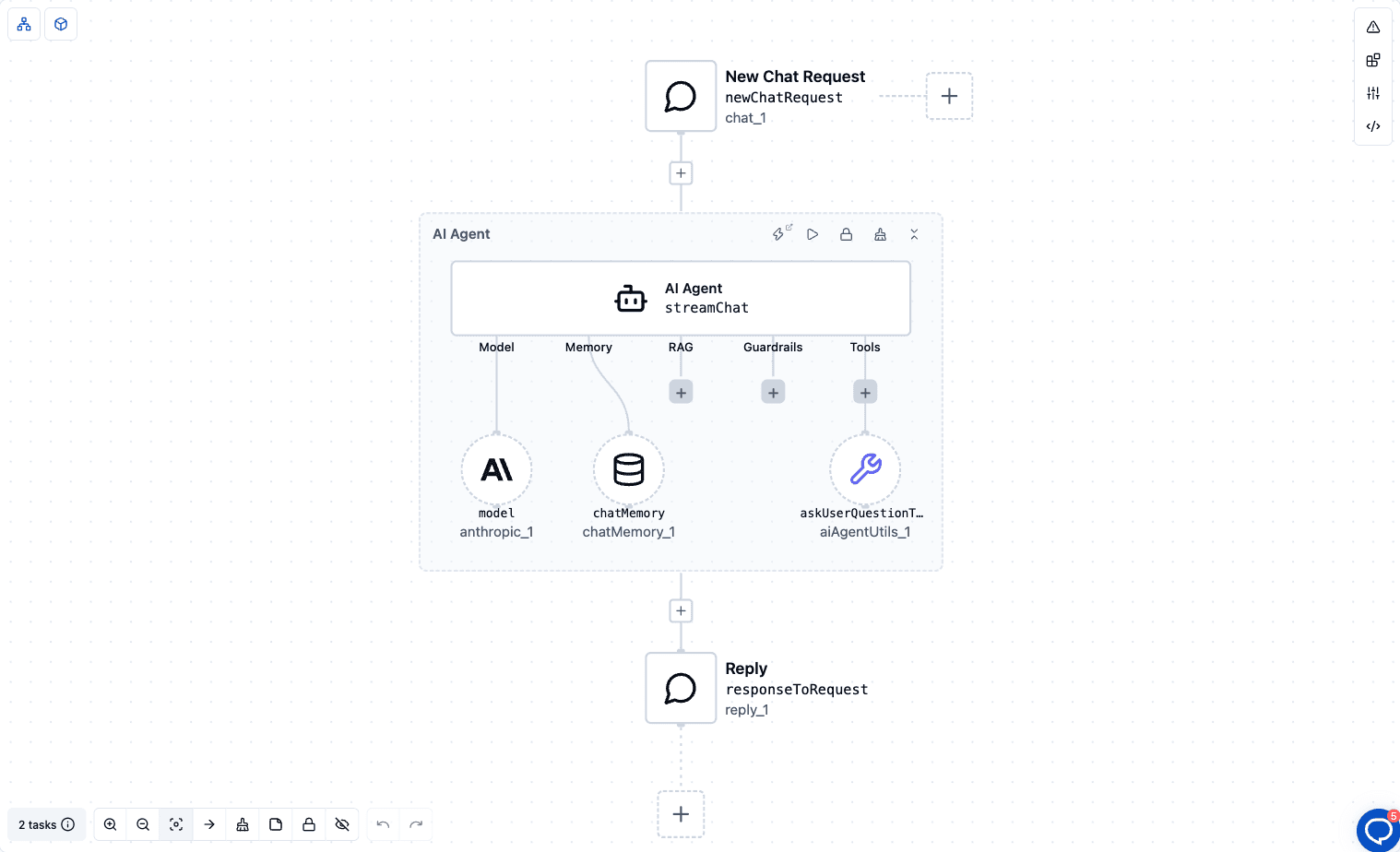
The system prompt does the real work:
You plan team events. Never guess requirements. Before you plan anything, call the AskUserQuestionTool once with three or four multiple-choice questions covering budget, dates, team size and location. Offer 3 or 4 concrete options per question. After the answers arrive, produce a one-page plan.
Two rules matter here. "Never guess requirements" tells the agent that asking is expected, not a failure. "Call the tool once" stops it from asking one question at a time and dragging the conversation out.
The tool comes from the spring-ai-agent-utils toolkit. The model sees it as a tool named AskUserQuestionTool, the name the prompt uses. It takes one to four questions, and each question has:
For the offsite planner, a call might carry a "Budget" question with options like "Under $5k" and "$5k to $15k", and a "Dates" question with a few candidate weeks. The model writes these itself, from the user's request and your system prompt.
In Spring AI you'd also write a question handler: the code that shows the questions and collects the answers. On a console it reads a line from the keyboard. In a real product, the user may answer in ten seconds or tomorrow, from another device. That gap is what ByteChef fills.
When the agent calls the tool, ByteChef sends the questions to the chat as an ask_user_question event. The chat shows each question with its header and a numbered list of options. You answer by typing in the chat, so you can pick an option or write your own answer.
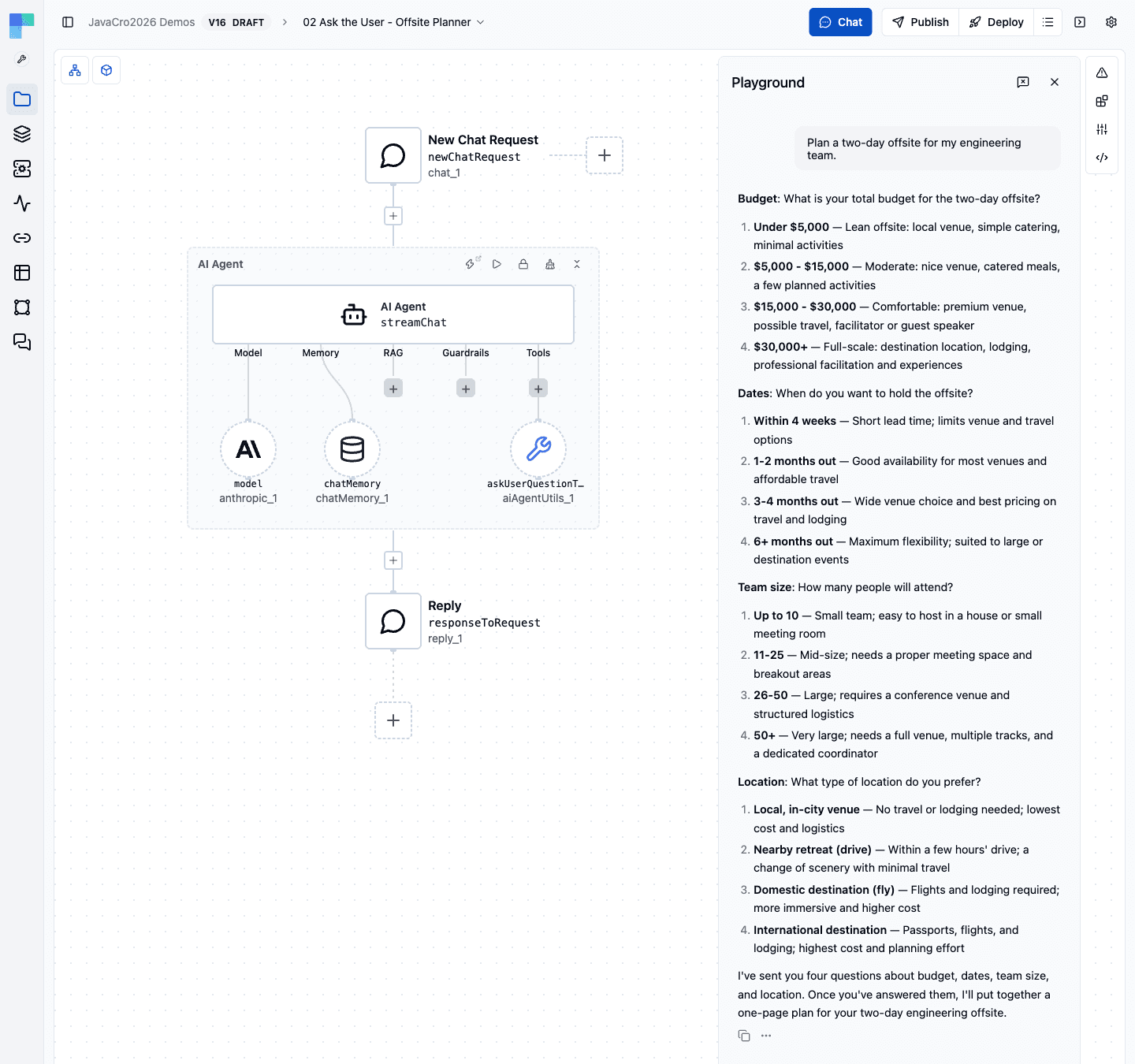
This is a real test run of the template. Asked to plan a two-day offsite, the agent sent four questions instead of a plan.
What happens next depends on where the chat runs.
In a deployed workflow, the questions come with a resume URL, and the workflow suspends. It isn't holding a thread while it waits. The run is saved, and it can wait for up to 30 days. When you send your answer, the chat posts it to the resume URL. The AI Agent picks up exactly where it stopped, with your answers as the tool's result, and streams the plan back.
In the editor's test chat, a test run can't be resumed through a resume URL. The questions still show, but the agent is told to end its turn and read the answers from your next message. Because the template has Chat Memory, the agent still sees its own questions when your answer arrives, so the conversation works the same way.
This suspend and resume protocol is the same one behind ByteChef's Approval component. A workflow that waits for a person to approve and one that waits for a person to answer are the same problem: a run that has to stop, wait for days, survive a restart, and continue on an outside signal.
Two limits are worth knowing:
The template needs only an Anthropic connection.
Thanks to Chat Memory, you can ask for changes afterwards, such as "move it to September", without starting over.
It's tempting to treat clarifying questions as polite extras. For agents they're closer to a correctness tool:
The Spring AI post ends where a library ends: here's the tool, write a handler. ByteChef supplies the rest:
The question format, the library and the model portability are the same. The template uses Claude, but the tool works with any model provider ByteChef supports.
The most useful agent behaviors are often the plain ones. "Ask before you assume" isn't flashy, but it's the difference between an agent whose work you undo and one whose work you can trust.
Try it now. Import the Plan a team offsite with an agent that asks before it plans template, add your Anthropic connection, and ask it to plan your next offsite. Then add the Ask User Question Tool to your own agents wherever a guess would be expensive.
Get the latest guides on complex automation, AI agents, and visual workflow best practices delivered to your inbox.