7 min read
Ivica Čardić

TL;DR: Give an agent a job with ten steps and it may quietly skip one. The Todo Write Tool fixes that: the agent writes a checklist first, keeps exactly one task in progress, and updates the list after every step. ByteChef runs the same
TodoWriteToolthat the Spring AI team describes in their agentic patterns series, as one tool you add to an AI Agent. To see it, import the Spring Boot 4 migration planner template and ask for a migration plan.
Here's a failure you've probably seen. You give an agent a real job: "audit these ten endpoints, fix the auth bug in each, run the tests, and write up what changed." It starts well. It fixes six endpoints, runs some tests, writes a summary, and never touches the last four. No crash, no error. It just lost track.
This is a known property of language models. As the context grows, they pay less attention to what sits in the middle of it. The Spring AI team's TodoWrite post names the problem and borrows the fix from Claude Code: instead of keeping the plan in its head, the agent writes it down as a checklist and keeps it current.
In Part 1 we gave agents know-how with skills. This part gives them a plan.
The Spring Boot 4 migration planner template is three steps:
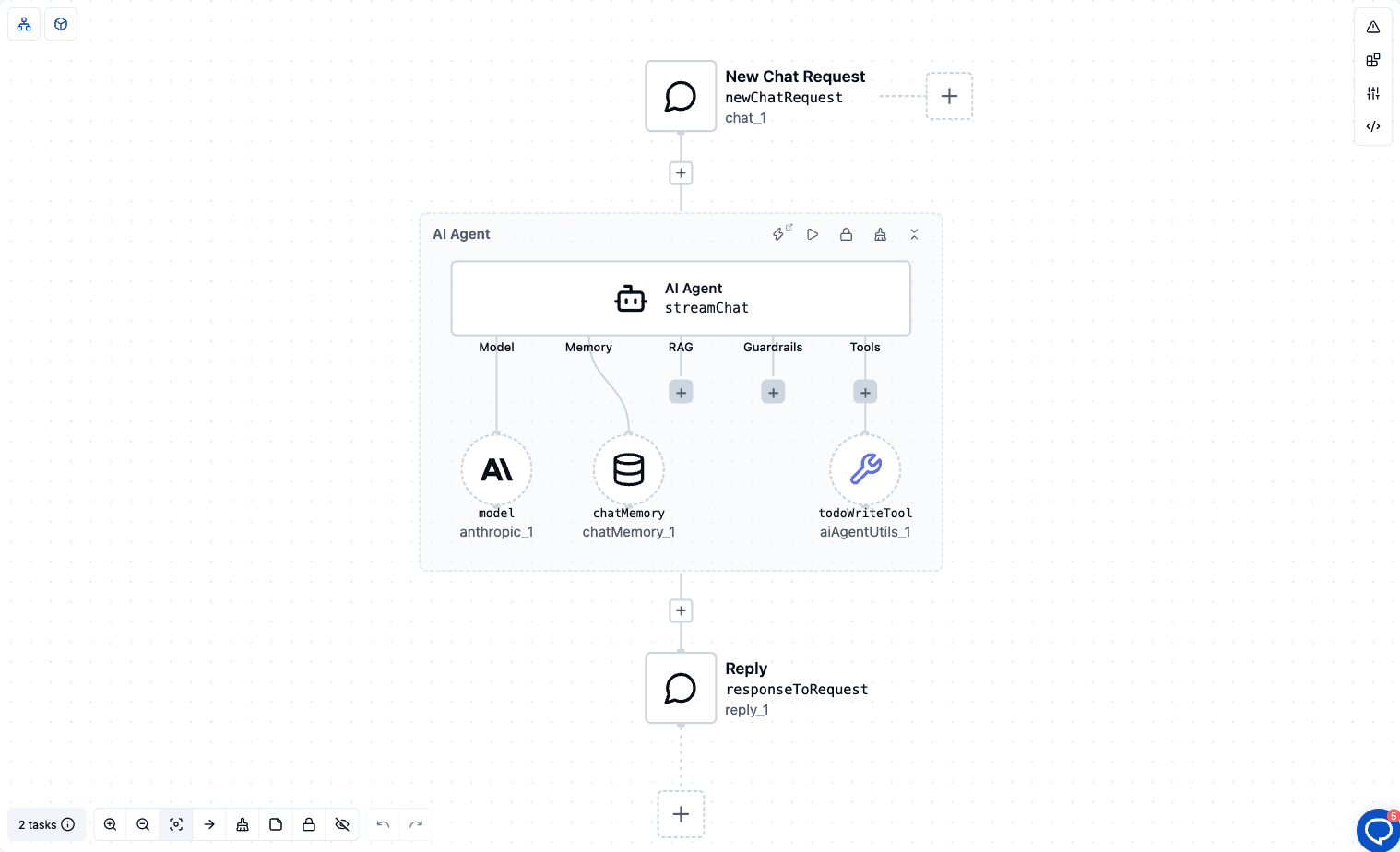
The system prompt does the rest:
You are a senior Java engineer. For any request with 3 or more distinct steps, first create a todo list with the TodoWrite tool. Keep exactly one task in_progress at a time, mark each task completed as soon as it is done, and update the list after every step. Finish with a short summary.
Spring Boot 4 migrations are a good test. They have many small steps (Java version, dependency updates, Jakarta changes, configuration properties, tests), and skipping one is easy.
The Todo Write Tool comes from the spring-ai-agent-utils library. The model sees it as a tool called TodoWrite. Each call sends the whole list, and each item has three fields:
pending, in_progress or completedTasks move from pending to in_progress to completed. The key rule is that only one task can be in_progress at a time. The tool checks this and rejects a list with two tasks in progress, with a message to finish the current task first. That one rule pushes the agent to work in order instead of starting everything at once.
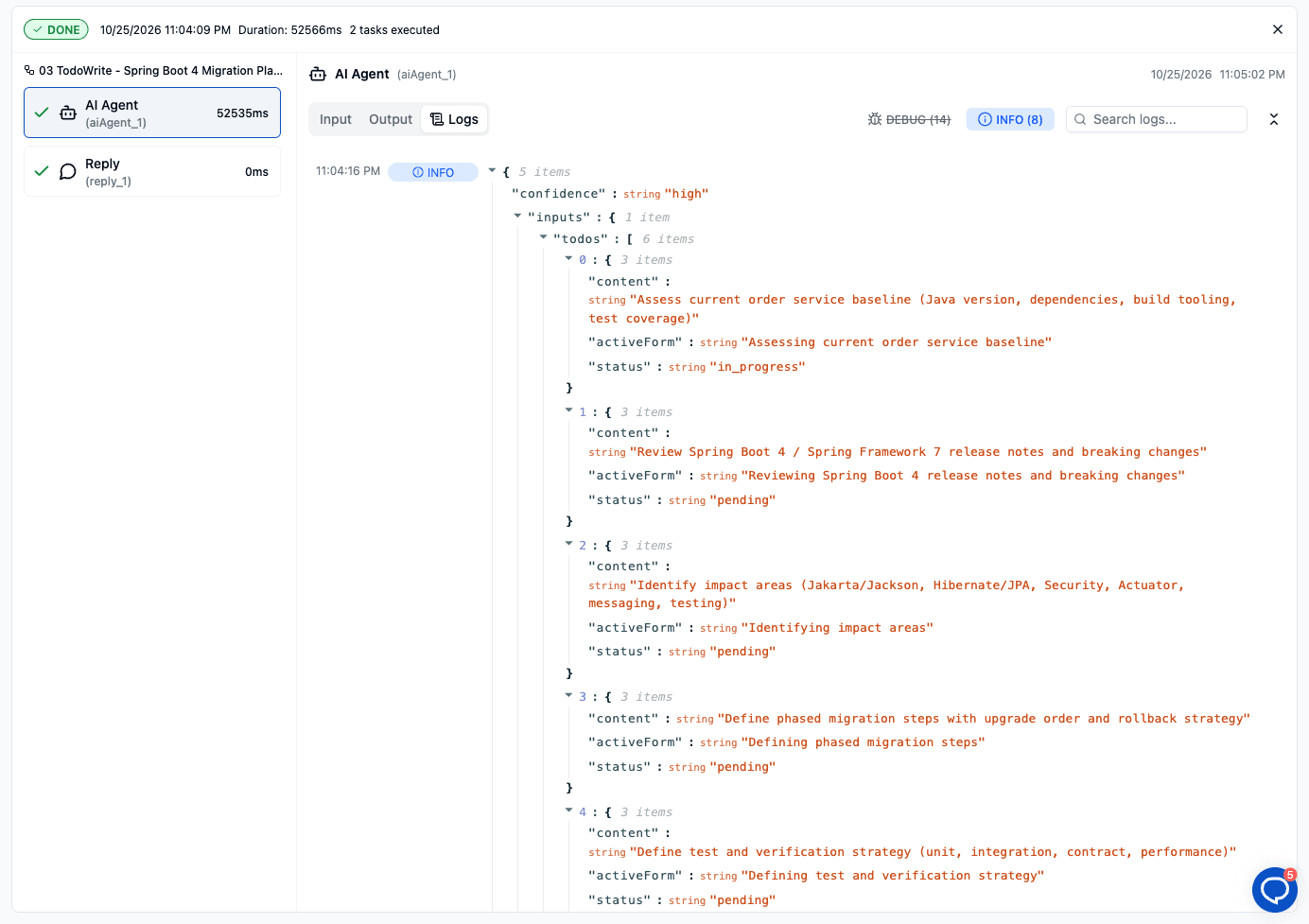
This is the first TodoWrite call from a real test run, shown in the AI Agent's Logs tab. Asked to plan the migration, the agent wrote its task list first, with exactly one task in progress.
The tool's description also tells the model when to use it: for tasks with three or more distinct steps, and not for single, simple requests. So the agent decides for itself when a job needs a plan. The template's system prompt repeats the rule to make it reliable.
A task should only be marked completed when it's fully done. The tool's instructions say to keep a task in progress if tests fail or the work is partial, and to add a new task for whatever is blocking it.
A checklist only helps if the agent keeps reading it. That's the real trick.
Each TodoWrite call carries the full, current list in its arguments. Inside one agent run, ByteChef's AI Agent keeps every tool call and tool result in the conversation while the tool-calling loop runs. So every time the model decides its next step, the latest list is right there: three tasks done, one in progress, six pending. The plan can't drift out of attention, because it's written again with every update.
The Spring AI post spends a lot of time on configuration: MessageChatMemoryAdvisor and ToolCallAdvisor with the right settings, so the todo updates reach the model. In ByteChef you don't configure any of that. The AI Agent builds its tool-calling loop for you, and the Todo Write Tool is a single element you add to it:
TodoWriteTool todoWriteTool = TodoWriteTool.builder()
    .build();

return ToolCallbackProvider.from(ToolCallbacks.from(todoWriteTool));
That's the whole ByteChef wrapper. The library does the work; the AI Agent provides the loop it needs.
The template also adds a Chat Memory element, keyed on the chat's conversation ID, so you can ask follow-up questions about the plan in the same chat.
The template needs only an Anthropic connection:
Before it answers, the agent should call TodoWrite with a plan. The exact tasks depend on the model and your request. A plan for this request might look like this:
[ ] Upgrade the service to a supported Java version
[ ] Update the Spring Boot version and the dependency BOM
[ ] Fix renamed and removed configuration properties
[ ] Update tests and run the build
[ ] Summarize the changes
Then it works through the list one task at a time, calling TodoWrite again after each step, and ends with the short summary the system prompt asks for.
To watch the list change, use the Agent Playbook in the editor. Its tool-call cards show each TodoWrite call with the list it sent. If the agent skips the list for a big job, make the request more explicit about its steps, or tighten the system prompt.
The Todo Write Tool looks almost too simple to matter. On long tasks it's one of the most useful tools you can add:
It also pairs well with the other tools in AI Agent Utils, the component that holds the Todo Write Tool. File System Tools, Shell Tools, Grep Tool and Glob Tool give an agent hands. The todo list gives it a plan to use them on.
ByteChef runs the same TodoWriteTool, so you get the same three statuses, the same one-in-progress rule and the same three-step trigger.
What changes is the setup:
ChatClient in code. In ByteChef, it's the Todo Write Tool element on an AI Agent.The tools that make agents reliable are rarely the flashy ones. The Todo Write Tool is a checklist, but one the agent writes itself and sees again at every step. That's exactly what a long task needs.
Have an agent that drops steps on long jobs? Import the Spring Boot 4 migration planner, add your Anthropic connection, and give it a ten-step job.
Get the latest guides on complex automation, AI agents, and visual workflow best practices delivered to your inbox.