5 min read
Ivica Čardić
TL;DR: Not everything needs a workflow. The ComponentKit lets your app call any connector action directly on a connected user's account:
POST /api/embedded/v1/{externalUserId}/components/{component}/versions/{version}/actions/{action}with an{ input }body runs, say,slack/sendChannelMessageoropenai/askwith the user's stored credentials and returns the result. The embedded sample app's ComponentKit Playground is a form over that one endpoint. This is part two of the series.
In part one your users connected their apps. An embedded platform is more than a workflow engine, though. It is also a pre-authenticated API client for 280+ services, and sometimes you want that directly. Your app needs to post one Slack message, enrich one contact, or run one OpenAI completion, as your customer, without authoring or running a workflow for it. That's the ComponentKit.
The page is a form with four fields and a result panel. Pick a component, a version, an action, and a JSON input, and it posts them to the app's own API route:
export default function ComponentKitPage() {
  const [componentName, setComponentName] = useState("openai");
  const [componentVersion, setComponentVersion] = useState(1);
  const [actionName, setActionName] = useState("ask");
  const [inputJson, setInputJson] = useState(JSON.stringify(input, null, 2));
  const [result, setResult] = useState<string | null>(null);

  const handleSubmit = async (event: React.FormEvent) => {
    event.preventDefault();

    const response = await fetch("/api/component-kit", {
      method: "POST",
      headers: { "Content-Type": "application/json" },
      body: JSON.stringify({ actionName, componentName, componentVersion, input: JSON.parse(inputJson) }),
    });

    setResult(JSON.stringify(await response.json(), null, 2));
  };

  // ...a Card with the four inputs, and a Card that renders `result` in a <pre>
}
The defaults are openai / version 1 / ask, and the input textarea is pre-filled with a chat request:
{
  "model": "gpt-4o",
  "format": "ADVANCED",
  "messages": [{ "role": "USER", "content": "Say hello" }],
  "response": { "responseFormat": "TEXT" }
}
Click Execute Action and the response lands in the right-hand card, as JSON. Errors from ByteChef land there too, so a wrong action name or a missing required input shows you exactly what the server complained about.
Here it is pointed at Gmail instead of OpenAI. Component googleMail, version 1, action searchEmail, and an input that only sets subject and maxResults. The search ran in the demo user's own mailbox and came back empty:
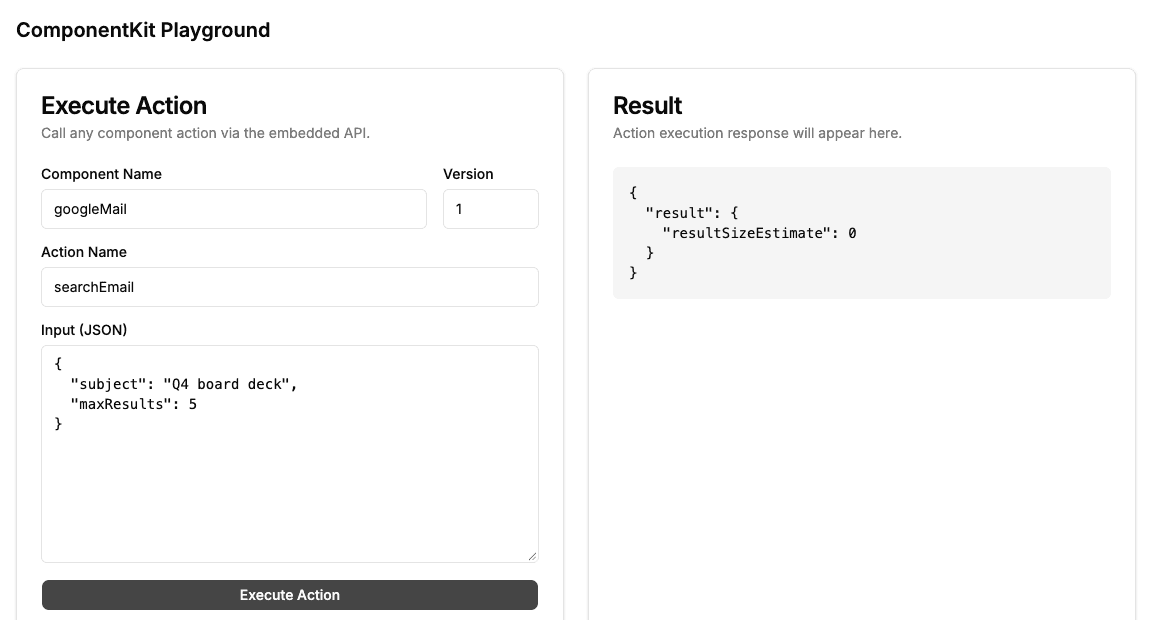
The three identifiers are the same ones a workflow definition uses. A Gmail step in a workflow has "type": "googleMail/v1/searchEmail", which is component, version, and action in one string. Note that the component name is the connector's key, not its display name: googleMail, not gmail. If you're unsure, add the action to any workflow in the ByteChef editor and open the Workflow Code Editor from the right sidebar to read its type.
The input object takes the action's property names as keys, and optional ones can be left out. The call above sets just two of Search Email's properties.
The route adds the connected user's JWT and forwards the call to the ComponentKit endpoint:
const response = await fetch(
  `${BYTECHEF_APP_BASE_URL}/api/embedded/v1/${BYTECHEF_EXTERNAL_USER_ID}/components/${componentName}/versions/${componentVersion}/actions/${actionName}`,
  {
    method: "POST",
    headers: { Authorization: `Bearer ${jwtToken}`, "Content-Type": "application/json", "X-Environment": BYTECHEF_ENVIRONMENT },
    body: JSON.stringify({ input }),
  }
);
ByteChef finds the integration this user connected for that component, takes the connection behind it, and runs the action with those credentials. The response comes back as-is. No workflow, no trigger, no execution history, just a synchronous "do this thing in their account."
The shape is universal. Swap in slack / sendChannelMessage, googleSheets / insertRow, or hubspot / createContact and nothing else changes. The action's input schema is the same one the workflow editor uses, so if you know what a field looks like in a workflow, you know what to put in input.
If a user has connected the same app more than once, pass the X-Instance-Id header to say which integration instance you mean. Without it, ByteChef picks the user's instance for that component.
The ComponentKit turns ByteChef Embedded from "a workflow feature" into "an integration layer for your whole product." Anywhere in your app where you'd otherwise hand-roll an API client, with OAuth, token refresh, request signing, and response parsing, times 280 services, you make one call instead:
Because it rides the same connection and JWT as everything else in this series, it's automatically scoped, authenticated, and refreshed. You send one POST; ByteChef is the API client you didn't write.
For one POST:
On top of the setup from part one:
.env.local. The ComponentKit only reaches components the user has an integration for, so publish the integration and enable its instance configuration in ByteChef before connecting.slack / 1 / sendChannelMessage, and give it a channel and text. Same page, same route, different account.The ComponentKit is your app calling one action at a time. Hand those same actions to a model and it can pick which one to call, fill in the input, and read the result. That's part three: the ComponentKit Chat.
Following along? Connect an integration, open the ComponentKit Playground, and execute one action on a connected account. It's the simplest possible embedded integration.
Get the latest guides on complex automation, AI agents, and visual workflow best practices delivered to your inbox.