ByteChef Embedded, Part 4: The App Event Playground
On this page
TL;DR: In part two and part three your app called into connected apps, one action at a time or through an AI assistant. App Events are the opposite direction: your product emits an event and ByteChef triggers your customers' workflows from it.
POST /api/embedded/v1/app-eventswith a free-form JSON body fans that payload out to every enabled workflow's app-event trigger for the current connected user. It's how "something happened in my SaaS" becomes "run the automations my customer built around it." This is part four of the series.
Half of embedded automation is your customers reacting to external apps (a new row in their Google Sheet). The other half, the half that makes your product the center of their automations, is reacting to events in your app. When a user upgrades their plan, closes a deal, or gets a new signup in your product, they'll want to automate what happens next. App Events are the inbound trigger that makes your product a first-class event source.
Step 1: Define the Event
Before your product can emit anything, ByteChef needs to know what the event looks like. Open Embedded → App Events and click New App Event. The dialog asks for two things:
- Name - how the event shows up when someone picks it in a workflow. A dotted name like
user.signed_uporsubscription.upgradedreads well and groups naturally. - Schema - a sample JSON body, exactly as your backend will send it. ByteChef reads the properties off it, and those become the variables workflows can map from.
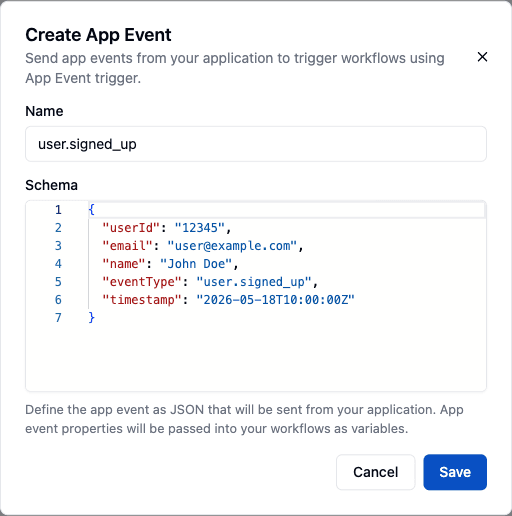
Save it and the event appears in the App Events list. Define one event per thing that happens in your product; keep the schema close to the real payload, because that's what workflow builders will see when they map fields.
Step 2: Add the App Event Trigger
Now build a workflow that listens for it. Open an integration's workflow in the editor, and for the trigger pick the App Event component with the New Event trigger. On the trigger's Properties tab, choose your event from the App Event Id dropdown.
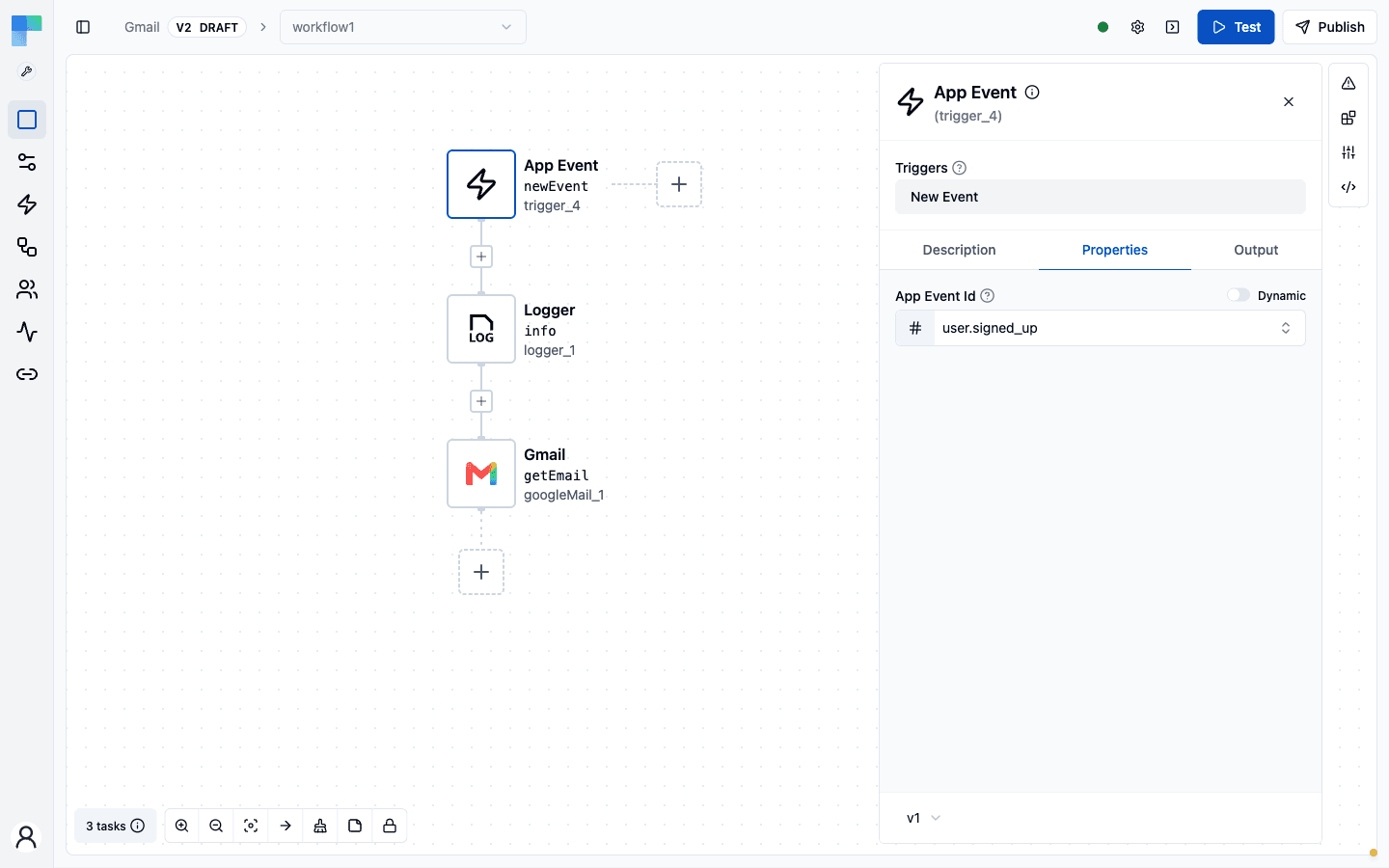
From there it's a normal workflow. Every property from the event's schema is available to the steps below the trigger, so a Logger, a Gmail action, or a CRM update can reference email, userId, or whatever your event carries. Publish the workflow, and once a connected user has the integration enabled, their copy of it is listening.
Three switches have to be on before an event reaches a workflow, and a missing one fails silently:
- The integration version is published.
- Its instance configuration under Embedded → Integration Configurations is enabled, with this workflow enabled in it.
- The connected user has connected the integration and enabled the workflow, which they do in the ConnectDialog.
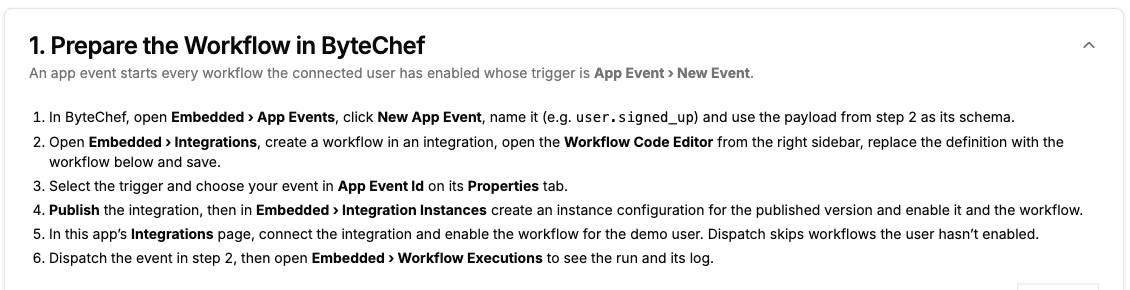
The sample app's App Event Playground prints this checklist at the top of the page, along with a ready-made workflow definition (an App Event trigger feeding a Logger) you can paste into the Workflow Code Editor instead of building it by hand:
Step 3: Emit the Event
The playground is a single POST with a free-form body:
// POST /api/embedded/v1/app-events   (bearer JWT)
await fetch('/api/app-events', { method: 'POST', body: JSON.stringify(eventPayload) });
On the ByteChef side, that call iterates every enabled integration the current user has, finds each workflow with an app-event trigger, and forwards your body as the event payload. One emit, fanned out to all the automations listening for it. The body shape is yours. It should match the JSON schema you defined for the event, so the workflows can map fields off it.
In the playground, paste a payload and click Dispatch App Events:
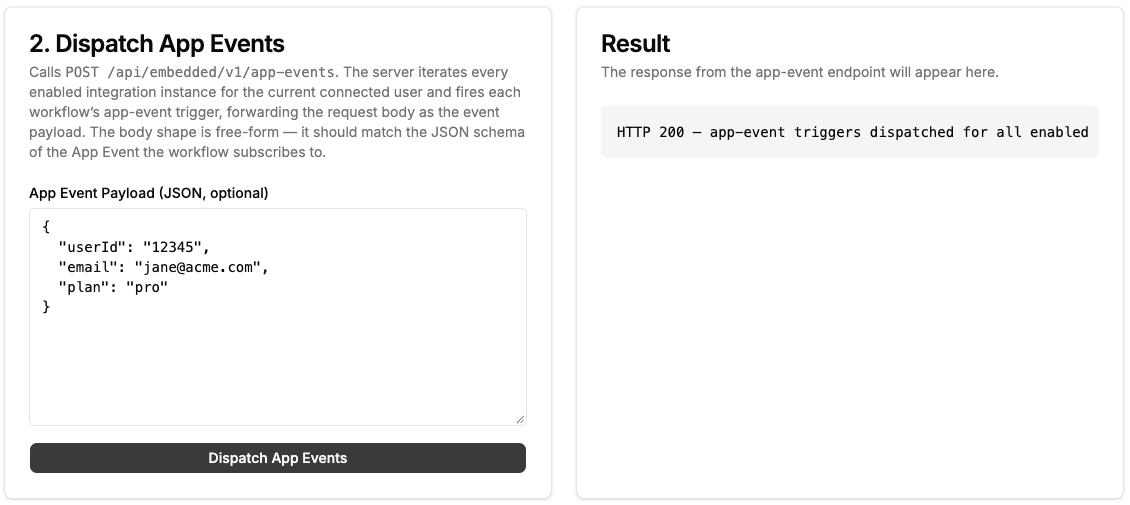
Note what the 200 means: the event was accepted and fanned out. It does not mean any workflow ran. The screenshot above came from a demo user whose only enabled integration has no app-event workflow, and the response is the same 200. Dispatch is fire-and-forget, so to confirm a run, check the executions page described next.
Put that in your product's backend, and every meaningful thing that happens becomes a potential automation trigger for your customers: subscription.upgraded, lead.created, ticket.resolved. You emit once; ByteChef routes it to whoever built a workflow around it.
See Every Run
Each workflow an event starts is a normal workflow execution, so it shows up on the Workflow Executions page under Embedded in ByteChef. You can filter by integration, workflow, status, and date range, and open any run to see the trigger payload your product sent and what each step did with it. When a customer asks "why didn't my automation fire?", that's where you look.
Why This Closes the Loop
Together, the ComponentKit and App Events make your product a full node in your customers' automation graph. Data flows both ways:
- App Events (in): your product's events start their workflows.
- ComponentKit (out): your app, or an AI assistant inside it, acts on connected services.
That bidirectionality is what turns "we have some integrations" into "our product is the hub." An event in your product can trigger a workflow that updates your customer's CRM, posts to their Slack, or calls back into your own API. ByteChef is the router in the middle, and App Events are your product's on-ramp to it.
What You Didn't Build
For one POST:
- An event ingestion endpoint that authenticates and scopes to a connected user.
- Fan-out routing to every matching workflow trigger across all the user's integrations.
- Payload delivery into the execution engine as trigger input.
- Execution history for every run the event started, on the Workflow Executions page.
No event bus, no subscription registry, no per-workflow dispatch. You emit; ByteChef routes.
What's Next
App Events start workflows implicitly: whoever's listening runs. Sometimes you want to invoke a specific workflow directly and get its result back. That's the next part, the Request Playground, where a workflow behaves like a synchronous API endpoint.
Following along? POST an event body to /app-events from your product's backend - every workflow your customers built around that event fires.
Subscribe to the ByteChef Newsletter
Get the latest guides on complex automation, AI agents, and visual workflow best practices delivered to your inbox.