10 min read
Ivica Čardić
TL;DR: In part three, your own route fetched the user's tools from ByteChef and adapted each one to the AI SDK. The MCP Chat lets a standard do that work: its backend route (
/api/chat-mcp) opens an MCP client to ByteChef's embedded MCP server over streamable HTTP, callsmcpClient.tools()to discover the connected user's tools, and hands them straight to the model. It's the same Model Context Protocol that Claude and Cursor speak, consumed inside your own chat. This is part six of the series.
The ComponentKit Chat gave an assistant real tools, but your route had to know ByteChef's tools API: fetch the list, parse each schema, wrap it with tool(), and POST every call back for execution. The MCP Chat gets the same kind of toolbox through a protocol instead, so discovery and execution are standardized rather than hand-written per app.
Before the chat can discover anything, ByteChef needs an MCP server that says which tools to expose. You build it once, as the vendor, and every connected user gets their own scoped view of it.
An embedded MCP server only offers components that one of your published integrations uses. If you followed part one, you already have one. Here it's a Gmail integration, and that's what makes Gmail show up in the steps below.
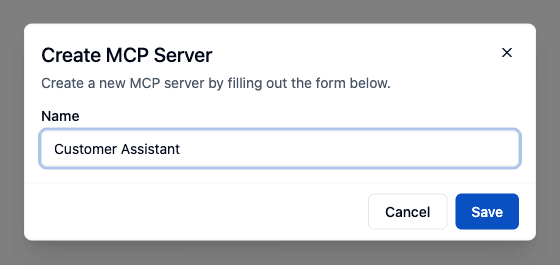
Open Embedded → MCP Servers and click New MCP Server. The only thing it asks for is a name. Pick one that describes what the assistant is for, since you can run several servers with different toolboxes side by side.
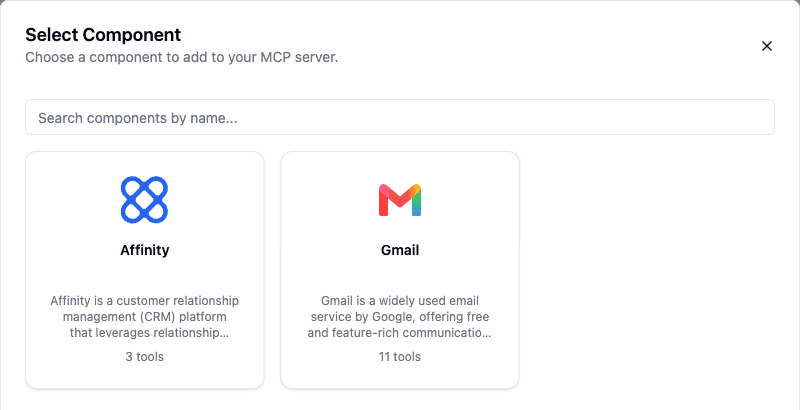
Expand the new server and, on its Component Tools tab, click Add Component. The picker lists the components behind your published integrations, with a count of the tools each one offers.
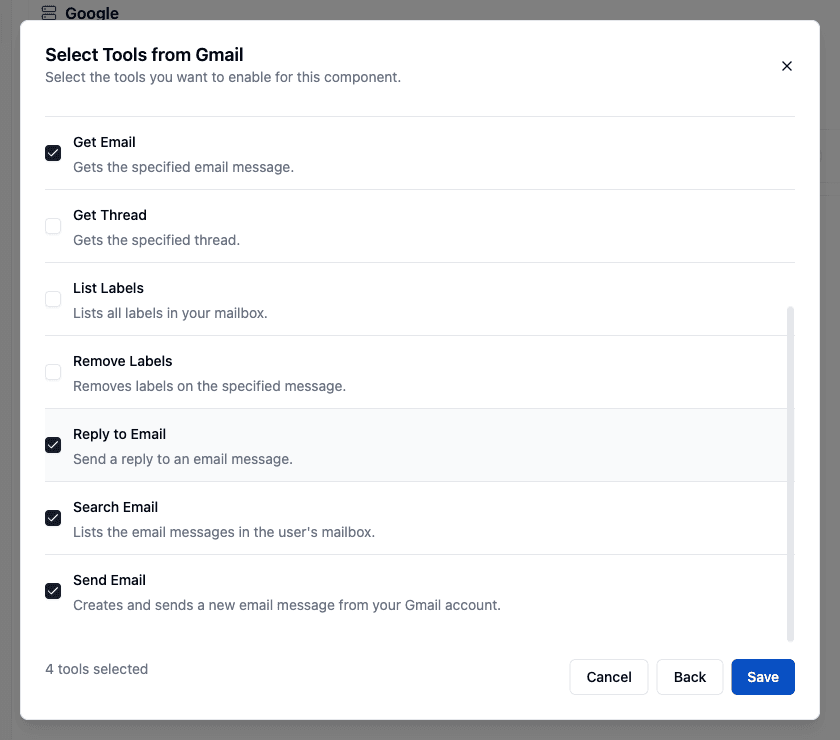
Choose one and you get its full list of actions. Tick only the ones you want a model to have. Gmail has eleven, including Delete Email, so this is where you decide that the assistant can search and read mail without being able to delete it.
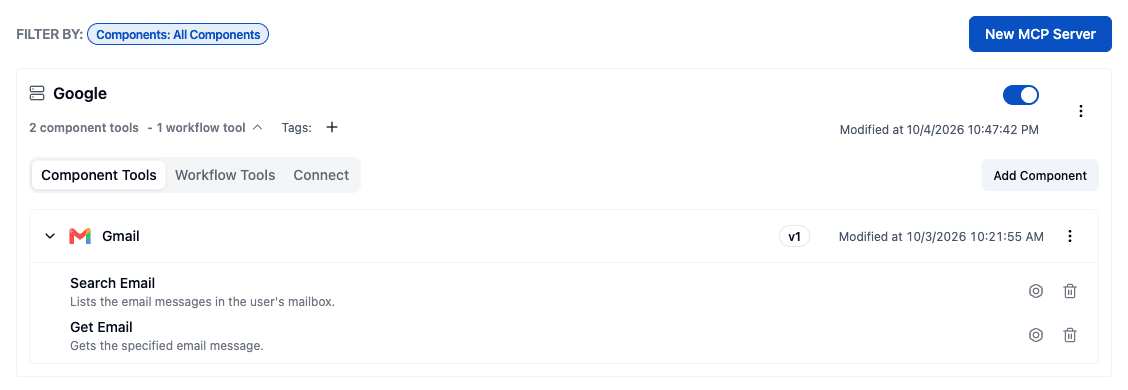
Save, and the component appears on the server with the tools you picked. The gear icon (Configure) next to each tool lets you rename it, rewrite the description the model reads, and pin any input to a fixed value. Inputs you leave alone stay Automatically defined by the model. Pinning Max Results on Search Email, for example, keeps the model from pulling a whole mailbox in one call.
A single action isn't always enough. On the Workflow Tools tab, Add Workflows lets you expose a whole integration workflow as one tool. Pick an integration instance configuration and tick its workflows. Only workflows that start with the Workflow › New Workflow Call trigger qualify, because that trigger defines the input schema the model fills in.
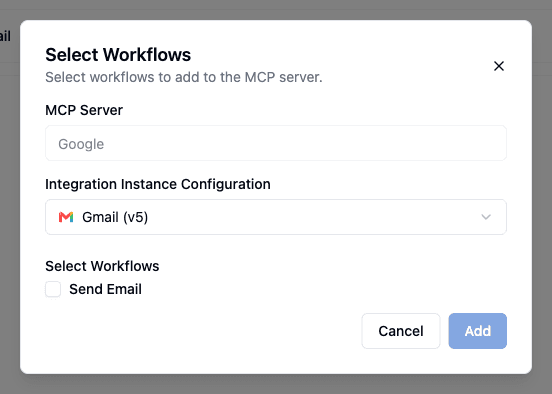
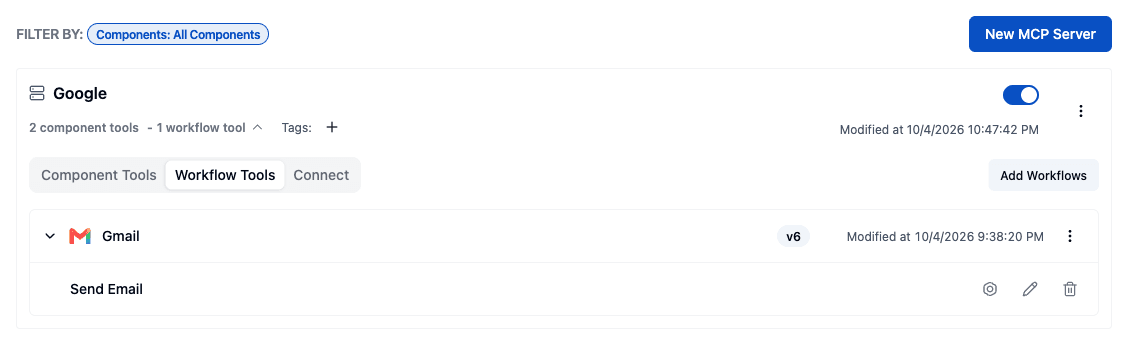
Here a Send Email workflow from the Gmail integration becomes a tool next to the raw Gmail actions. A workflow tool can enforce your rules (a fixed sender, a template, a log step) that a bare action can't.
Switch the server's toggle on, then open the Connect tab. The Server URL has the form https://<your-bytechef>/api/embedded/{secretKey}/mcp. It's marked Sensitive because the secret key in the path identifies your server. The copy icon copies it, and the refresh icon rotates the secret if it ever leaks.
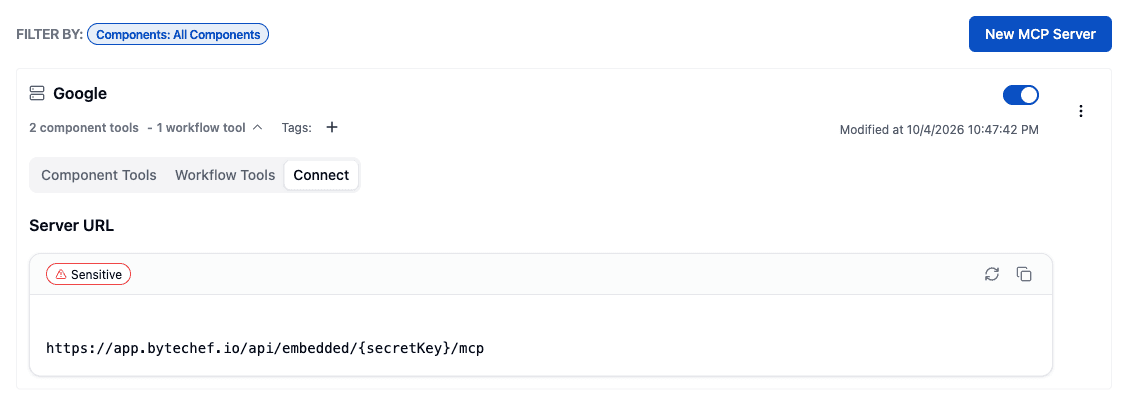
That URL is the only server-side setting the sample app needs. Put it in front-end/.env.local:
NEXT_PUBLIC_BYTECHEF_MCP_SERVER_URL=https://your-bytechef/api/embedded/{secretKey}/mcpThe URL picks the server; the connected-user JWT your route sends picks whose tools and connections to use. Every user shares one URL and still gets their own toolbox.
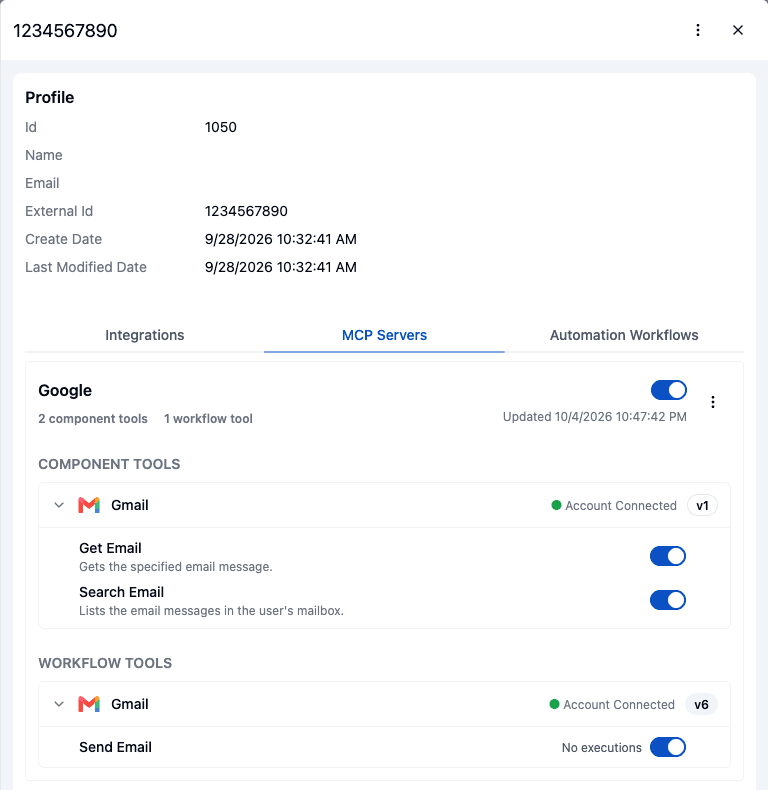
Once a connected user has connected an integration whose component is on the server, the server shows up in their record. Open Embedded → Connected Users, click the user, and switch to the MCP Servers tab. Each server lists that user's tools in two groups, Component Tools and Workflow Tools, under the integration they come from, with its connection status and version. Workflow tools like Send Email sit there next to plain actions like Search Email. You can turn the whole server off for that one user, or switch off individual tools.
Your users get the same control. When they open the ConnectDialog for a connected integration, its Tools tab lists the integration's tools with a toggle for each. Workflow tools like Send Email sit next to plain actions, with any inputs the workflow asks for.
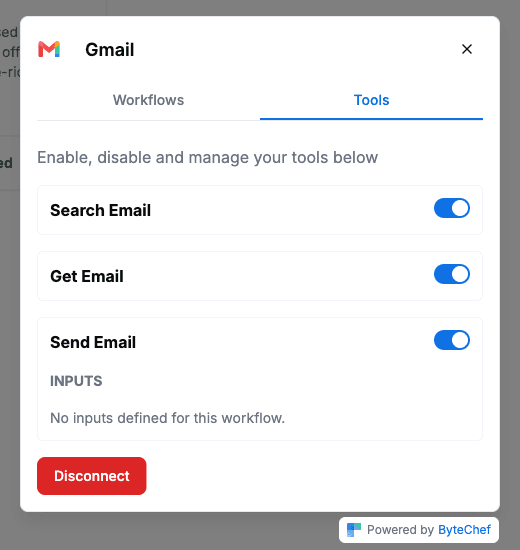
Note the default: when a user connects (or reconnects) an integration, its tools start switched off. Until the user turns them on, the assistant can't use them. That's a sensible opt-in for anything that acts in someone's mailbox, but it means your UI should point users at this tab after they connect.
The chat page is the same assistant-ui thread as part three. The difference is entirely in the backend route:
import { createMCPClient } from '@ai-sdk/mcp';
import { StreamableHTTPClientTransport } from '@modelcontextprotocol/sdk/client/streamableHttp.js';

const jwtToken = await getToken();

const mcpClient = await createMCPClient({
    transport: new StreamableHTTPClientTransport(new URL(BYTECHEF_MCP_SERVER_URL), {
        requestInit: {
            headers: {
                Authorization: `Bearer ${jwtToken}`,
                'X-Environment': BYTECHEF_ENVIRONMENT,
            },
        },
    }),
});

const tools = await mcpClient.tools(); // discover the connected user's tools

const result = streamText({
    model: openai.chat('gpt-5'),
    messages: await convertToModelMessages(messages),
    tools: { ...tools, ...frontendTools(clientTools ?? {}) },
    stopWhen: stepCountIs(8),
    onFinish: async () => {
        await mcpClient.close();
    },
});
Instead of enumerating and wrapping actions yourself, you open an MCP connection to ByteChef's embedded MCP server and ask it for the tools available to this connected user. The same JWT from part one rides along in the Authorization header, so the user's integrations (the ones you configured for them as a vendor) arrive as ready-to-call tools, already scoped to their connections. There's no execute function to write: when the model calls a tool, the MCP client sends the call back to the server for you.
A few details worth noticing in the route:
stopWhen: stepCountIs(8) lets the agent loop continue past tool calls, so the model can read a tool's result and act again (or answer) instead of stopping after one step.frontendTools(...) merges in any tools the assistant-ui page registers on the client, so server tools from MCP and browser-side tools live in one toolbox.mcpClient.close() runs in onFinish, so each request opens and closes its own MCP session.Add a tool to the MCP server on the ByteChef side and it shows up in the chat on the next request. No client change.
Here's one turn in the sample app. The model finds GOOGLEMAIL_SEARCH_EMAIL among the discovered tools, fills in the subject, and answers from the result:
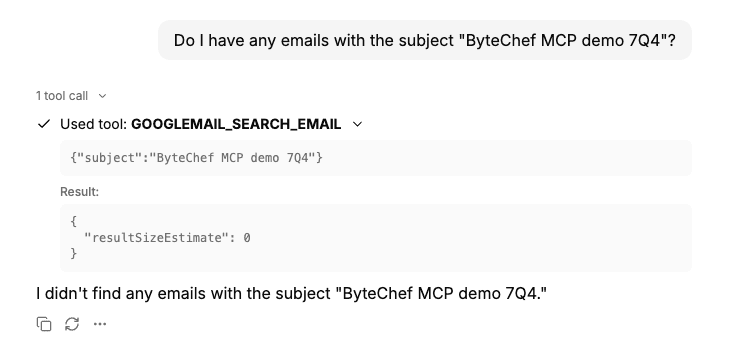
Tool names follow a COMPONENT_ACTION pattern, so the Gmail Search Email action becomes GOOGLEMAIL_SEARCH_EMAIL. A workflow tool is named after its workflow, so the Send Email workflow from step 4 arrives as Send_Email.
The user doesn't have to connect every app up front. If the model calls a tool whose integration isn't connected yet, the embedded MCP server doesn't fail the call. It returns a result that tells the model what to do:
{
    "error": "connection_required",
    "message": "The googleMail integration is not connected for this user. To connect, visit: https://your-bytechef/connect.html?token=... . Instruct the user to visit this link to connect their account. Present it as a markdown link labelled \"Connect googleMail\" instead of printing the raw URL.",
    "setupUrl": "https://your-bytechef/connect.html?token=..."
}
The message is written for the model, not the user: it says what went wrong, where to send the user, and even how to format the link. Here's the same Gmail search from above, asked by a user who hasn't connected Gmail yet:
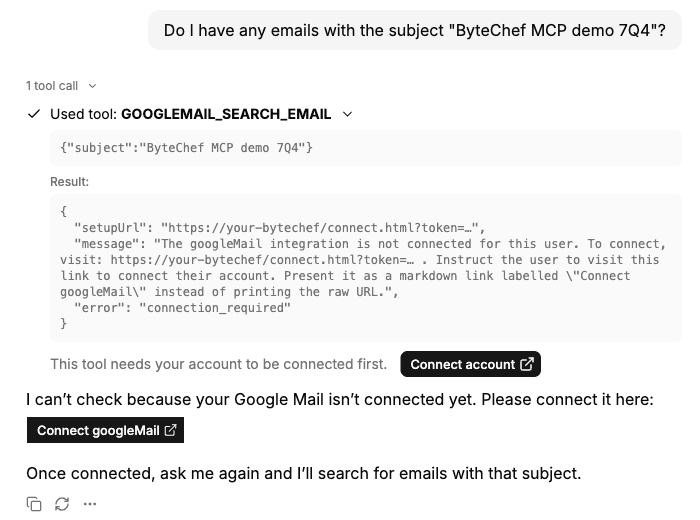
There are two buttons, and they come from different places. The model wrote Connect googleMail into its answer because the message asked it to. Connect account under the tool result comes from the sample app's chat UI, which spots error: "connection_required" and renders setupUrl as a button, so the link is there even if a model ignores the instruction.
The model passes the link on in the chat. The link opens ByteChef's hosted connect page, which carries a short-lived token (valid for 10 minutes) scoped to that user and integration. The page opens the same ConnectDialog from part one: an OAuth2 popup for OAuth2 apps, or a form for API keys and other credential types.
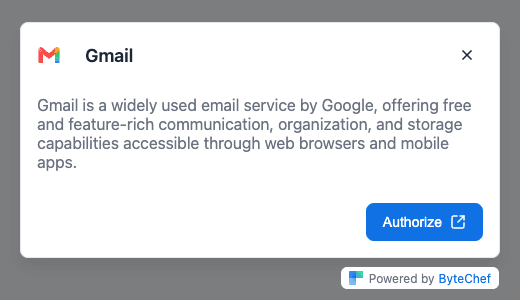
Once the user connects, nothing else is needed. The server checks for a connection on every tool call, so when the model tries the tool again, it runs on the user's new connection.
That turns onboarding into part of the conversation: the user asks for something, the assistant finds it needs Slack, hands over a link, and carries on once Slack is connected. Connections only get created for the apps people actually use.
Doing this over MCP rather than through a custom adapter buys you three things:
Same outcome as the ComponentKit Chat (an agent that operates the user's apps), but the tools flow through an open, discoverable protocol instead of bespoke wiring.
The pieces so far compose into one story about what "embedded automation" takes:
Every one of them was a component or a couple of API calls, all scoped by a single JWT and all riding the same connections. That's the promise of embedded: the integration surface is yours (your UI, your brand, your product) and the integration machinery is ByteChef's.
Following along? Create an MCP server under Embedded → MCP Servers, paste its URL into NEXT_PUBLIC_BYTECHEF_MCP_SERVER_URL, set OPENAI_API_KEY, connect the integration in the embedded sample app, and open MCP Chat. Your assistant now finds its tools on its own.
Get the latest guides on complex automation, AI agents, and visual workflow best practices delivered to your inbox.